4 4
3
1
2
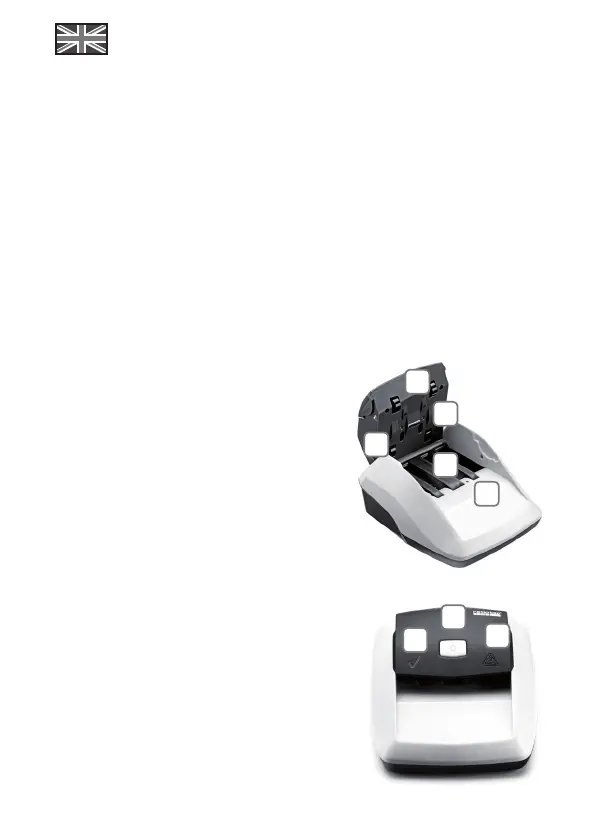
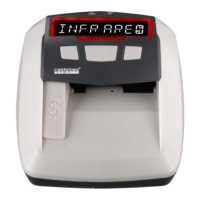
Validation symbol: Indicates that Soldi Smart is
ready to use. It also confirms the authenticity of a
banknote.
ON/OFF switch: To switch ON and OFF.
Warning symbol: The blinking red light indicates
that the tested banknote is suspicious. It is
constantly on during update modus.
1.
2.
3.
Control panel
1
2
3
4
5
Dear customer,
Thank you for choosing the ratiotec banknote detector Soldi Smart. The Soldi Smart offers a fast
and reliable counterfeit detection.
Contents of Package
Banknote detector Soldi Smart, Power adaptor, Instruction Manual
Start-up
Note: All sensors are covered with a security stripe. Before first use, remove security stripe by
opening cover.
Connect Soldi Smart using the mains cable (after removing security stripe and closing the cover).
Please clean all sensors frequently to ensure a trouble-free operation.
1. Upper feeding sensors
2. MG sensor
3. Upper IR sensors
4. Lower IR sensors
5. Lower feeding sensors



 To Next Page