HYBRID
EXTREMELY DURABLE
SEMI-MECHANICAL KEYBOARD
9
EN
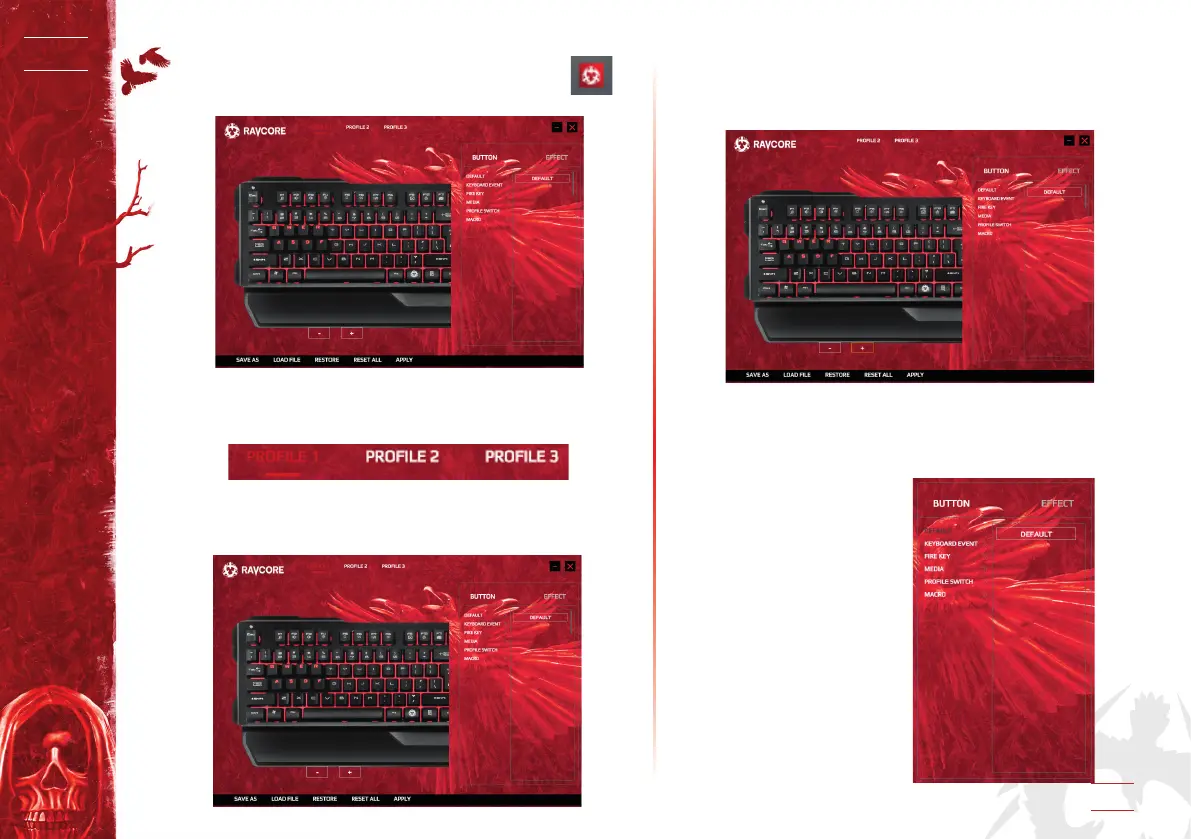
After installation is completed, you will see the program
icon in the taskbar. Double-click this icon to show or hide
the below program picture.
GAMING PROFILE TAB
A. This software allows you to have 3 dierent proles to con-
gure individual settings; they are PROFILE 1, PROFILE 2 and
PROFILE 3.
B. Select the appropriate mode, click the left mouse button on
PROFILE 1 or PROFILE 2 or PROFILE 3. For example, if you wo-
uld like to use PROFILE 1, just click on PROFILE 1 to dene your
individual settings for specic tasks within this program.
KEY ASSIGNMENTS
1A.) Keyboard size settings:
Click the icon “-” and “+” to change the size of keyboard, see
the below picture.
1B.) Move the keyboard position in horizontal direction:
Hold the left mouse button to move the keyboard picture in
horizontal direction.
2. Dene key settings:
Click “BUTTON” to make
settings.
3. Button has 6 modes:
DEFAULT,
KEYBOARD EVENT,
FIRE KEY,
MEDIA,
PROFILE SWITCH,
MACRO


 To Next Page