LANCE
BT WIRELESS DUAL VIBRATION
GAME CONTROLLER
4
EN
ITEM DESCRIPTION
• Article size: 145 mm*115mm*40mm
• Article weight: 204.5g± 10g
• Matrial:ABS
• Article color: Up shell (black) + button shell (black) + buttons
(black) (for option)
• Printing up shell printing:
SELECT, START, MODE, TURBO, CLEAR
• Number buttons: Customized
• Cable: 1 m
• Battery: 800mAh polymer lithium rechargeable battery
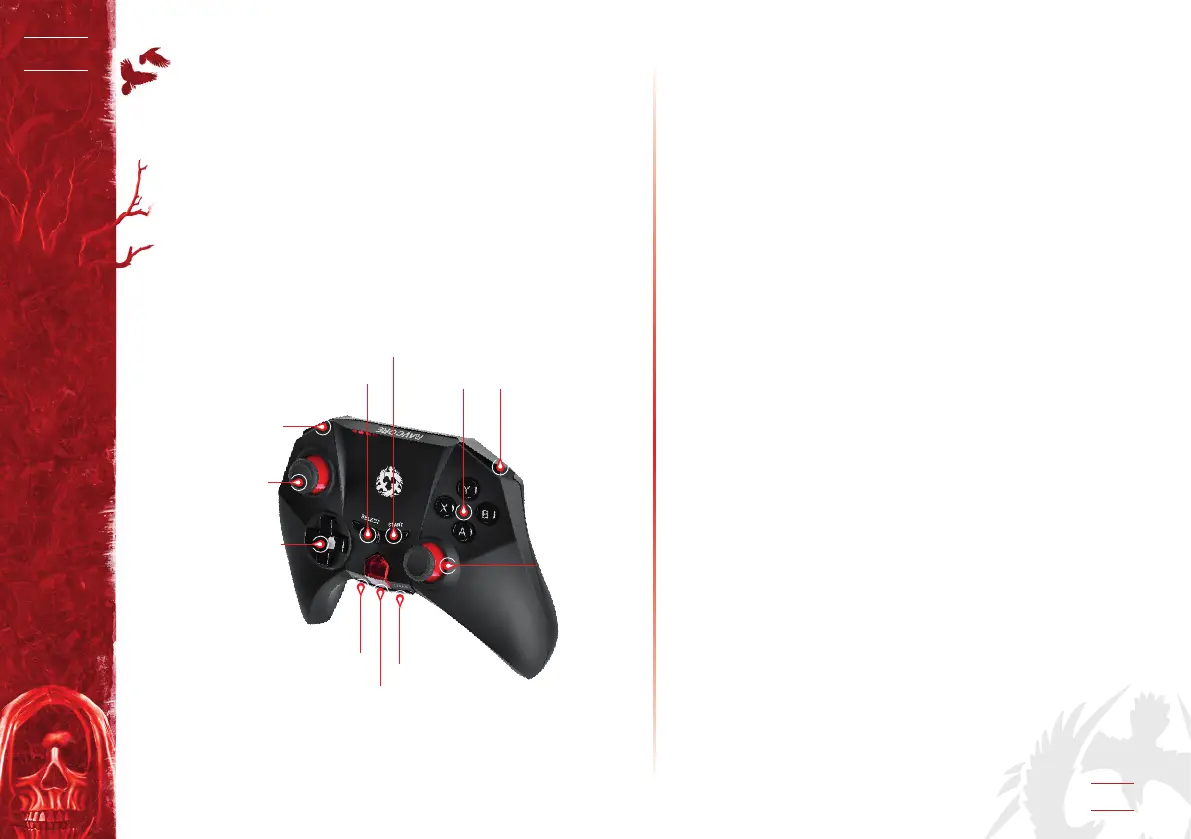
TURBO
START
BUTTON
ACTION
BUTTONS
ACTION
BUTTONS
ACTION
BUTTONS
SELECT
BUTTON
HOME
CLEAR
RIGHT
JOYSTICK
LEFT
JOYSTICK
ELECTRICAL PERFORMANCE
PC: Support 32bit/64bit/dual core/single core PC
(Connect PC by using USB cable)
Console: Support PS3 (any version)
Port: Micro USB
Connecting: Bluetooth wireless technology
Driver: No
Function:
• 4 asix and 15 buttons; double high precision joystick, 360°rota-
ting
Additional function:
• 4 LED indicators; Analog mode button; Support any version
PS3 console
• Automatically connection after st time pairing by bluetooth
technology
• 12 channel frequency hopping working is eective to elimina-
te the inuence of external wireless device
• 10 m valid connection range
• Built-in 800mAh Polymer lithium rechargeable battery,
23 working time continuously
• Turbo&Clear function; energy saving switch button to turn
on/o controller
LED Indicator/Connection – Connection Procedure:
• Press Home button, Four LEDs at the bottom of the controller
ashing simultaneously
• When using the controller for the rst time or when using it
with another ps3 system,you need to pare the device by using
one USB cable rstly
• After connected with one USB cable, the rst LED keeps
lighting,if the second controller connected,the second LED
keeps lighting.If controller can be be connected,the four LEDs
ashing quickly,lasting 15 seconds,then controller will be in
sleeping status automatically Press Home button to activate
the controller


 To Next Page