4
Specifications
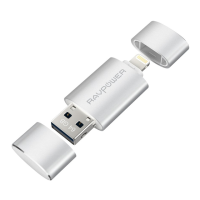
Port
1 x USB 3.0 Port
1 x Lightning Port
Lightning Port Speed Read: 10 - 30 MB/s, Write: 7 - 10 MB/s
USB 3.0 Port Speed Read:30 - 80 MB/s, Write: 10 - 30 MB/s
File Format FAT32, exFAT
Media Formats Supported
Image: bmp, gif, jpg, tif, png
Music: aac, aiff, caf, mp3, wav
Video:avi, divx, flv, m4v, mkv, mov, mp4, mpg, rm,
rmvb, ts, vob, wmv, 3gp
Document: doc, docx, ppt, pptx, xls, xlsx, key,
numbers, pages, pdf, html, txt, rtf
Device Support iPhone, iPad (iOS 7.1 or higher)
Computer OS Support
Mac OS X v10.6+
Linux
Windows Vista®, Windows 7, Windows 8, Windows 10
Dimension (L x W x H) 53 x 20 x 9 mm / 2.09 x 0.79 x 0.35 in
Weight 10.1g / 0.36 oz.
App Installation
When connecting the iPlugmate Flash Drive for the first time, open your
phone’s Safari browser and the app installation reminder will automatically
pop up. You can also download the iPlugmate app from the Apple App
Store. Just search for “iPlugmate”.


 To Next Page