
 Need help?
Do you have a question about the RAWLINK 36763 and is the answer not in the manual?
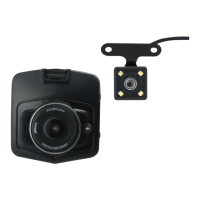
Highlights five main features: night vision, quick-lock video files, and reverse image support.
Lists and numbers all physical buttons and interfaces for easy reference and operation.
Details the primary functions of Power, OK, and Menu buttons for device control and navigation.
Explains the operations of Up, Down, and Mode buttons for menu navigation and mode switching.
Covers Micro SD card requirements, insertion, removal, and important usage notes.
Details how to set date, time, auto-shutdown, screen saver, language, and light frequency.
Explains video recording, resolution, loop recording, and audio settings.
Covers settings for taking photos, including resolution, image quality, and white balance.
Guides on browsing recorded files and options for deleting or protecting data.
Provides a summary of technical features like lens type, language options, and battery.
Lists detailed specifications including image sensor, LCD size, video format, and capacity.
Details two mounting options for the rear camera and connection instructions.
Addresses problems like inability to record, file errors, and unclear video.
Provides solutions for black images, imperfect colors, and cross stripe interference.
Explains how to resolve system crashes by using the reset button.
Provides contact information and details for service, spare parts, and warranty.
Explains proper disposal of electrical and electronic equipment (WEEE).
 General
| Resolution | 1080P |
|---|---|
| Frame Rate | 30fps |
| G-sensor | Yes |
| Loop Recording | Yes |
| Parking Monitoring | Yes |
| WDR | Yes |
| Night Vision | Yes |
| Aperture | F/2.0 |
| Storage | Micro SD card |
| Battery | Built-in rechargeable battery |

 To Next Page