OPERATINGCONTROLS AND FEATURES
FRONT PANEL
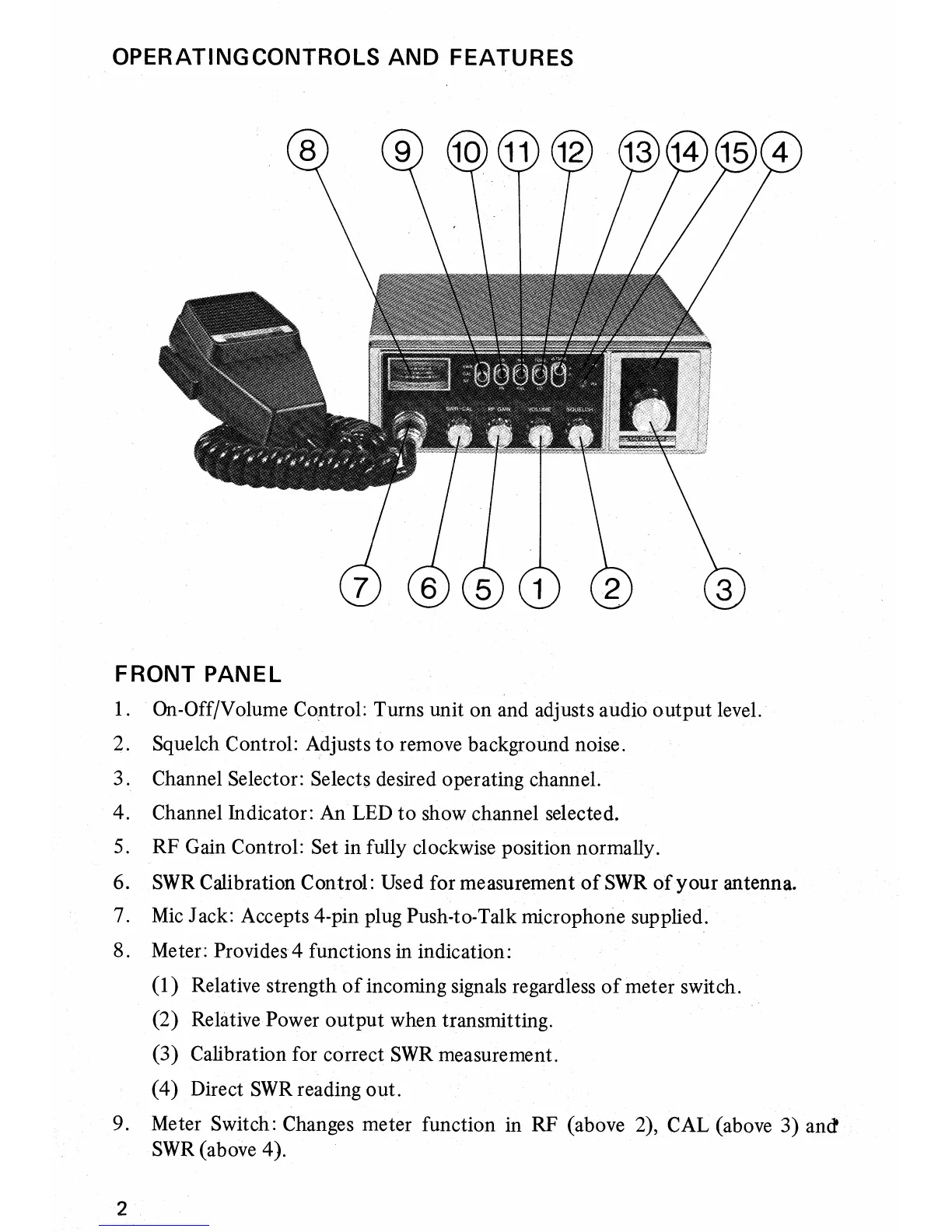
1. On-Off/Volume Control: Turns unit on and adjusts audio output level.
2.
Squelch Control: Adjusts to remove background noise.
3. Channel Selector: Selects desired operating channel.
4.
Channel Indicator: An LED to show channel selected.
5.
RF Gain Control: Set in fully clockwise position normally.
6.
SWR Calibration Control: Used for measurement of
SWR
of your antenna.
7.
Mic Jack: Accepts 4-pin plug Push-to-Talk microphone supplied.
8.
Meter: Provides 4 functions in indication:
(1)
Relative strength of incoming signals regardless of meter switch.
(2)
Relative Power output when transmitting.
(3)
Calibration for correct SWR measurement.
(4)
Direct SWR reading out.
9. Meter Switch: Changes meter function in RF (above 2), CAL (above 3) and
SWR (above 4).



 To Next Page