Raytheon
Model
R20
Raster Scan Radar System
____
,,,__
.. _
..
,
...
-"
...
~-------------
·-----·
..
·--
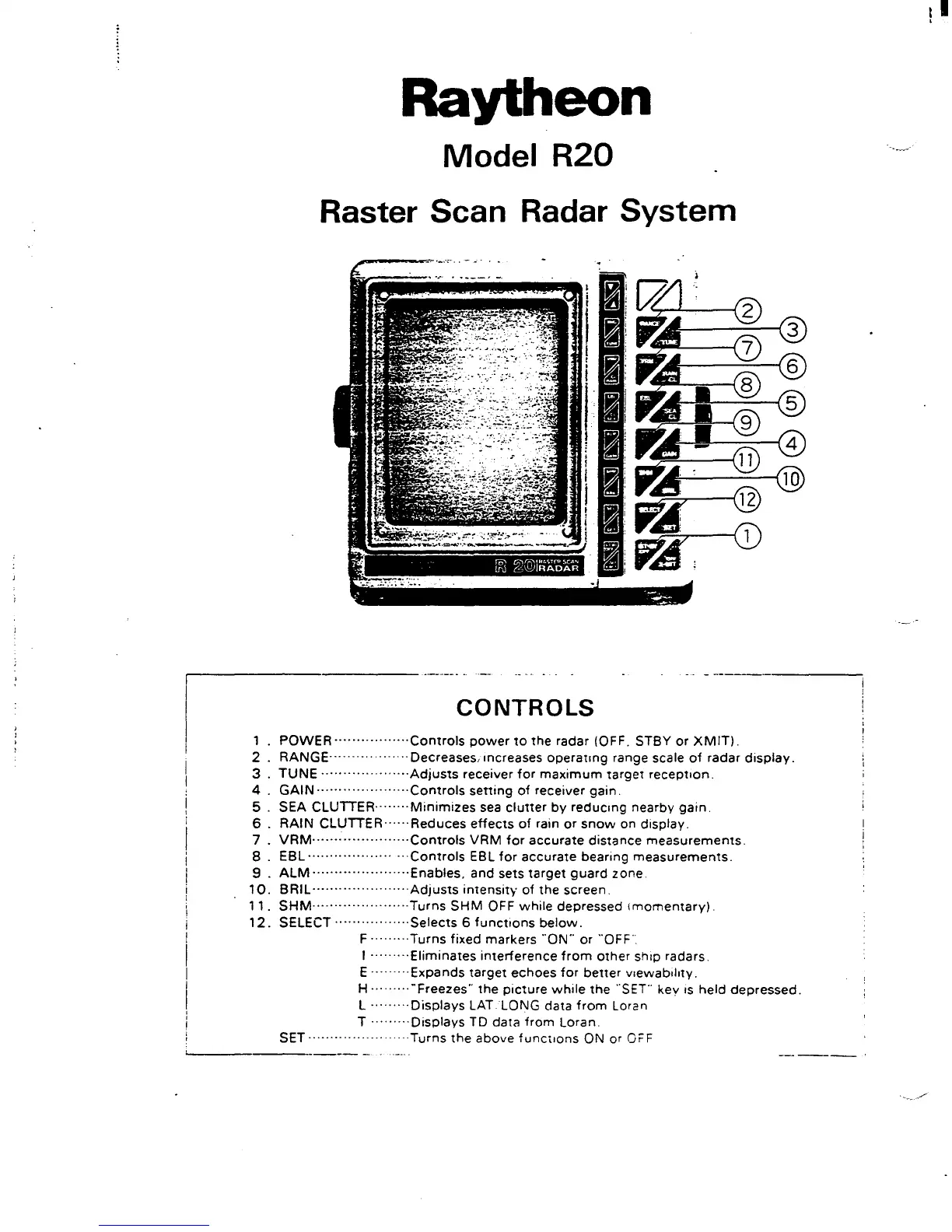
CONTROLS
1 . POWER
·················Controls
power
to
the
radar (OFF. STBY or
XMIT).
2 .
RANGE·········
..
···
..
··
Decreases' increases
operating
range scale
of
radar
display.
3 .
TUNE············
.... ·
···Adjusts
receiver
for
maximum
target
reception.
4 .
GAIN
·····················Controls
setting
of
receiver gain.
5 .
SEA CLUTTER········
Minimizes
sea
clutter
by
reducing
nearby
gain.
6 .
RAIN
CLUTTER······Reduces
effects
of
rain
or
snow
on display.
7 .
VRM······················Controls
VRM
for
accurate distance
measurements.
8.
EBL···················
···Controls
EBL
for
accurate bearing
measurements.
9 .
ALM
······················Enables,
and sets
target
guard
zone
10.
BRIL····················
..
Adjusts
intensity
of
the
screen.
11.
SHM······················Turns
SHM
OFF
while
depressed I
momentary).
12.
SELECT
·················Selects
6
functions
below.
F ......... Turns fixed markers "ON'" or "OFF".
I
·········Eliminates
interference
from
other
ship radars.
E
·········Expands
target
echoes
for
better
v1ewab1hty.
H ·········"Freezes'"
the
picture
while
the
"SET"' key
1s
held
depressed.
L
······
..
·Displays LAT LONG data
from
Loran
T
·········Displays
TD data
from
Loran.
SET
.......................
Turns
the
above
functions
ON or
Oi=F
'-----·-------
-
I



 To Next Page