EasyManua.ls Logo

Raytheon R20 - Rain Clutter

Raytheon R20
22 pages
Print Icon
To Next Page IconTo Next Page
To Previous Page IconTo Previous Page
Loading...
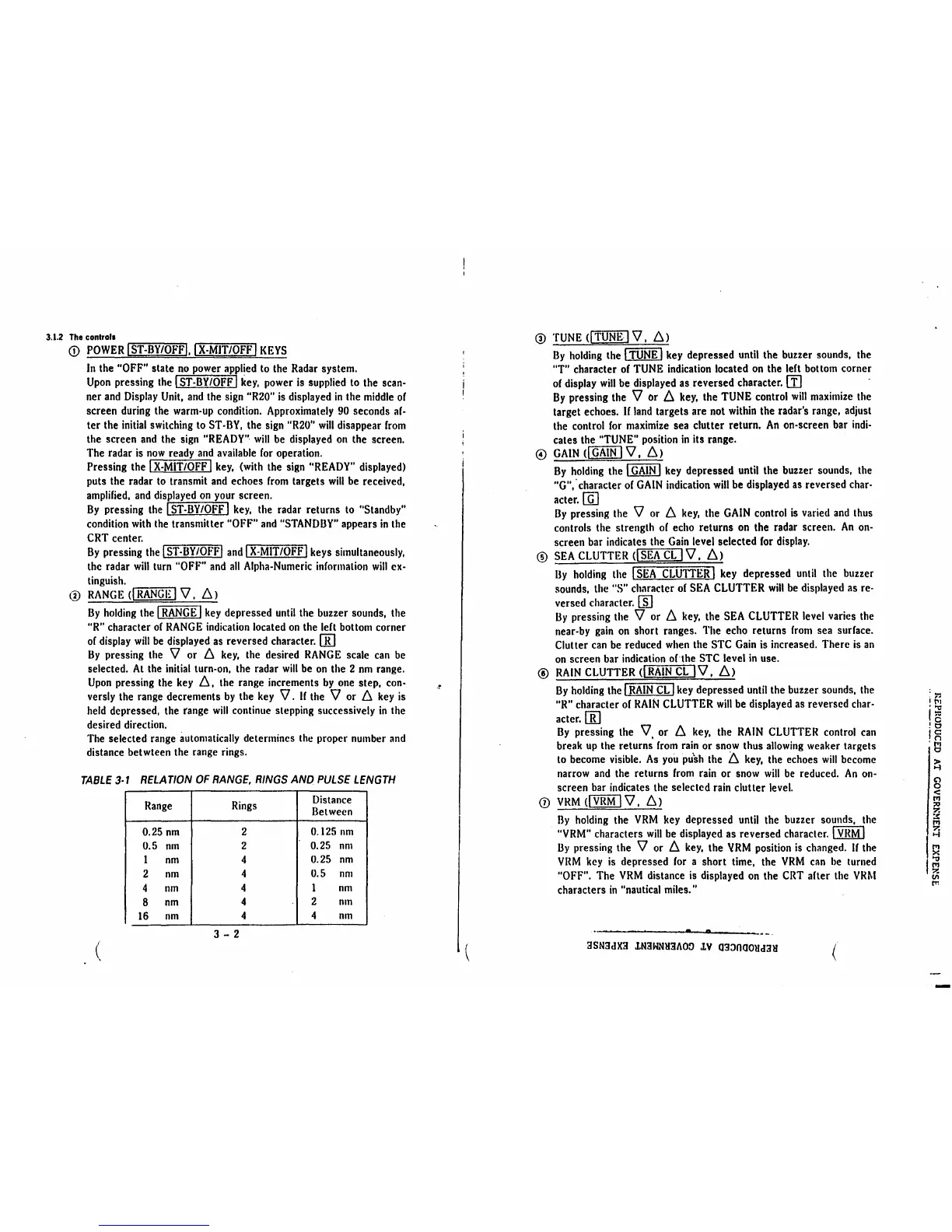
3.1.2
The
controls
<D
POWER
I
ST-BY/OFFI,
IX-MIT/OFF
I
KEYS
In
the "OFF" state
no
power
applied
to
the
Radar
system.
Upon
pressing
the
I
ST-BY/OFF
I
key,
power
is
supplied
to
the
scan-
ner
and
Display
Unit,
and
the
sign
"R20"
is
displayed
in
the
middle
of
screen
during
the
warm-up
condition.
Approximately
90
seconds
af-
ter the
initial
switching
to
ST-BY,
the
sign
"R20"
will
disappear
from
the screen
and
the
sign
"READY"·
will
be
displayed
on
the screen.
The
radar
is
now
ready
and
available
for
operation.
Pressing the
IX-MIT/OFF
I
key,
(with
the
sign
"READY"
displayed)
puts the radar
to
transmit
and
echoes
from
targets
will
be
received,
amplified,
and
displayed
on
your
screen.
By
pressing
the
I
ST-BY/OFF
I
key,
the radar returns
to
"Standby"
condition
with
the
transmitter "OFF"
and
"STANDBY"
appears
in
the
CRT
center.
By
pressing
the
I
ST-BY
/OFF!
and
IX-MIT/OFF
I keys simultaneously,
the radar
will
turn
"OFF"
and
all
Alpha-Numeric
information
will
ex-
tinguish.
@
RANGE
C....,.I
R....,.AN~G-=·1~~
I
'V,
!J.)
By
holding
the I
RANGE
I
key
depressed
until
the buzzer sounds, the
"R"
character
or
RANGE
indication
located
on
the lert bottom corner
or
display
will
be
displayed
as
reversed character.
[[)
By
pressing
the
'V
or 6
key,
the desired
RANGE
scale
can
be
selected.
At
the
initial
turn-on, the radar
will
be
on
the 2
nm
range.
Upon
pressing the
key
6,
the range increments
by
one
step,
con-
versly
the
range decrements
by
the
key
'V.
If
the
'V
or 6
key
is
held
depressed, the range
will
continue stepping successively
in
the
desired direction.
The
selected range
automatically
determines
the
proper
number
and
distance betwteen
the
range rings.
TABLE
3-1
RELATION
OF
RANGE,
RINGS
AND
PULSE
LENGTH
Range
Rings
Distance
Between
0.25
nm
2
0.125
nm
0.5
nm
2
0.25
nm
l
nm
4
0.25
nm
2
nm
4
0.5
nm
4
nm
4 l
nm
8
nm
4
2
nm
16
nm
4
4
nm
3 - 2
(
.~
(
@
TUNE
CITUNE
I
'V,
/J.)
By
holding
the
fTITiiIBl
key
depressed
until
the buzzer sounds, the
"T" character
of
TUNE
indication
located
on
the lert bottom corner
of
display
will
be
displayed
as
reversed character.
II]
By
pressing the
'V
or 6
key,
the
TUNE
control
will
maximize
the
target echoes.
If
land
targets are
not
within
the radar's range, adjust
the control
for
maximize
sea clutter return.
An
on-screen bar
indi-
cates the
"TUNE"
position
in
its range.
©
GAIN
c[fillli]
'V,
!J.)
By
holding
the I
GAIN
I
key
depressed
until
the buzzer sounds,
the
"G"; character
or
GAIN
indication
will
be displayed
as
reversed
char-
acter.
[ill
By
pressing the
'V
or 6
key,
the
GAIN
control
is
varied
and
thus
controls the strength
or
echo returns
on
the radar screen.
An
on-
screen
bar
indicates the
Gain
level selected
for
display.
®
SEA
CLUTTER
Cl
SEA
CL
I
'V,
!J.)
By
holding
the
I
SEA
CLUTTER
I
key
depressed
until
the buzzer
sounds, the "S" character
or
SEA
CLUTTER
will
be
displayed
as
re-
versed character.
[fil
By
pressing the
'V
or 6
key,
the
SEA
CLUTTER
level varies the
near-by
gain
on
short ranges. The echo returns
from
sea surface.
Clutter
can
be
reduced
when
the
STC
Gain
is
increased. There
is
an
on
screen bar
indication
of
the
STC
level
in
use.
@
RAIN
CLUTTER
cl
RAIN
CL
I
'V,
!J.)
By
holding
the I
RAIN
CL
I
key
depressed
until
the buzzer sounds,
the
"R"
character
or
RAIN
CLUTTER
will
be
displayed
as
reversed
char-
acter.[[]
By
pressing the
'V,
or 6
key,
the
RAIN
CLUTTER
control
can
break
up
the returns
from
rain
or
snow
thus
allowing
weaker targets
to
become
visible.
As
you
pu'sh
the
'6.
key,
the echoes
will
become
narrow
and
the returns
from
rain
or
snow
will
be
reduced.
An
on-
screen
bar
indicates
the
selected
rain
clutter
level.
0
VRM
<CTEMJ
'V,
/J.)
By
holding
the
VRM
key
depressed
until
the buzzer sounds,
the
"VRM"
characters
will
be
displayed as reversed character. I
VRM
I
By
pressing the
'V
or 6
key,
the
VRM
position
is
changed. U the
VRM
key
is
depressed
for
a short time, the
VRM
can
be
turned
"OFF". The
VRM
distance
is
displayed
on
the
CRT
arter the
VRM
characters
in
"nautical miles."
3SN3dX3
lN3HNH3AOO
lV
033000Ud3H
z
i
f.1
"C
Is
•o
jg
'1'1
0
~
8
<:
l"1
:;o
?.
::!:
l"1
?.
H
I~
I~
(II
rr.

Related product manuals