7. CONFIGURING YOUR RAZER CORE
Disclaimer: The features listed here require you to log in to Razer Synapse. These features are also
subject to change based on the current software version and your Operating System.
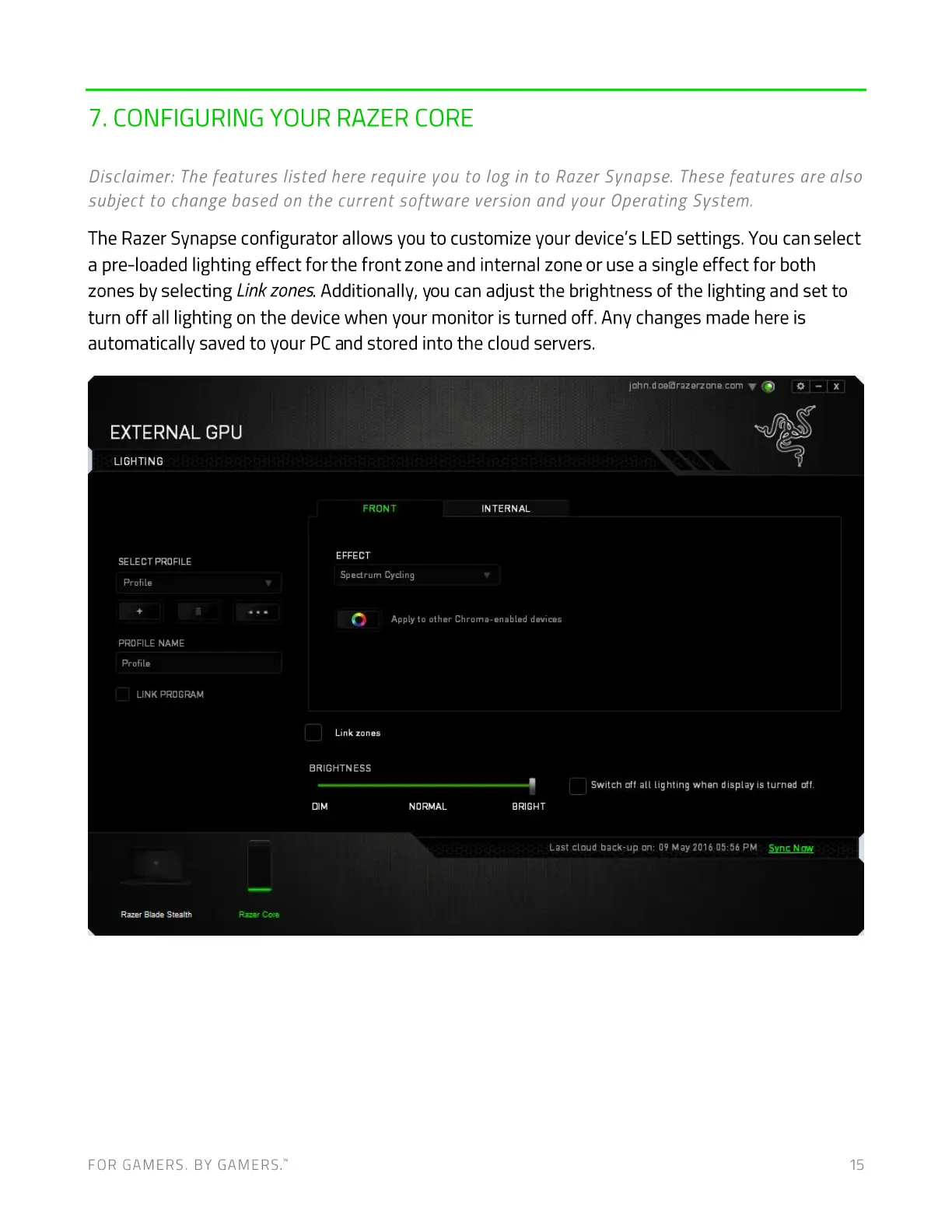
The Razer Synapse configurator allows you to customize your device's LED settings. You can select
a pre-loaded lighting effect for the front zone and internal zone or use a single effect for both
zones by selecting Linkzones.Additionally, you can adjust the brightness of the lighting and set to
turn off all lighting on the device when your monitor is turned off. Any changes made here is
automatically saved to your PC and stored into the cloud servers.
EXTERNAL GPU
LIGHTING
SELECT PROFILE
profile
PROFILE NAME
profile
LINK PROGRAM
Razer Blade Stealth
john.doeßrazerzon@.com V
INTERNALFRONT
EFFECT
Spectrum Cycling
Ap ply to other Chroma-enabled devices
Link zones
BRIGHTN ESS
DIM
Rær
NORMAL
FOR GAMERS. BY GAME-RS:
Switch off all lighting when display is turned off.
BRIGHT
Last cloud back-up on: 09 May 2016 05:56 PM Sync
15


 To Next Page
 Loading...