EasyManua.ls Logo

Razer KAIRA X - User Manual

Razer KAIRA X
12 pages
Print Icon
To Next Page IconTo Next Page
Loading...
RAZER KAIRA X
MASTER GUIDE
Question and Answer IconNeed help?

Do you have a question about the Razer KAIRA X and is the answer not in the manual?

Summary

Whats Inside and Needed

Whats Inside Components

Lists the components of the Razer Kaira X headset.

Usage Requirements

Details audio and microphone usage requirements for the headset.

Getting Covered

Product Registration and Warranty

Covers product registration for warranty and exclusive Razer benefits.

Technical Specifications

Headphone Specifications

Lists the technical specifications for the Razer Kaira X headphones.

Microphone Specifications

Lists the technical specifications for the Razer Kaira X microphone.

Using Your Razer Kaira X

Volume Wheel Operation

Explains how to adjust volume using the dedicated wheel.

Microphone Positioning Guide

Instructions on how to position the microphone for optimal use.

Microphone Mute Switch

Explains how to mute or unmute the microphone using the switch.

Headset Lifespan Maintenance Tips

Provides tips on proper handling to extend the headset's lifespan.

Activate 7.1 Surround Sound

Instructions on how to activate the 7.1 Surround Sound feature.

Safety and Maintenance

Safety Guidelines

Provides essential safety guidelines for using the Razer Kaira X headset.

Maintenance and Cleaning Instructions

Details recommended procedures for cleaning and maintaining the headset.

Legalese

Copyright and Intellectual Property Information

Information regarding copyright, trademarks, and intellectual property rights.

Limited Product Warranty and Liability

Outlines the terms of the limited product warranty and limitation of liability.

General Terms of Use

Details the governing law and terms of use for the product.

Summary

Whats Inside and Needed

Whats Inside Components

Lists the components of the Razer Kaira X headset.

Usage Requirements

Details audio and microphone usage requirements for the headset.

Getting Covered

Product Registration and Warranty

Covers product registration for warranty and exclusive Razer benefits.

Technical Specifications

Headphone Specifications

Lists the technical specifications for the Razer Kaira X headphones.

Microphone Specifications

Lists the technical specifications for the Razer Kaira X microphone.

Using Your Razer Kaira X

Volume Wheel Operation

Explains how to adjust volume using the dedicated wheel.

Microphone Positioning Guide

Instructions on how to position the microphone for optimal use.

Microphone Mute Switch

Explains how to mute or unmute the microphone using the switch.

Headset Lifespan Maintenance Tips

Provides tips on proper handling to extend the headset's lifespan.

Activate 7.1 Surround Sound

Instructions on how to activate the 7.1 Surround Sound feature.

Safety and Maintenance

Safety Guidelines

Provides essential safety guidelines for using the Razer Kaira X headset.

Maintenance and Cleaning Instructions

Details recommended procedures for cleaning and maintaining the headset.

Legalese

Copyright and Intellectual Property Information

Information regarding copyright, trademarks, and intellectual property rights.

Limited Product Warranty and Liability

Outlines the terms of the limited product warranty and limitation of liability.

General Terms of Use

Details the governing law and terms of use for the product.

Overview

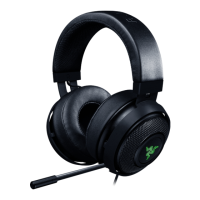
The Razer Kaira X is a gaming headset designed for immersive audio experiences across various platforms. This master guide provides comprehensive information on its features, usage, and maintenance to ensure optimal performance and longevity.

Function Description

The Razer Kaira X is a wired gaming headset that delivers high-quality audio and clear communication. It is equipped with a 3.5 mm audio + mic jack, making it compatible with a wide range of devices including PCs, Macs, and consoles. The headset features 50 mm drivers with Neodymium magnets, designed to provide rich, detailed sound for games, movies, and music. For communication, it incorporates a bendable Razer HyperClear cardioid microphone, engineered to capture your voice clearly while minimizing background noise. The headset also supports 7.1 Surround Sound, offering accurate positional audio for an enhanced gaming experience, although this feature is exclusive to Windows 10 64-bit systems and requires software download and product registration.

Usage Features

The Razer Kaira X is designed for ease of use and comfort during extended gaming sessions.

  • Auto-adjusting headband: The headband automatically adjusts to fit your head, providing a comfortable and secure fit without manual adjustments. To minimize stress on the headband and extend its lifespan, it is recommended to gently stretch the headset apart before placing it over your head. However, avoid overstretching beyond its technical limits.
  • Flowknit memory foam ear cushions: The ear cushions are made from Flowknit memory foam, which is designed for full-ear coverage and incorporates heat-transfer fabric. This combination ensures long-wearing comfort by reducing heat buildup and providing a soft, conforming fit around your ears.
  • Volume wheel: Located on one of the earcups, the volume wheel allows for quick and intuitive adjustment of the audio level. Simply rotate the wheel to increase or decrease the volume to your desired level.
  • Mic mute switch: A dedicated mic mute switch is integrated into the headset, enabling you to easily mute or unmute the microphone as needed. This provides convenient control over your communication during gameplay or calls.
  • Bendable Razer HyperClear cardioid mic: The microphone is bendable, allowing you to position it optimally for voice capture. For best performance, bend the mic until it is parallel to your mouth. Ensure that the mic diaphragm is facing forward and the air vent is positioned away from your mouth to maximize clarity and minimize unwanted noise.
  • Audio connectivity: The headset connects to your device via a 3.5 mm audio + mic combined port. For devices with separate audio and microphone ports, you will need a compatible adapter (not included). The 3.5 mm connection ensures broad compatibility with various gaming platforms and audio devices.
  • 7.1 Surround Sound activation (Windows 10 64-bit only): To activate the 7.1 Surround Sound feature, you need to download the 7.1 Surround Sound software from razer.com/7.1-surround-sound. After downloading, register your Razer Kaira X product at razerid.razer.com/products. Upon successful registration, an activation code will be sent to your email, allowing you to unlock the positional audio capabilities. This feature is specifically designed to enhance the audio experience for games, movies, and music by providing accurate sound positioning.

Maintenance Features

Proper maintenance of your Razer Kaira X will help ensure its longevity and continued optimal performance.

  • Regular cleaning: To prevent dirt buildup and maintain the headset in optimum condition, it is recommended to clean it once a month. Unplug the device from its audio source before cleaning. Use a soft cloth or a cotton swab to gently wipe down the surfaces of the headset, including the earcups, headband, and microphone.
  • Avoid harsh cleaning agents: Do not use soap or harsh cleaning agents on the headset, as these can damage the materials and finish. Stick to a soft, dry cloth or a slightly damp cloth if necessary, ensuring no moisture enters the internal components.
  • Temperature guidelines: Operate the device only within a specific temperature range of 0°C (32°F) to 40°C (104°F). If the ambient temperature exceeds this range, unplug and/or switch off the device to allow it to stabilize to an optimal level. Extreme temperatures can affect the performance and lifespan of the headset.
  • Moisture protection: Keep the device away from liquid, humidity, or excessive moisture. Exposure to these elements can cause internal damage and void your warranty.
  • Avoid disassembly: Do not attempt to take apart the device or operate it under abnormal current loads. Disassembling the headset will void your warranty and may lead to damage. If you encounter any issues that cannot be resolved through basic troubleshooting, contact Razer support for assistance.
  • Hearing safety: Listening to excessively loud volumes for prolonged periods can damage your hearing. It is recommended to reduce the volume to a comfortable level when using the headset for extended periods. Be mindful of local regulations regarding maximum sound levels, such as the 86dB limit for 8 hours a day in some countries. The headset isolates external ambient sounds even at low volumes, so remove it when engaging in activities that require active awareness of your surroundings.

Razer KAIRA X Specifications

General IconGeneral
Impedance32 Ω
Driver unit50 mm
Ear couplingCircumaural
Headphone frequency20 - 20000 Hz
Headphone sensitivity96 dB
Microphone typeBoom
Microphone frequency100 - 10000 Hz
Microphone sensitivity-42 dB
3.5 mm connectorYes
Connectivity technologyWired
Color nameShock Blue
Cable length1.3 m
Control typeButtons, Rotary, Slider
Headset typeBinaural
Product typeHeadset
Product colorBlue
Wearing styleHead-band
Operating keysMute
Volume controlRotary
Control unit typeOn-ear control unit
Recommended usageGaming
Compatible productsXbox, PC, Mac, Nintendo Switch and Mobile Devices
Weight and Dimensions IconWeight and Dimensions
Depth650 mm
Width450 mm
Weight283 g

Related product manuals