SETTINGS WINDOW
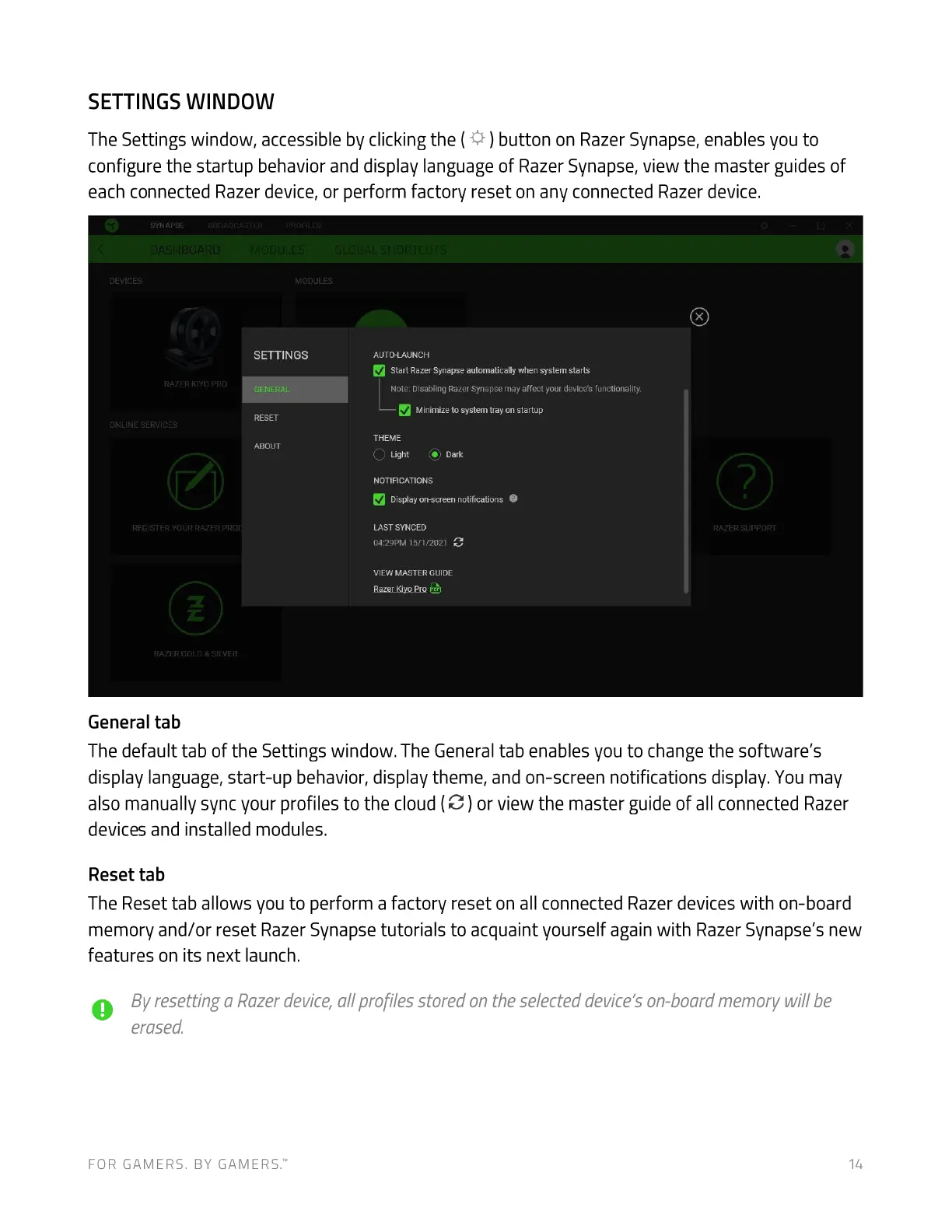
The Settings window, accessible by clicking the ( ) button on Razer Synapse, enables you to
configure the startup behavior and display language of Razer Synapse, view the master guides of
each connected Razer device, or perform factory reset on any connected Razer device.
SYNAPSE
ASHBOARC
tyv:ces
SETTINGS
RAZER PRO
GENERAL
RESET
ONL'NE SERVICES
ABOUT
REGiSTER YOUR RAZER
RAZER GOLD & SILVER
General tab
AUTO-LAUNCH
Start RazerSynapseautomatically when system starts
Note: Disabling RazerSynapsemay affect your device's functionality.
Minimize to system tray on startup
THEME
Light (O) Dark
NOTIFICATIONS
Displayon-screennotifications O
LAST SYNCED
0429PM 15/1 /2021
VIEW MASTER GUIDE
RazerKiyoPro
RAZER SUPPORT
The default tab of the Settings window. The General tab enables you to change the software's
display language, start-up behavior, display theme, and on-screen notifications display. You may
also manually sync your profiles to the cloud (C ) or view the master guide of all connected Razer
devices and installed modules.
Reset tab
The Reset tab allows you to perform a factory reset on all connected Razer devices with on-board
memory and/or reset Razer Synapse tutorials to acquaint yourself again with Razer Synapse's new
features on its next launch.
O Byresetting aRazerdevice,allprofilesstoredontheselecteddevice'son-boardmemorywillbe
erased.
FOR GAMERS. BY GAMERS.W 14


 To Next Page
 Loading...