4. GETTING STARTED
1.
2.
3.
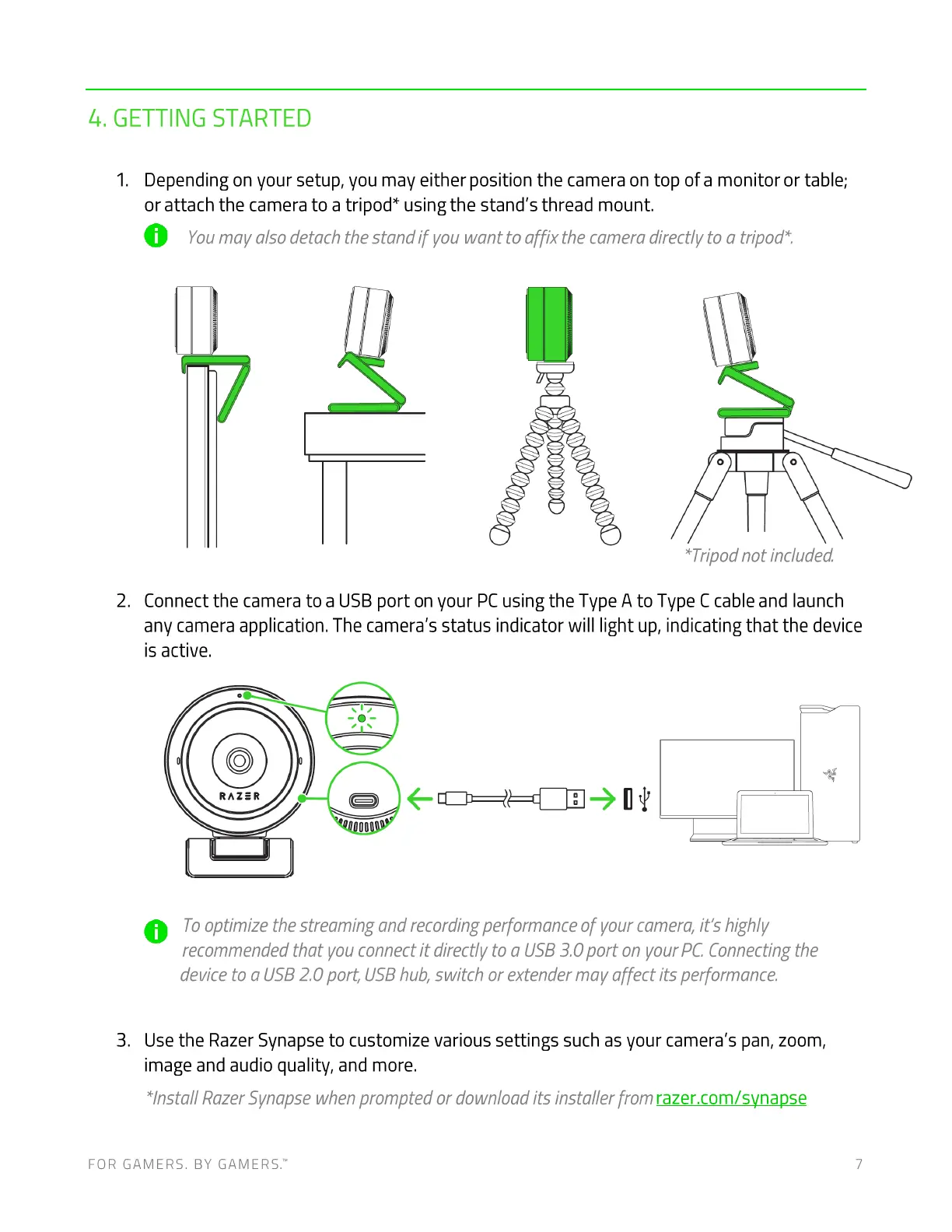
Depending on your setup, you may either position the camera on top of a monitor or table;
or attach the camera to a tripod* using the stand's thread mount.
O Youmayalsodetachthestandif youwanttoaffixthecameradirectlytoatripod
*Tripodnot included.
Connect the camera to a USB port on your PC using the Type A to Type C cable and launch
any camera application. The camera's status indicator will light up, indicating that the device
is active.
RAZER
-o-
0000
O Tooptimizethestreamingandrecordingperformanceofyourcamera,it'shighly
recommended that you connect it directly to a USB3.0 port on your PC Connectingthe
device to a USB2.0 port, USBhub, switch or extender mav affect its performance.
Use the Razer Synapse to customize various settings such as your camera's pan, zoom,
image and audio quality, and more.
*Instal/ RazerSynapse when prompted or download its installer from razer.com/synapse
FOR GAMERS. BY GAMERS.W 7


 To Next Page