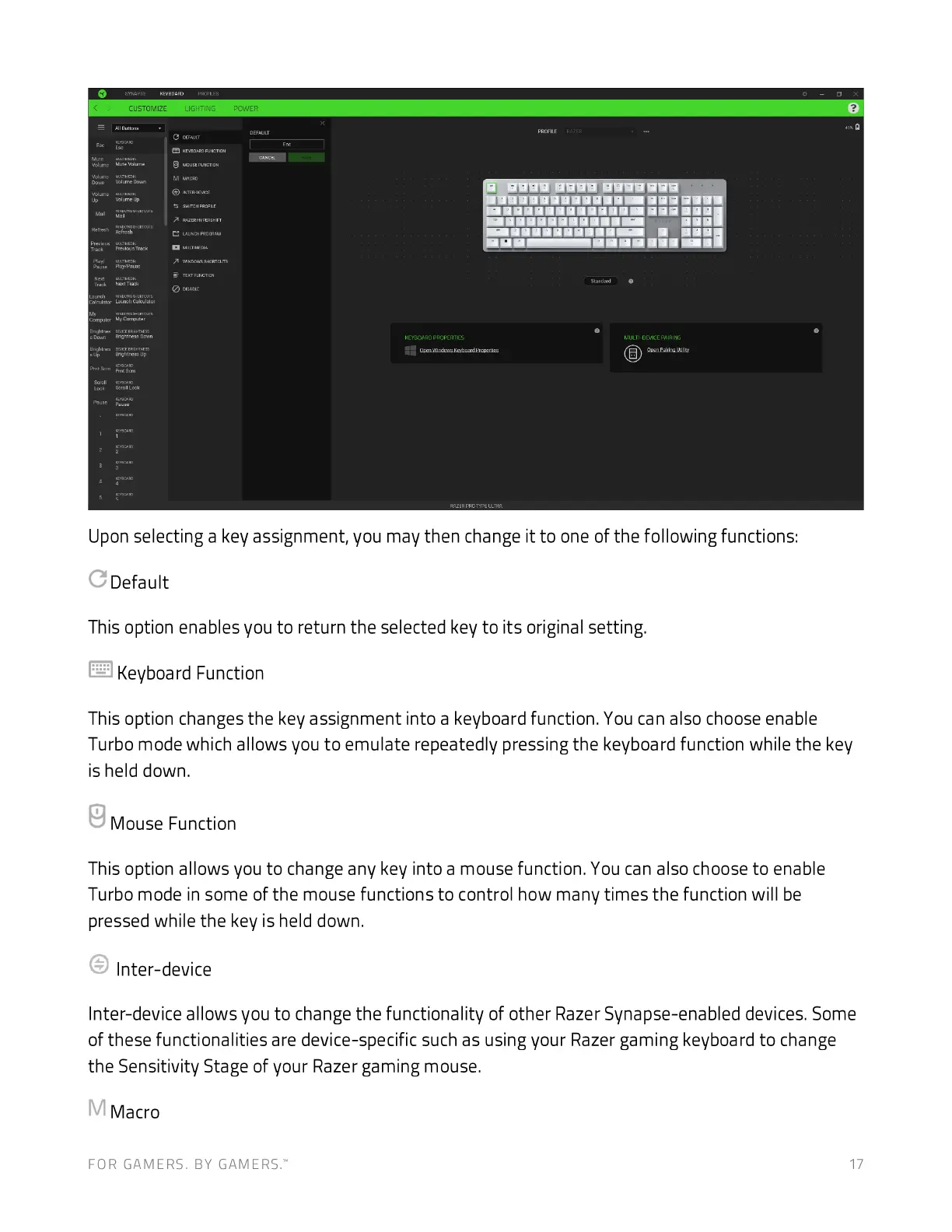
Upon selecting a key assignment, you may then change it to one of the following functions:
c
Default
This option enables you to return the selected key to its original setting.
Keyboard Function
This option changes the key assignment into a keyboard function. You can also choose enable
Turbo mode which allows you to emulate repeatedly pressing the keyboard function while the key
is held down.
Mouse Function
This option allows you to change any key into a mouse function. You can also choose to enable
Turbo mode in some of the mouse functions to control how many times the function will be
pressed while the key is held down.
Inter-device
Inter-device allows you to change the functionality of other Razer Synapse-enabled devices. Some
of these functionalities are device-specific such as using your Razer gaming keyboard to change
the Sensitivity Stage of your Razer gaming mouse.
M
Macro
CUSTOMIZE
FOR GAMERS. BY GAMERS:
uaaaaaaaaa•a•
17







 To Next Page