What games will work with the Razer Tartarus Pro?
Any game that works with analog controllers will work with Analog Input without the need for
integration but we need to identify which games can benefit even more with Analog Input for PC. The
following are the list of games that are confirmed to be working well with the Tartarus Pro:
Apex Legends
Forza Motorsport 7
GTAV
Rocket League
COD Series
Overwatch
World of Warcraft
FFXIV
Troubleshooting
Razer Synapse does not detect my device. How do I fix this?
If Synapse just updated and your device is not detected, please reboot your PC. Otherwise, please
check for Synapse updates through Settings > About > Check for Updates. If there are no updates
detected, please try another USB port. If all of the above fails, please uninstall Synapse and reboot
your PC. Re-install Synapse 3 using the latest installer.
My Razer peripheral will not work properly when used with a KVM switch.
We recommend plugging your Razer product directly into your PC. KVM switches are known to cause
interruptions in communications between devices and PCs. If your Razer product works when plugged
directly into the computer, then it is working correctly, and the issue is most likely due to the KVM
switch.
Hardware
What type of key switch does the Razer Tartarus Pro use?
The Razer Tartarus Pro features Razer’s analog optical switch.
What does the thumb-pad do and how do the other buttons on the keypad
function?
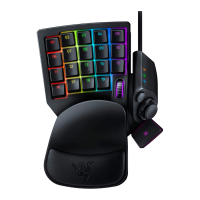
The multi-directional thumb-pad is used for navigation by default and the button placements above
and below the thumb-pad are mapped to ‘alt’ and ‘spacebar’ respectively. All buttons can be
customized to your own key bindings and macros.
How do I clean my Razer keypad?
As with any office or home computer input devices, your keypad may collect dust or get dirty from
regular use. Occasional cleaning will help keep the device clean. We recommend wiping your keypad
with a cloth that is lightly dampened with a mild soap solution. Because solvents and other harsh
chemicals may affect and degenerate the plastic on keypads, we do not recommend using any
solvents to clean the keyboard.
Note: Under no circumstances should you ever submerge the keypad in any liquid. Submerging the
keyboard in any liquid will void the warranty on your keypad.
How can I modify or disassemble my Razer product?
While you are free to swap the keycaps, we cannot help you in modifying or disassembling your Razer
product since that will void the manufacturer’s warranty on the unit.







 To Next Page