20 /
28
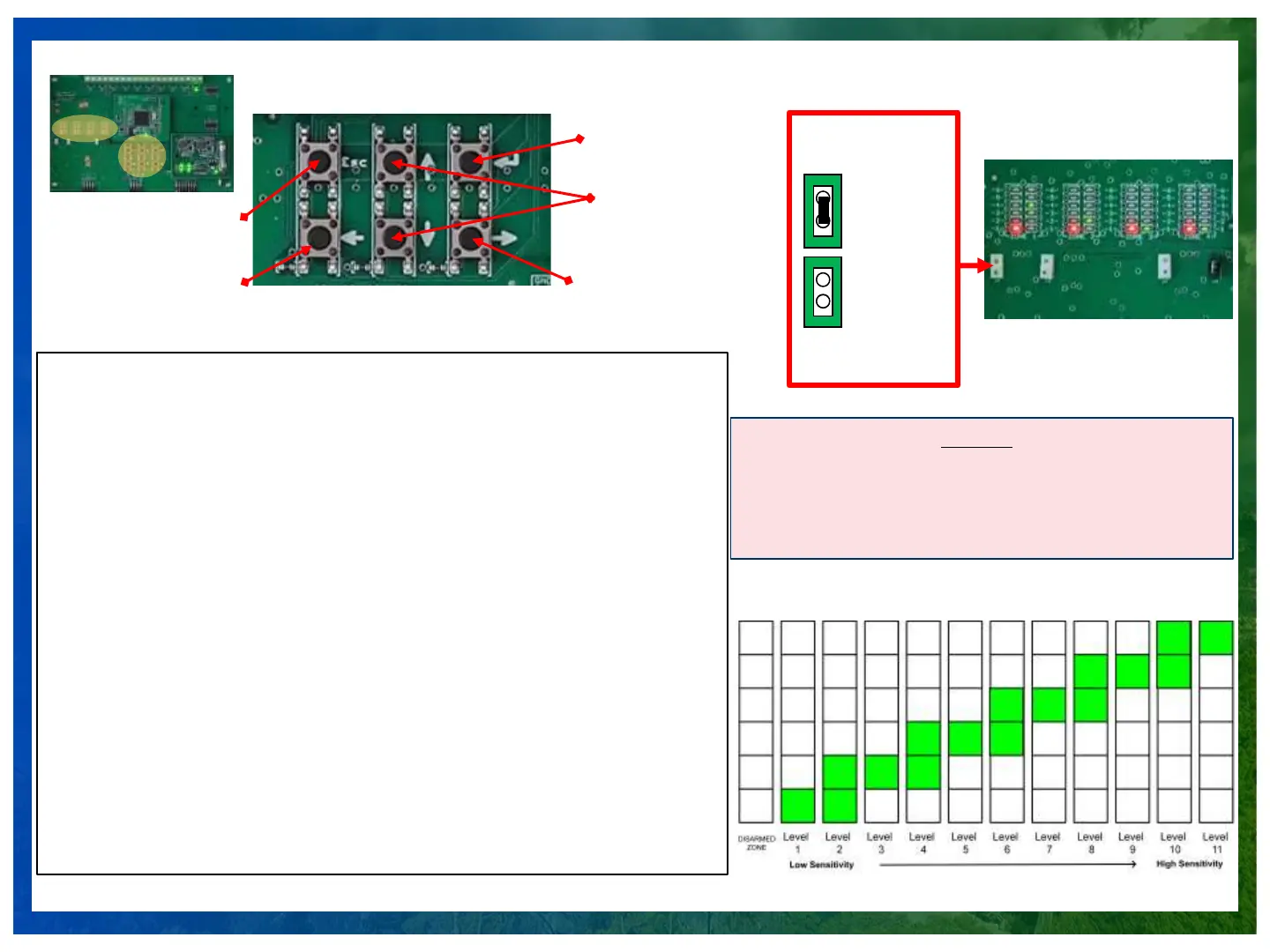
Sensitivity Level Adjustment Instructions
Sensitivity Adjustment Process:
1. Enter sensitivity setup by clicking the ENTER button.
2. The GREEN LED in ZONE 1 will start to blink.
3. Choose the relevant zone to configure by using the LEFT AND RIGHT NAVIGATOR
BUTTONS.
4. Once the chosen ZONE is blinking, change sensitivity by using the UP AND DOWN
BUTTONS.
5. Press ESC to exit calibration and test the sensitivity level on the fence.
6. Before starting to test the system only LED 1 should be lit on the RED Sensing
Indication LEDs
Sensitivity/Alarm Testing:
Sensitivity test should ONLY be done by tapping on the fence. Pulling, pushing or shaking
of the fence is the WRONG way to test the system. Tapping on the fence should be done
by firmly knocking on the fence links/material as one would knock on a door, or with an
object such as a large screwdriver or wrench. Tapping should serve as a simulation of the
force and sensation of wire cutters severing the fencing material.
1. Tap the fence. If detected, the LED should be moving up from 1 to 6. Keep lowering the
sensitivity until only hard tap on the fence will cause the red LED to reach number 6 and
trigger the alarm LED on the top of the board.
2. Once reached a level hard tap triggers an alarm raise the sensitivity 1 levels up to
achieve detection level.
3. Test the fence with a person climbing and simulate a cut but tap the fence twice with a
heavy metallic tool such as a large screwdriver or wrench.
Sensitivity Setting
Jumper
High Sensitivity
Low Sensitivity
Sensitivity Levels
“Enter” Key Setup
Mode (1)
Navigator Between
Zones (3)
Exit Set-Up
Mode (4)
Sensitivity
Adjustment
(UP/DOWN) (2)
Navigator
Between Zones
Reset board after
every change
Sensitivity LEDS
If Both Sets of LEDs are off press
“ENTER” key. If it’s off then it’s
Disarmed/Disabled. To enable
press “UP” key.
The Sensitivity lights turn off after 1 minute to save
on power.
As long as the other green LEDs such as power,
Relay, and others are still working the system
functions correctly!


 To Next Page
 Loading...