ANT/
CABLE
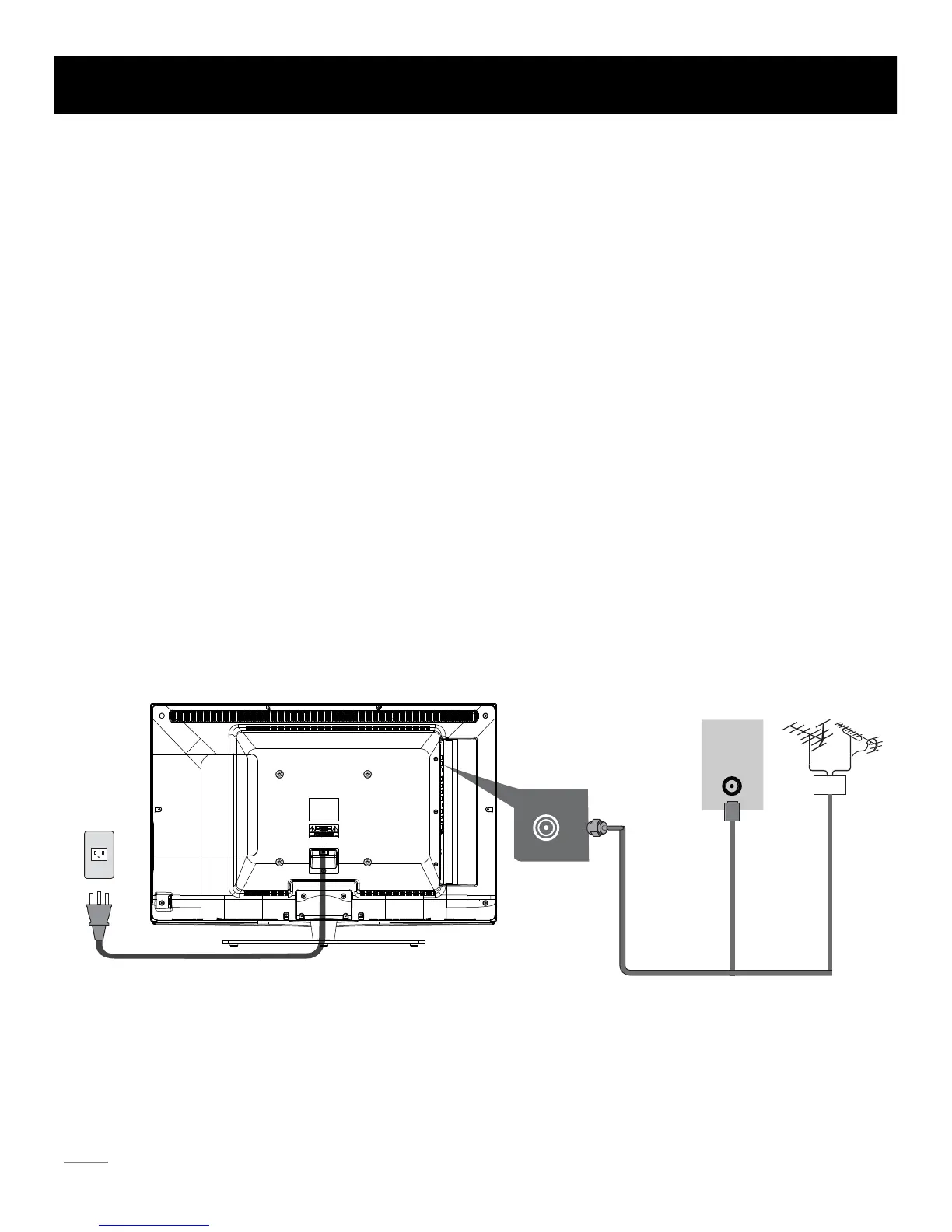
The first step in connecting your TV is obtaining the signal. Your TV 32LA30RQ has a side panel, which allows you to receive analog
and/or digital television channels via TV jack.
Befo
re connecting your TV, determine using an antenna or a cable service to obtain the signal.
A. Antenna
Connect the antenna to TV via coaxial cable on TV jack of the side panel. You are ready to receive air local digital and analog
channels.
B. Cable TV service
Connect the cable TV wall jack to TV via coaxial cable on TV jack of the side panel. You are ready to receive off-air local digital
and analog channels.
C. Set-Top Box
If you use a set-top box, you may need to call your cable company or satellite service provider, which use a special connection,
plesase refer to the user’s guide of set-top box.
Note: Do not plug the AC cord until you have accomplished all the connections.
AC Power Cord
(Connect after all the other connections are done.)
AC
110V/60Hz
AntennaCable TV
Or
TV Signal Connection
8
WALL
OUTLET


 To Next Page