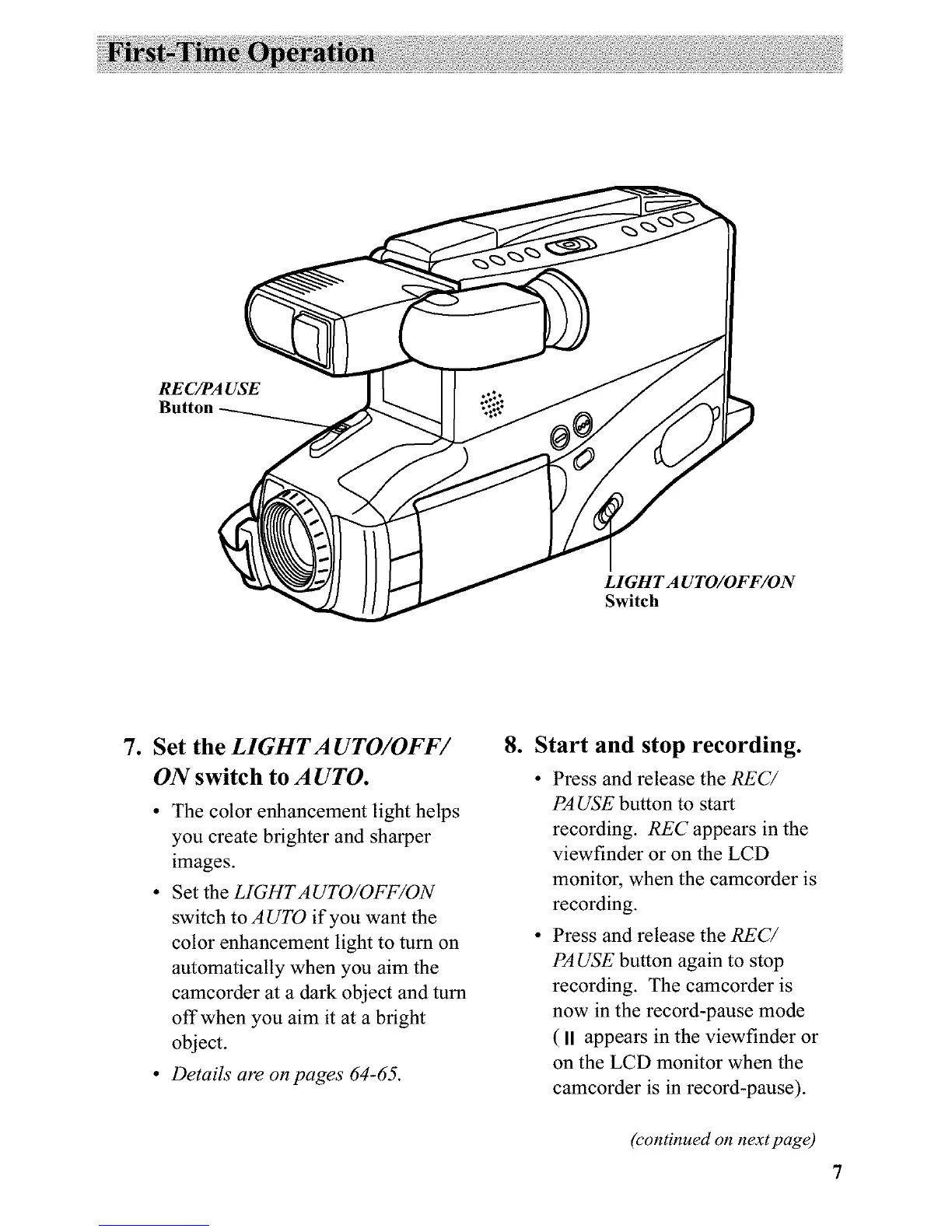
RE C/PA USE
Button
LIGHT A UTO/OFF/ON
Switch
7. Set the LIGHTA UTO/OFF/
ON switch to A UTO.
• The color enhancement light helps
you create brighter and sharper
images.
• Set the LIGHTAUTO/OFF/ON
switch to AUTO if you want the
color enhancement light to turn on
automatically when you aim the
camcorder at a dark object and turn
offwhen you aim it at a bright
object.
• Details are on pages 64-65.
.
Start and stop recording.
• Press and release the REC/
PA USE button to start
recording. REC appears in the
viewfinder or on the LCD
monitor, when the camcorder is
recording.
• Press and release the REC/
PA USE button again to stop
recording. The camcorder is
now in the record-pause mode
( II appears in the viewfinder or
on the LCD monitor when the
camcorder is in record-pause).
(continued on next page)



 To Next Page