50
Playback
BATT. RELEASE
AUDIO
RF
DC OUT
VIDEO
+
–
OR
1
VHF Antenna
OR
OR
2
3
2
VHF
VHF
Back of TV
Optional Coaxial
RF Cable
(such as VH82 or VH84)
Optional RF Output Adapter
(1CVA147C)
Optional
300-75 Ohm
Transformer
IN FROM ANT
Connector
RF Output
Adapter's Plug
CH3/CH4
Switch
Optional
Transformer
(Such as VH54)
VCR/TV Switch
AUDIO, RF DC
OUT, VIDEO
Jacks
OUT TO TV Connector
CAMERA
VCR
POWER
OFF
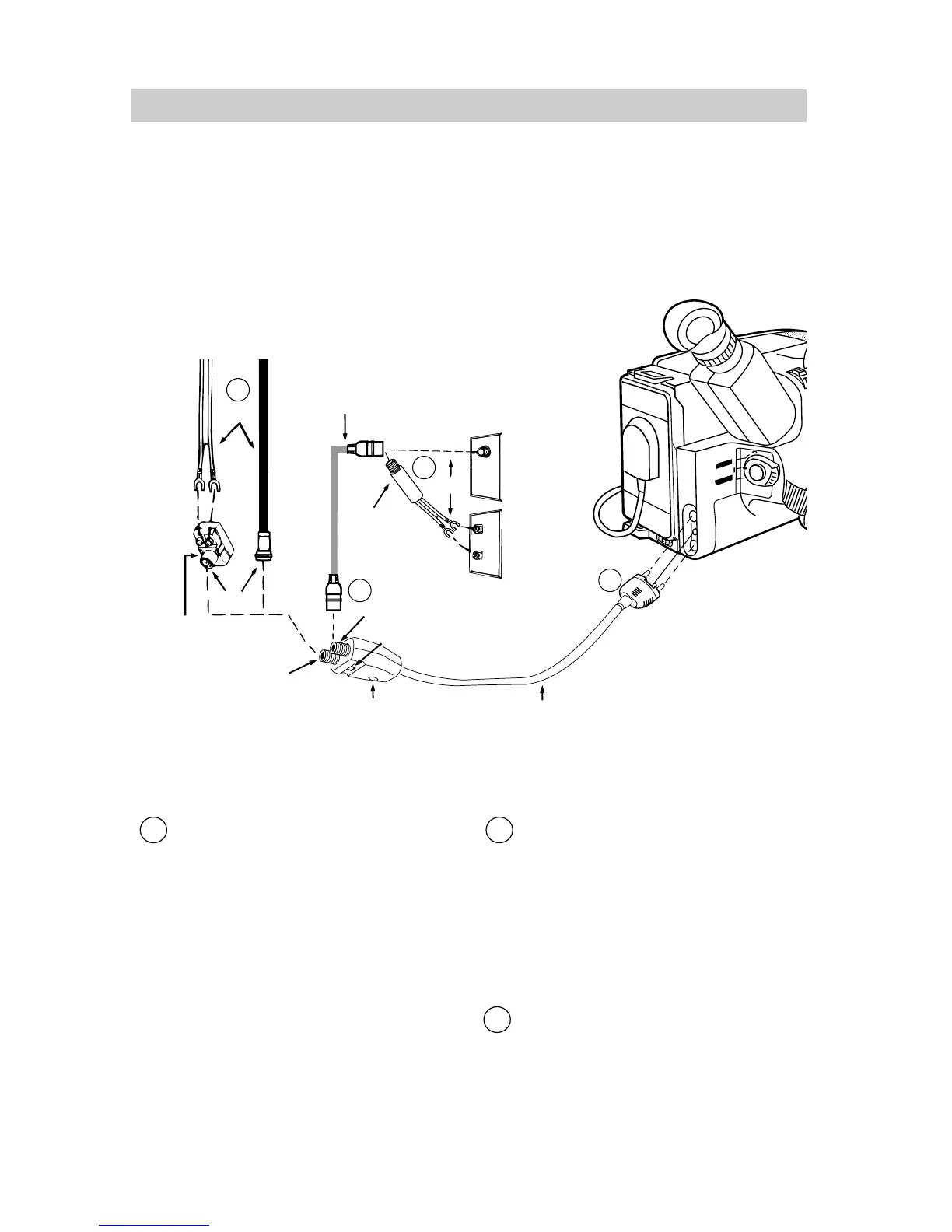
Playback on a TV Without Audio/Video Inputs
To connect your camcorder to a TV without audio/video inputs, you will need an
optional 1CVA147C RF output adapter and an optional coaxial RF cable, such as VH82
or VH84 shown on page 54. If your TV has AUDIO and VIDEO IN jacks (or is
connected to a VCR), refer to pages 48-49.
Installation
1 Disconnect the VHF antenna from
your TV. Connect the antenna to the
IN FROM ANT connector on the RF
output adapter if you are going to leave
the adapter connected to the TV.
Note: If your VHF antenna is the flat
twin-lead type attached by two screws,
you will also need an optional 300-to-75
ohm transformer.
2 Attach one end of the optional coaxial
RF cable to the OUT TO TV connector
on the adapter, and attach the other end
to the VHF input on your TV as
shown.
Note: If your TV has 300 ohm screw
terminals, you will need a 75-to-300 ohm
transformer, such as VH54, shown on
page 54.
3 Attach the RF output adapter’s plug to
the AUDIO, RF DC OUT, and VIDEO
jacks located under the small cover on
the back of the camcorder.



 To Next Page