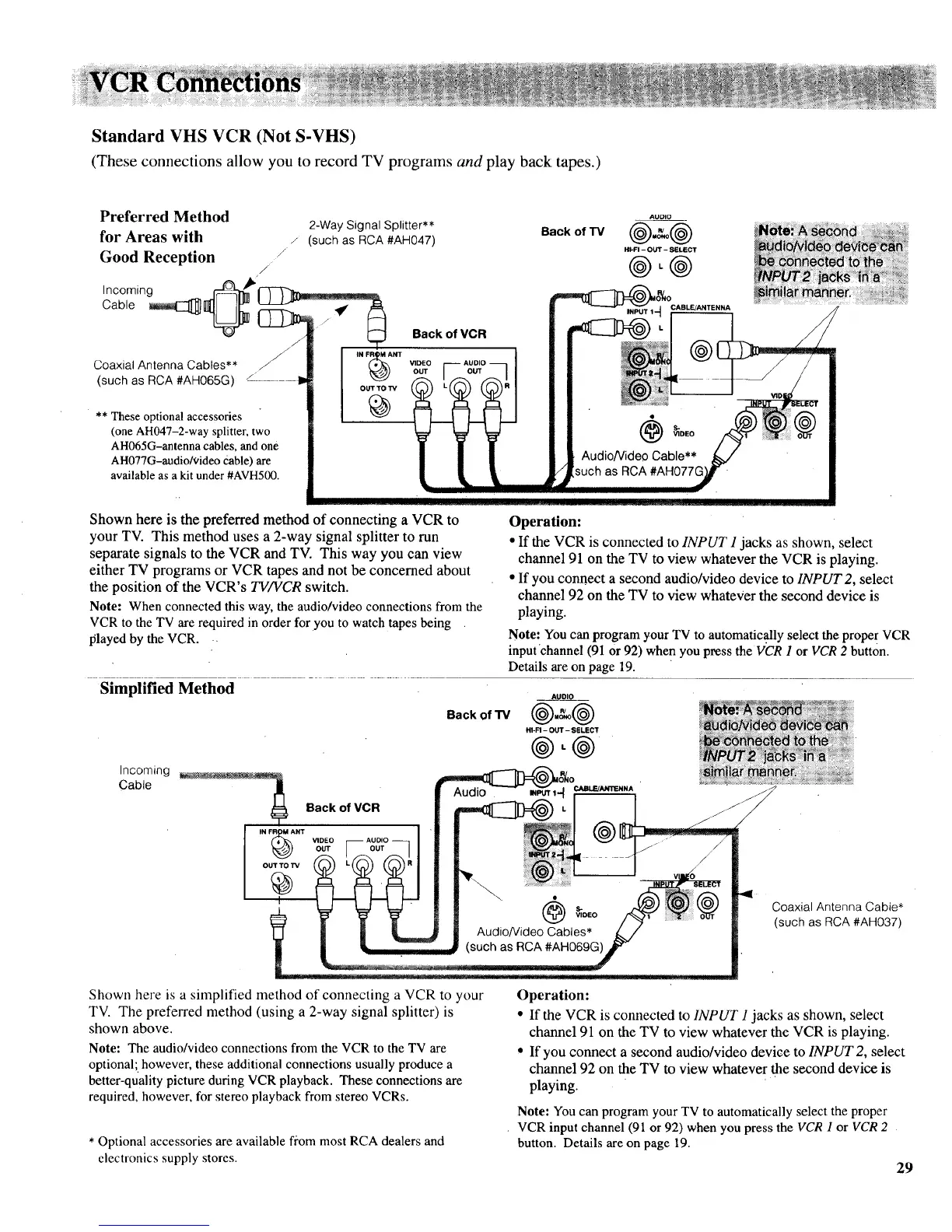
Standard VHS VCR (Not S-VHS)
(These connections allow you to record TV programs and play back tapes.)
Preferred Method
for Areas with
Good Reception /
J
Incoming i_ _"
Cable _1_] I_ _--_--r'-'_
Coaxial Antenna Cables** ,_ ,. F_)Am
(such as RCA#AH065G) /
** These optional accessories
(one AH047-2-way splitter, two
AH065G-antenna cables, and one
AH077G-audio&ideo Cable) are
available as a kit under #AVH500.
2-Way Signal Splitter**
/ (such as RCA #AH047)
OUTTO TV
Back of VCR
Back of "IV
AUDIO
HI-FI - OUT - SELECT
@.@
Shown here is the preferred method of connecting a VCR to
your TV. This method uses a 2-way signal splitter to run
separate signals to the VCR and TV. This way you can view
either TV programs or VCR tapes and not be concerned about
the position of the VCR's TV/VCR switch.
Note: When connected this way, the audio/video connections from the
VCR to the TV are required in order for you to watch tapes being
played by the VCR.
Simplified Method
Back of "13/
Incoming
Cable
Back of VCR
IN F_ANT
OUT TO "iV
Operation:
• If the VCR is connected to INPUT 1jacks as shown, select
channel 91 on the TV to view whatever the VCR is playing.
• If you connect a second audio/video device to INPUT 2, select
channel 92 on the TV to view whatever the second device is
playing.
Note: Youcan program your TV to automatic.allyselect the proper VCR
inputchannel (91 Or92) when youpress the VCR I or VCR 2 button.
Details are on page 19.
AUDIO
HI-FI - OUT - SELECT
@-@
• s-
® @ v,oEo
U Audio/Video Cables*
|
(such as RCA#AH069G)
L ................................=.......................:..........................
Shown here is a simplified method of connecting a VCR to your
TV. The preferred method (using a 2-way signal splitter) is
shown above.
Note: The audio/video connections from the VCR to the TV are
optional;, however, these additional connections usually produce a
better-quality picture during VCR playback. These connections are
required, however, for stereo playback from stereo VCRs.
* Optional accessories are available from most RCA dealers and
electronics supply stores.
Coaxial Antenna Cable*
(such as RCA #AH037)
29
Operation:
• If the VCR is connected to INPUT 1 jacks as shown, select
channel 91 on the TV to view whatever the VCR is playing.
• If you connect a second audio/video device to INPUT 2, select
channel 92 on the TV to view whatever the second device is
playing.
Note: You can program your TV to automatically select the proper
VCR input channel (91 or 92) when you press the VCR 1 or VCR 2
button. Details are on page 19.



 To Next Page