ThedigitalremotecontrolthatcamepackedwithyourTV
controlsyourTV and up to two compatible RCA VCRs.
To control a compatible RCA VCR, first press the VCR 1
or VCR 2 button to put the remote in the "VCR mode".
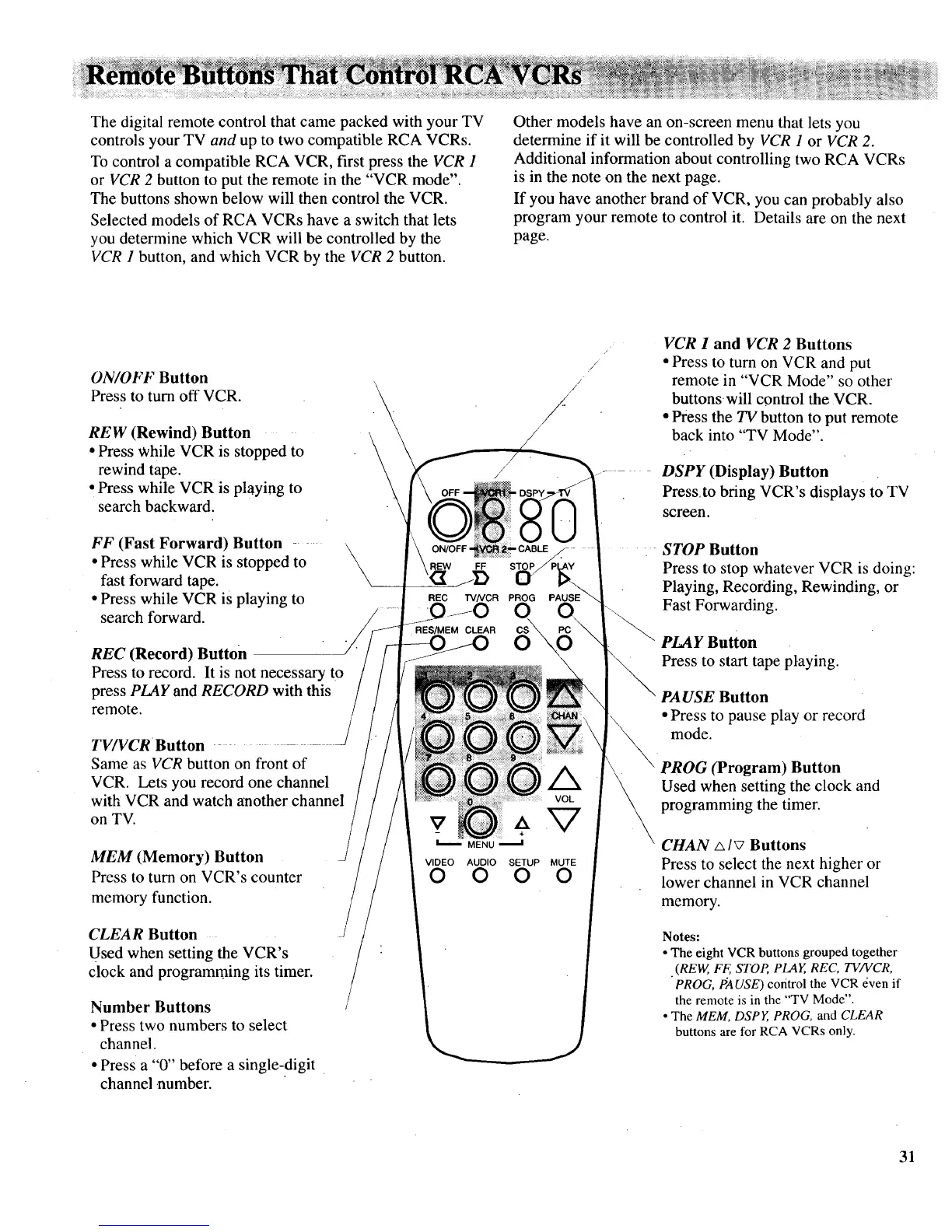
The buttons shown below will then control the VCR.
Selected models of RCA VCRs have a switch that lets
you determine which VCR will be controlled by the
VCR 1 button, and which VCR by the VCR 2 button.
Other models have an on-screen menu that lets you
determine if it will be controlled by VCR 1 or VCR 2.
Additional information about controlling two RCA VCRs
is in the note on the next page.
If you have another brand of VCR, you can probably also
program your remote to control it. Details are on the next
page.
ON/OFF Button
Press to turn off VCR. _
\
REW (Rewind) Button
\
• Press while VCR is stopped to \
rewind tape.
\
• Press while VCR is playing to
search backward.
FF (Fast Forward) Button ..... \
• Press while VCR is stopped to
\
fast forward tape.
• Press while VCR is playing to
search forward.
REC (Record) Button
Press to record. It is not necessary to
press PLAY and RECORD with this
remote.
TV/VCR Button
Same as VCR button on front of
VCR. Lets you record one channel
with VCR and watch another channel
on TV.
MEM (Memory) Button
Press to turn on VCR's counter
memory function.
CLEAR Button
Used when setting the VCR's
clock and programming its timer.
Number Buttons
• Press two numbers to select
channel.
• Press a "0" before a single-digit
channel number.
//
/
/
/
/
RES/MEM CLEAR
0 0 0 0
VCR 1 and VCR 2 Buttons
• Press to turn on VCR and put
remote in "VCR Mode" so other
buttons, will control the VCR.
• Press the TV button to put remote
back into "TV Mode".
DSPY (Display) Button
Press,to bring VCR's displays to TV
screen.
STOP Button
Press to stop whatever VCR is doing:
Playing, Recording, Rewinding, or
Fast Forwarding.
PLAY Button
Press to start tape playing.
PAUSE Button
• Press to pause play or record
mode.
PROG (Program) Button
Used when setting the clock and
programming the timer.
CHAN A IV Buttons
Press to select the next higher or
lower channel in VCR channel
memory.
Notes:
• The eight VCR buttons grouped together
•(REW, FF, STOP, PLAY, REC, TV/VCR,
PROG, tiAUSE) control the VCR even if
the remote is in the "TV Mode".
• The MEM, DSPY, PROG, and CLEAR
buttons are for RCA VCRs only.
31



 To Next Page