COMPONENT VIDEO
YPbPr
VIDEO
INPUT
L
R
AUDIO
VIDEO
OUTPUT
S-VIDEO
S-VIDEO
L
R
AUDIO
LR
AUDIO
VIDEO
R
AUDIO
L
AUDIO/VIDEO INPUT
(VID)
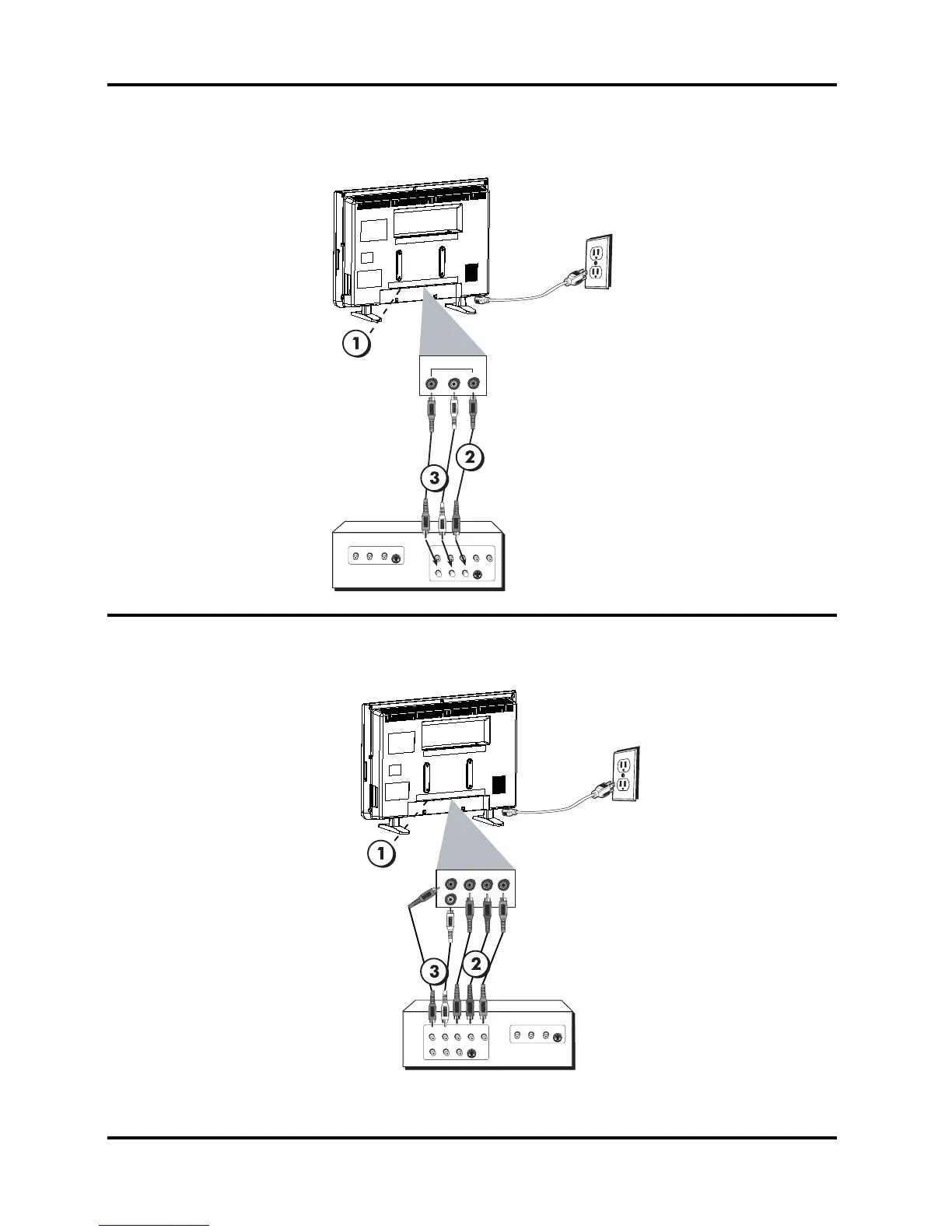
Composite Video (Basic) Connection
This is an example of a connection using the composite video jack. Go to the top of page 9 for specific
instructions.
Component Video (Advanced) Connection
This is an example of a connection using the Component Video jacks. Go to the middle of
page 9 for specific instructions.
Connections and Setup
Don't forget: If necessary,
connect antenna or cable to
get a picture. Go to page 6 for
instructions.
Don't forget: If necessary,
connect antenna or cable to
get a picture. Go to page 6 for
instructions.
8 Chapter 1
COMPONENT VIDEO
VIDEO
INPUT
L
R
AUDIO
VIDEO
OUTPUT
S-VIDEO
S-VIDEO
L
R
AUDIO
L
Pr Pb Y
R
AUDIO
COMPONENT INPUT (CMPT)
Y
PbPr
R
AUDIO
L


 To Next Page