Chapter 3 33
Using the TV’s Features
Additional Features
There are additional features available unrelated to Parental Controls. These features can be
found in other menus.
Picture Processing
With a focus on exceptional picture performance, all RCA models feature Enhanced Natural
Vision (EN-V). EN-V picture processing is designed to provide enhanced color and contrast so
you can enjoy a bright, crisp picture.
Go to page 35 to adjust picture settings.
Screen Formats
Screen format is the way the picture is displayed on your TV. Press the ZOOM +/- button on
your remote to see if a different format is available for the video you are viewing. The format
changes as you press the FORMAT button and the format type is displayed at the bottom of the
screen.
Analog video is sent in a 4/3 format, which your TV displays in a 16/9 format. Most digital
video is sent in a 16/9 format which does fi ll your screen, but sometimes is sent in 4/3 which
does not fi ll your screen. It depends on how the station or device connected to your TV is
formatting the video. If there are bars on-screen, press the FORMAT button to try a different
format that may eliminate the bars. Some bars can't be removed because of the way the format
is sent by the broadcaster.
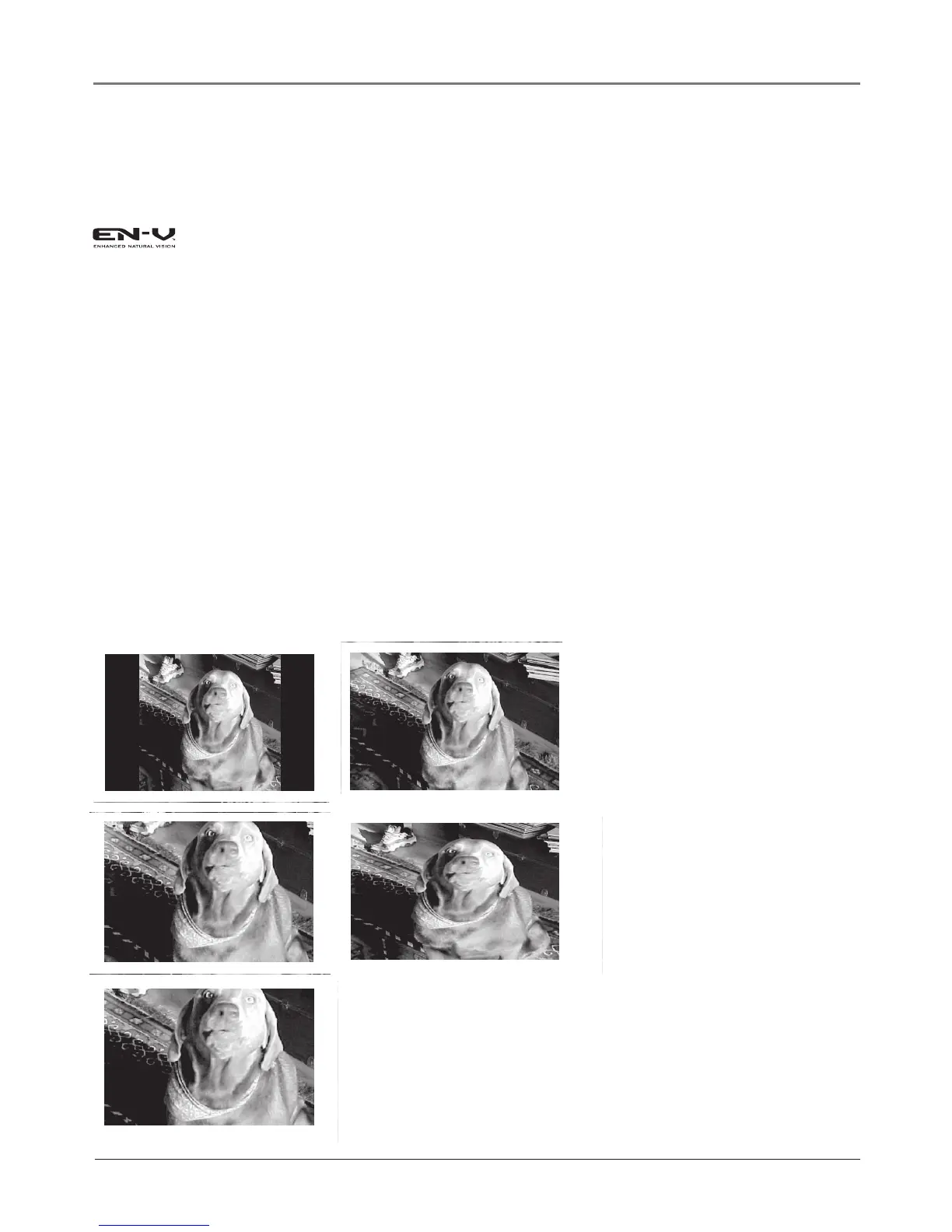
The different formats available and what they look like follow. Each format is available for
analog video, but might not be available for digital video.
Normal 4/3 Normal 16/9
Stretch
Center
Zoom


 To Next Page