EasyManua.ls Logo

RCA RCT6378W2 - Overview of Controls; Device Layout and Ports

RCA RCT6378W2
10 pages
Print Icon
To Next Page IconTo Next Page
To Previous Page IconTo Previous Page
Loading...
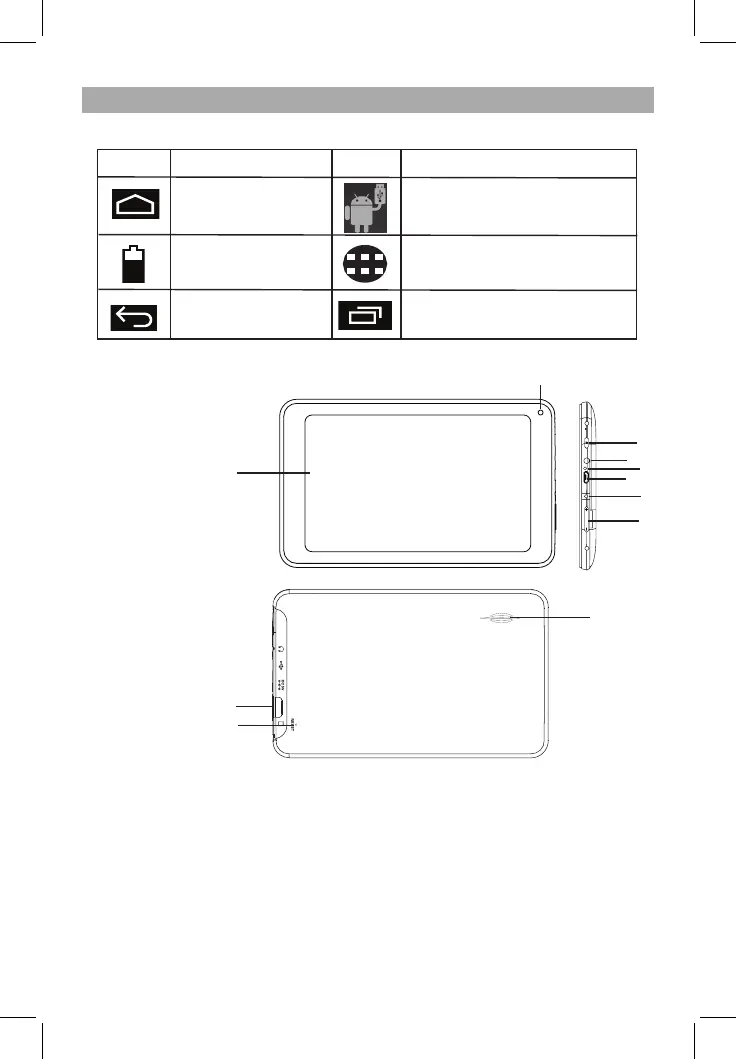
Operation of the Function Icons
Function Icon Definitions:
EN - 4
Icon
Function Instruction
Note when connect with PC via
USB.
Back to Home menu
Show current power
status
Return
App menu
Open the list of apps that you
have used recently.
Icon
Function Instruction
1. Display
2. Front Camera
3 POWER Button: Press the button shortly to enter standby/wake up mode,
press for a few seconds to switch On/Off the unit.
4. Earphone Jack: Stereo earpiece jack.
5. Microphone Jack
6. USB Slot: MINI USB Port, connect to a PC.
7. DC Socket: Connect with 5V DC charger.
8. Volume+/- Key: Press to adjust the volume.
9. Card Slot: TF card slot (Micro SD Card Slot).
10. Reset
11. Speaker
9
10
11
1
2
3
4
5
7
8
Overview of Controls
6


Related product manuals