- 9 -
Care and Maintenance
AM / FM Operation
STEREO indicator is o in FM mode.
• Adjusttheantenna.
• PressMONO / ST button to insure you are not outputting in mono.
The signal is Mono. Severe hum or noise.
• Thesignalistooweak.Connectanexternalantenna.
• Adjustantenna.
• Repositionantennaawayfromanyelectronics.
There is interference to FM reception.
• Turnootherelectricalunit(e.g.DVD,BD,CDplayer)neartheunit.
Remote Control Operation
The remote control does not operate the unit.
• No batteries installed (included with your system). Install the
batteries before attempting to operate the remote. Be sure to match
the + and - ends of each battery to the symbols shown in the remote
battery compartment.
• Thebatteriesareweak.Replaceallbatteries.
• Theremoteisnotpointedattheremotecontrolsensoronthemain
unit or there is an obstacle between the remote and the main unit.
• Theremotecontrolistoofarfromthemainunit,movecloser.
General
No audio.
• Makesurethespeakersareconnected.
• Checktheinputconnections.
• Checkthepowercordconnections.
• MakesureMUTEiso.
• Makesurethedigitalsetting(optical,coaxialoranalog)iscorrect.
• Checkthattheheadphoneisnotinserted.
No audio from one channel.
• Checkthespeakerlevelsetting.
• Checkthespeakerwireorexternalsourcecableconnections.
Noise occurs when the TV is turned on.
• TheTVistooclosetotheaudiosystem.
Not getting audio from all speakers.
• CheckyourSurroundModesetting(underAdvancedSoundControl
section of this book). Your Home Theater has a number of different
SURROUND MODE settings, it defaults to modes most suited to the
type of audio content being played – however you can change these
settings. Some of these modes, (such as DOLBY DIGITAL, and Dolby
PROLOGIC II), will cause all speakers to be active, while other modes,
(such as STEREO and 3-STEREO), will cause your rear speakers to be
inactive. You can always test your Home Theater amplifier - and each
speaker, by using the built-in TEST TONE generator (press TEST TONE
button on remote control).
Advanced Sound Control
Notes:
• CNTR stands for “Center Speaker” selection while SURR
stands for “Surround Speaker” selection.
• Bydefault,theCenterandSurroundSpeakersaresettoYES.Ifyou
decide not to use them, set the ones you do not intend to use to
NO so that the sound performance is not affected.
Speaker Congurations
You can also change the setup of the speakers. Use a subwoofer to
enjoy optimum sound.
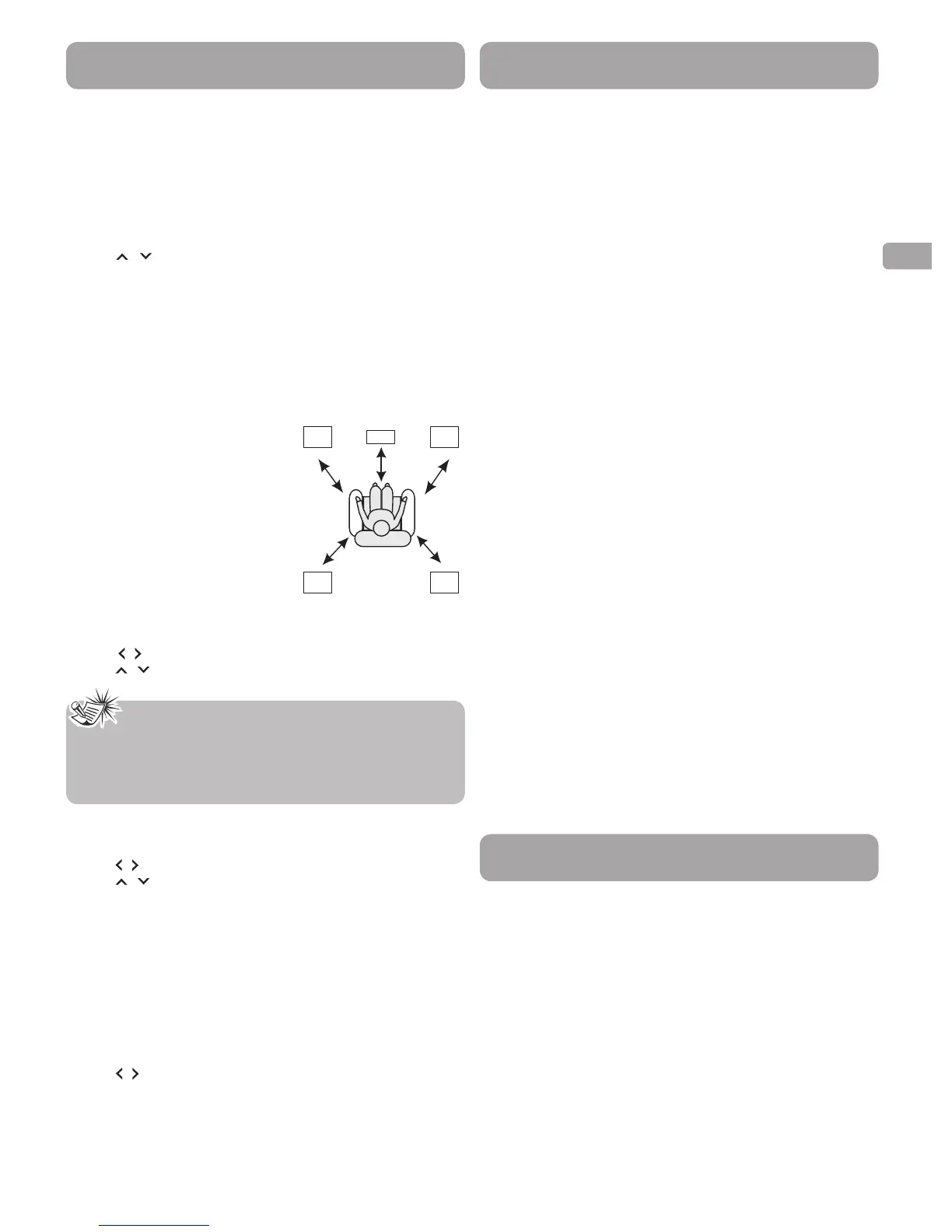
For optimum surround experience measure the distance between the
speaker and your favorite listening position. Press DISTANCE button to
adjust the speakers’ distance values.
1. Press the DISTANCE button to show setup options.
2. Continue to press the DISTANCE button until the speaker you want
to adjust is displayed.
3. Press / buttons to change the speaker settings. Your selection
will be stored automatically.
4. Repeat step 2 and 3 to set up the next speaker. You may adjust the
distance within the following ranges:
• FrontSpeakerdistance(FRNT):0-30ft
• CenterSpeakerdistance(CNTR):0-30ft
• RearSpeakerdistance(SURR):0-30ft
5. When set up is done, wait for five seconds to automatically save your
settings or press any buttons to save your selection and set up mode.
Factory Default Speaker Distance Settings
• FrontSpeakers(FRNT):15ft
• CenterSpeaker(CNTR):10ft
• RearSpeakers(SURR):10ft
Center / Surround Speaker Setup
1. Press the SETUP button on the remote control or front panel to
show setup options.
2. Press / button until CTR YES or SUR YES is displayed.
3. Press / button to select between YES and No.
Home Theater’s Display Dimmer Control
1. Press the SETUP button to show setup options.
2. Press / button until DIMMER 0 is displayed.
3. Press / button to select between 0 and 1.
NIGHT Mode Selection
"Night Mode" will limit the volume on loud passages of movies (such as
action sequences) while still allowing you to hear quiet passages (such
as dialog).
1. Press the NIGHT button to show setup options.
2. Continue to press the NIGHT button to select among different
options “MODE RATE /QUIET/OFF” .
3. It is available only during Dolby Digital signal playback.
SUBWOOFER Mode Selection
1. Press the SETUP button to show setup options.
2. Press / button until current SUBWOOFER mode is displayed.
3. Press SUBWOOFER button to select among "BALANCE", "STRONG",
"POWERFUL" or "SOFT " is scrolled once.
R/SL/S
Rch
Cch
Lch
Front
Left
Rear
Right
Rear
Left
Front
Right
Center
Disconnect the audio system from the power source before performing
any maintenance.
Cleaning the exterior
Disconnect the system from AC power before cleaning the exterior of the
system with a soft dust cloth, or with a slightly damp leather chamois.
Never use strong solvents.
Important Battery Information
• Removethebatteriestoavoidleakageifyoudonotuseyourremote
control for more than one month.
• Discardleakybatteriesimmediatelyasleakingbatteriesmaycause
skin burns or other personal injuries.
• Disposeofbatteriesin thepropermanner, accordingto provincial
and local regulations.
• Any battery may leak electrolyte if mixed with a dierent battery
type, if inserted incorrectly, if all batteries are not replaced at the
same time, if disposed of in fire, or if an attempt is made to charge a
battery not intended to be recharged.
Troubleshooting Tips
AV62781BE_IB_811-A27891W022.indd 9 2014/6/10 15:03:55



 To Next Page