EN
5
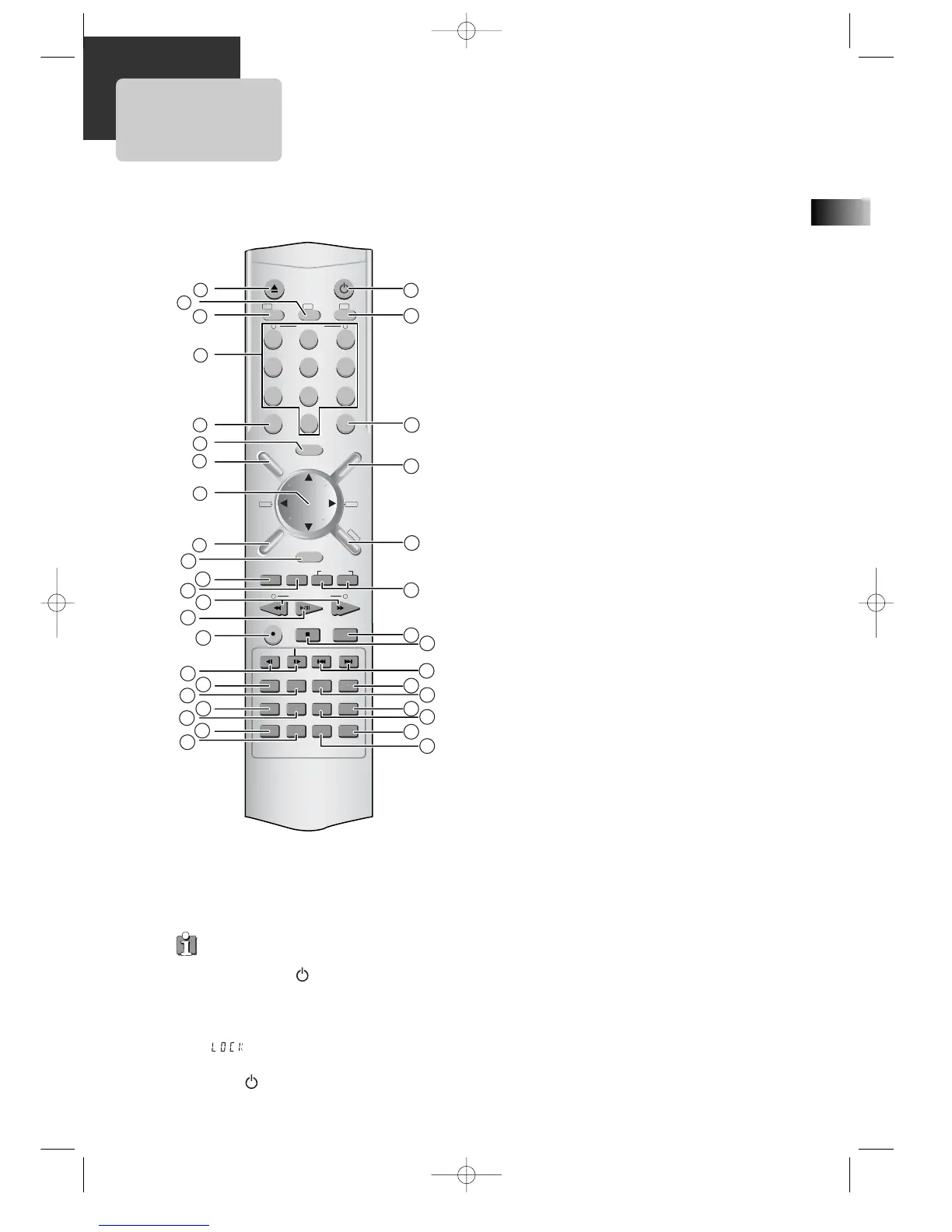
1 [DVD] Open/Close button, [VCR] Eject button
2 DVD SELECT button
3 VCR SELECT button
4 [DVD, VCR] Number button , [VCR] Tracking –/+
button
5 CLEAR button
6 SETUP button
7 [DVD] Title /PBC button
8 [DVD, VCR] Use to highlight a selection on the menu
and adjust certain settings, [RADIO] Adjust the
volume
9 [DVD] Menu button
0 ENTER (Confirm selections on a menu screen) button
A [DVD] ZOOM button
B [VCR] TIMER RECORDING button, [DVD] program
button
C [DVD, VCR] Forward / Reverse Search button,
[RADIO] Scan all available radio stations
D Play/Pause button
E [VCR] Record button
F STEP FORWARD/REVERSE button
G [DVD] Chapter/Title/Time Search button
H [DVD] Subtitle Select button, [RADIO] Switch
between AM or FM button
I [DVD] Repeat Playback button
J [DVD] REPEAT a defined period from A to B button
K SOUND MUTE button
L [DVD, VCR] Clock/Counter button
M Power button
N TV SELECT button
O 100/P-SCAN button
[VCR] Used to enter three digit numbers.
[DVD] Switches to P-Scan mode.
P [DVD, VCR] OSD Display button
Q [RADIO] FM/AM Select button
R [VCR] Channel Up/Down button, [RADIO] Tune to the
presetted stations
S [DVD] Angle, [VCR] Record Speed button
T Stop/MEMORY (Enter the number of a selected
chapter, track, station or channel) button
U [DVD] PREVIOUS (move to the previous chapter or
track) / Next (Move to the next chapter or track)
button, [VCR] Frame Advance button in pause mode
V [DVD] SOUND FIELD button
W [DVD] AUDIO Language Select, [VCR] AUDIO Select
button, [RADIO] Set FM Mode to Stereo or Mono
sound
X [DVD] Sound LEVEL button
Y [DVD] DELAY button
Z sleep button
[ TV/VCR Select, TV INPUT button
Child Lock!!! (VCR mode)
Press the power [ ] button on the remote
control for about 8 seconds. No buttons on
the front panel and the remote control can
be operated now and the Lock indicator
(“ ”) will be displayed on the window
display. To release child lock, press the
power [ ] button on the remote control
for about 8 seconds.
Remote Control



 To Next Page