Quick Reference Guides (continued)
Recording and Viewing Different Programs
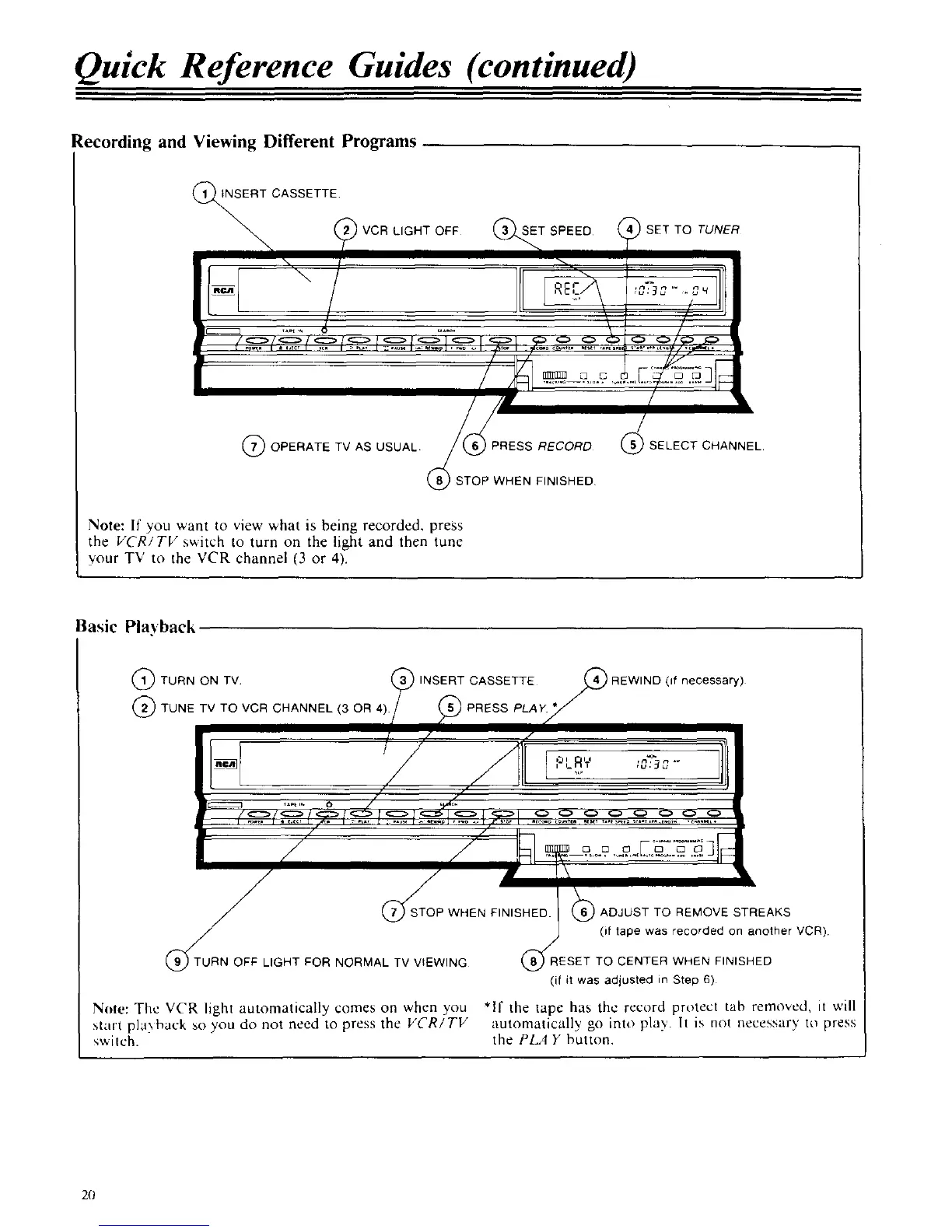
_I, NSERT CASSETTE
VCR LIGHT OFF SET SPEED SET TO TUNER
, /
/'
/
(7_OPERATE TV AS USUAL
_RESS RECORD @SELECT CHANNEL
STOP WHEN FINISHED
Note: If you ',','ant to view what is being recorded, press
the VCR/TV switch to turn on the light and then tune
your TV to the VCR channel (3 or 4).
Basic Pla_ back
@ TURN ON TV (_ INSERT CASSETTE //_ REWIND (if necessary)
(2_TUNETVTOVCRCHANNEL(3OR4)/ (_PRESSPLA_[_I !
/ J ] ,,,[:'LRr ;2,:32,"
ct ¢ r
,/
/
Y
/
/
(_RN OFFUGHTFORNORMALTVV*W,NG (_ESETTOCENTER
(_TOSTOp WHEN FINISHED. (_ ADJUST TO REMOVE STREAKS
J (i tape was recorded on another VCR)
WHEN FINISHED
(if it was adjusted in Step 6)
Note: The VCR light automatically comes on when you *If the tape has the recurd protect tab removed, it will
start playback so you do not need to press the VCRITV automatically go into play', h is not necessary to press
switch, the PLAY button.
2(J



 To Next Page