ARTEMIS PSi OPERATION
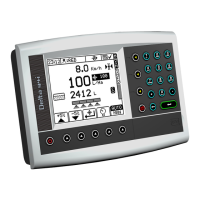
The Artemis is designed to allow automatic, variable rate control of any drill
utilising Accord type metering units. You can at any time, also manually override
the predetermined rate as field conditions require.
PRODUCT CALIBRATION
The Artemis must be calibrated once the metering unit position has been
selected for each new product.
1. Set up the drill in the usual way for a bucket test.
2. Locate the White priming button switch near to the metering unit and
press this.
3. The motor should start to meter out seed. Continue the test until a
reasonable amount of seed has been metered.
4. Weigh the product and note the weight in either grammes or Kg.
5. Return to the headunit and type in the weight that has been dispensed in
to the bucket.
6. Once this weight has been entered, the Artemis will display the
minimum and maximum forward speed that is achievable. If this speed
does not suit drilling conditions then adjust metering unit and
recalibrate.
PRE-START
The Pre-Start
button enables the seed pipes to be primed with seed
before setting off to drill. By pressing the button, the motor will run for a preset
time period as if it was travelling at the simulated speed value.
If the forward speed does not go above 0.5 km/hr within this preset time period
then the motor will stop until the drill starts to move or the Pre-
pressed again.
ALTERING THE APPLICATION RATE
The Application Rate can be alter
ed by pressing the “RATE” button on the right
hand side of the screen. This will alter depending upon if a single product or
dual product system is being used.
The Application Rate can be altered by either typing in a new rate on the
numerical keypad a
nd pressing the Enter button or by using the “Nudge”
buttons, these allow the Application Rate to be altered by a pre-
percentage.
TRAMLINE CONFIGURATION
The Tramline Configuration can be altered by pressing the “Setup” button and
then selecting the
key. This will display the following screen which is
based around the drill width.
The number of target bouts can be increased and decreased by using the up
and down arrows until the desired sprayer width is achieved.
The Left and Right butt
ons denote whether a Symmetric or Asymmetric Tramline
sequence is to be used.
731 : ISSUE 1.00 : 2/7/13 : UK731100.DOC


 To Previous Page
 Loading...