Technical support: www.real-el.com
ENG
3
User’s Manual
FC-150
Notes:
• Technical specifications given in this table are supplemental informati-
on and cannot give occasion to claims.
• Technical specifications and package contents are subject to change
without notice due to improvement of TM REAL-EL production.
(on the side)
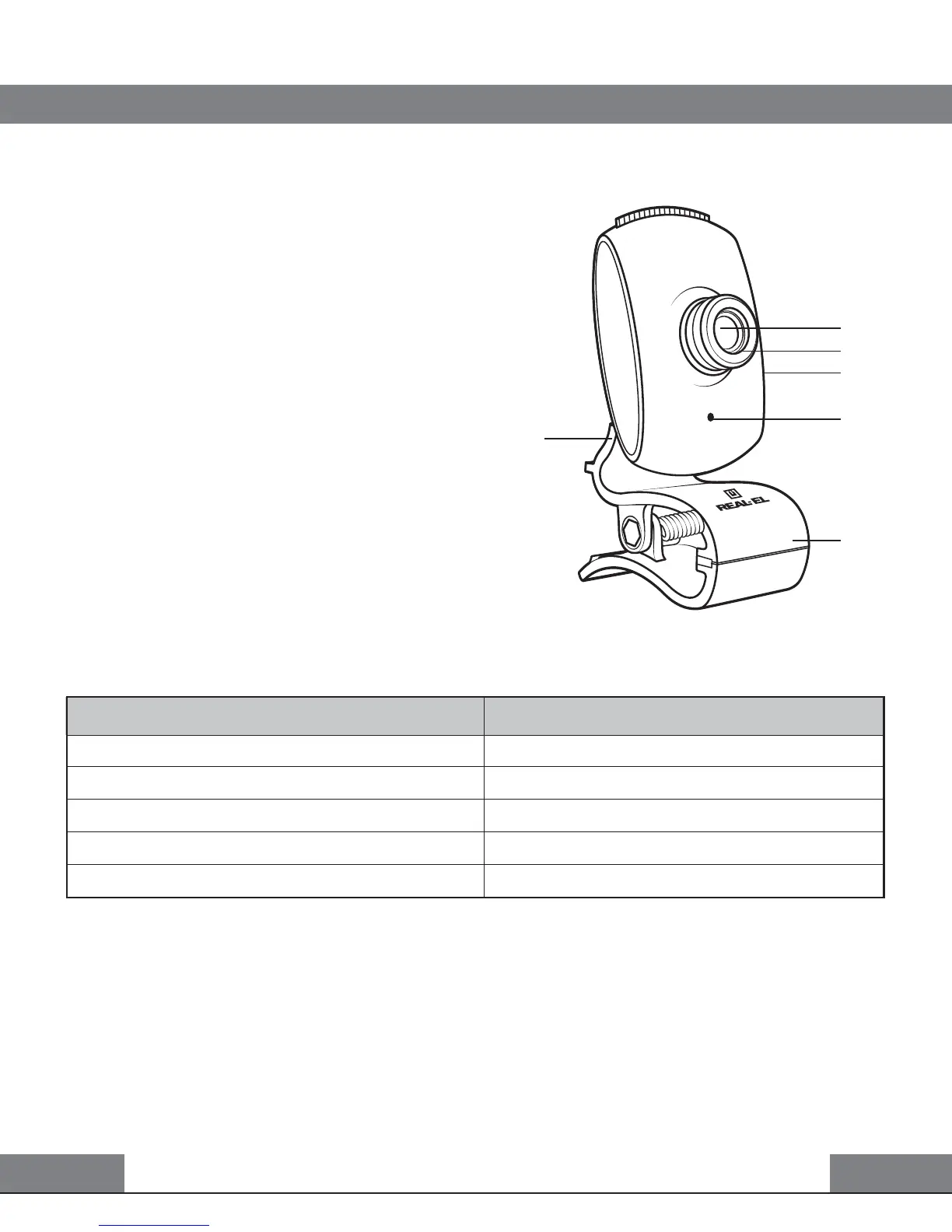
Fig. 1. FC-150 description
7. TECHNICAL SPECIFICATIONS
5. CONNECTION AND INSTALLATION
• Connect the web camera to an availa-
ble USB port.
• This web camera supports Plug and
Play technology. Installation of the device
is automatic after its connection to the
USB port.
6. DESCRIPTION
Lenses
Focus
Snapshot button
Built-in microphone
Hinge
Mounting clip
Parameter, measurement unit
Sensor type
Resolution, pix
Frame rate, frames/sec
Focus distance, mm
Cable length, m
Value
CMOS
640 × 480
up to 30 fps for 640 × 480
4.8 to infinity
1.25


 To Next Page