
 Need help?
Do you have a question about the Real-El GAMING 8500 and is the answer not in the manual?
Lists all items included in the keyboard package.
Highlights key characteristics and benefits of the keyboard.
Details the necessary software and hardware for the keyboard.
Provides instructions on how to connect and set up the keyboard.
Explains the functionality of the keyboard's shortcut keys.
Provides solutions for common keyboard operational problems.
Details key technical parameters of the keyboard.
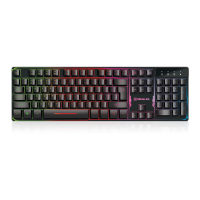
The REAL-EL GAMING 8500 is a multimedia gaming keyboard designed to enhance your gaming experience and provide convenient access to various multimedia and internet functions. This user-friendly device is compatible with a range of Windows operating systems and offers a comfortable and quiet typing experience.
The primary function of the REAL-EL GAMING 8500 keyboard is to serve as an input device for computers, specifically tailored for gaming. It features a standard 104-key layout, ensuring full functionality for everyday tasks, alongside additional shortcut buttons that streamline multimedia control and internet navigation. The keyboard is designed with an ergonomic gaming aesthetic, providing a comfortable and immersive experience during extended gaming sessions. Its high-quality membrane construction contributes to a soft and silent keystroke, which is beneficial for both gaming and general typing, reducing noise and improving user comfort.
A key feature of this keyboard is its multimedia capabilities, enabled by 10 dedicated shortcut buttons. These buttons allow users to quickly control media playback, adjust volume, and access common internet and system functions without interrupting their workflow or game. For instance, users can effortlessly play or pause music, skip tracks, increase or decrease volume, open their web browser, launch their email program, or put their computer into sleep mode with a single press. This integration of multimedia controls directly onto the keyboard significantly enhances user convenience and efficiency.
The keyboard also includes 8 replacement keycaps specifically designed for gaming. These keycaps can be swapped with standard keys, likely to highlight frequently used gaming keys (such as WASD or arrow keys) or to provide a different tactile feel, further customizing the keyboard for a personalized gaming setup. This feature allows gamers to optimize their keyboard for specific games or playstyles, potentially improving their reaction time and overall performance.
Using the REAL-EL GAMING 8500 is straightforward and requires minimal setup. The keyboard connects to your PC via a free USB port, and its installation is automatic upon connection, meaning you can plug it in and start using it immediately without needing to install any drivers manually. This plug-and-play functionality makes it highly accessible for users of all technical levels.
The ergonomic design is a significant usage feature, as it aims to reduce strain and fatigue during prolonged use. The layout and key spacing are optimized for comfortable typing and gaming, allowing users to maintain a natural hand position. The soft and silent keystroke, a result of the high-quality membrane, contributes to a more pleasant user experience, especially in shared environments where noise might be a concern.
The shortcut buttons are intuitive and clearly labeled with icons representing their functions. These include:
These dedicated controls eliminate the need to navigate through software menus or use complex key combinations, making multimedia and system management more efficient. The inclusion of replacement keycaps for gaming allows users to personalize their keyboard, making essential gaming keys more prominent or providing a different tactile feel for improved control and comfort during intense gaming sessions.
The keyboard is compatible with a wide range of Windows operating systems, including Windows XP, Vista, 7, and 8, ensuring broad usability across different PC setups. This broad compatibility means that most users will be able to integrate the GAMING 8500 into their existing systems without encountering compatibility issues.
The REAL-EL GAMING 8500 is designed for durability and ease of maintenance. The high-quality membrane construction not only provides a comfortable keystroke but also contributes to the keyboard's longevity, with an error-free running time of more than 20,000,000 strokes. This robust design minimizes the need for frequent repairs or replacements.
In terms of troubleshooting, the manual provides clear guidance for common issues. If the keyboard is not working, the first step is to disconnect it from the PC and inspect the connector pins for any visible damage. If no external damage is found and the pins appear intact, reconnecting the keyboard to the PC is recommended. This simple step can often resolve minor connection issues. If the problem persists after these basic checks, the manual advises seeking assistance from the nearest authorized service center, indicating that the device is designed to be serviceable by professionals if more complex issues arise.
General maintenance for the keyboard would typically involve keeping it clean. Regular dusting and occasional wiping with a soft, damp cloth can help prevent dust and debris from accumulating under the keys, which can affect performance and longevity. The robust construction of the keyboard means it can withstand normal wear and tear associated with daily use and gaming. The absence of complex software or drivers also simplifies maintenance, as there are no software updates or configurations to manage, ensuring a consistent and reliable performance over time. The plug-and-play nature of the device means that if a problem does occur, it is often hardware-related, making the troubleshooting steps straightforward.
 General
| Connection type | Wired |
|---|---|
| Interface | USB |
| Cable length | 1.8 m |
| Keycaps | ABS |
| Polling Rate | 1000 Hz |
| Number of additional keys | 12 (Function keys) |

 To Next Page