The device is the realme TechLife Air Purifier Pro (RMH2102), designed to improve indoor air quality. It features a comprehensive purification system and smart controls for user convenience.
Function Description
The realme TechLife Air Purifier Pro is an air purification device that filters out particulate matter and formaldehyde from the air. It incorporates a UV-C emitter for sterilization, contributing to a healthier indoor environment. The device offers various fan speeds, including a Sleep Mode for quiet operation, and an Auto Mode that adjusts fan speed based on detected air quality. It also includes a timer function for scheduled shutdowns. The purifier can be controlled via physical buttons on the device or remotely through the realme Link app, which also provides access to advanced features like custom fan speed settings and timed tasks.
Important Technical Specifications
- Model: RMH2102
- Dimensions: 260 x 265 x 524 mm
- Net Weight: 5.3 kg
- Input Voltage: 220-240 V
- Rated Frequency: 50/60 Hz
- Rated Power: 45 W
- Noise Level: 68 dB(A)
- Recommended Use Area: 33.6-57.6 m²
- Particulate Clean Air Volume (CADR Particulate Matter): 480 m³/h
- Particulate Matter Cumulative Purification Amount (CCM Particulate Matter): F4
- Formaldehyde Clean Air Volume (CADR Formaldehyde): 120 m³/h
- Formaldehyde Cumulative Purification Amount (CCM Formaldehyde): P4
- Purification Energy Efficiency: High Efficiency Grade
- Formaldehyde Purification Energy Efficiency: High Efficiency Grade
- UV-C Lamp Power: 0.8 W
- App Support System: Android 5.0 and above; iOS 11.0 and above
- Wireless Connectivity: Wi-Fi/Bluetooth connectivity 802.11 B/G/N20 1-14@2.4GHz (CH1-13 for EU/CN); supports Bluetooth version 4.0 and above. The device currently only supports connection to 2.4GHz Wi-Fi networks.
Usage Features
The realme TechLife Air Purifier Pro is designed for ease of use with both on-device controls and smart app integration.
Installation:
- Opening the Filter Compartment Door: Pull the clasp on the filter compartment door outward until it is fully open.
- Filter Installation: Take out the filter, remove it from its packaging, insert it into the filter compartment, and close the door.
- Connecting to Power Supply: Select a suitable location and connect the power cable. Ensure the device's air inlet is at least 50 cm away from walls and other obstructions for best results. Close doors and windows while using the device for optimal purification.
Button Usage:
- Power Button: Taps to turn the device on or off.
- Timer Button: Taps to set timed shutdown (1, 2, 4, or 8 hours). The timer indicator lights up when timed tasks are active (set via realme Link app).
- Fan Speed Button: Taps to select operating speed:
- Sleep Mode: Low-noise, ideal for sleep.
- Soft: Low-speed operation.
- Normal: Medium-speed operation.
- Strong: High-speed operation.
- Custom Mode: Customizable via realme Link app.
- Auto Mode Button: Taps for automatic fan speed adjustment based on room air quality.
- Child Lock Button: Press and hold for 5 seconds to enable/disable. When enabled, the purifier can still be controlled via the realme Link app.
- Filter Reset Button: When the filter replacement indicator lights up, replace the filter. After replacement, press and hold the Timer and Fan Speed buttons for 5 seconds to reset the filter timer.
Display Overview:
- PM2.5 Icon: Indicates current indoor PM2.5 concentration when lit.
- PM2.5 Concentration Level or Duration Until Timed Shutdown: Shows numerical value.
- Timer Icon: Indicates duration until timed shutdown when lit.
- Air Quality Indicator: Light changes color based on PM2.5 concentration:
- Green: 0-75 µg/m³
- Orange: 76-150 µg/m³
- Red: 150 µg/m³ or higher
- Child Lock Indicator: Lights up when Child Lock is enabled.
- Sleep Mode Indicator: Lights up when the device is running in Sleep Mode.
- UV-C Sterilization Indicator: Indicates UV-C sterilization status.
- Filter Replacement Indicator: Lights up when filter needs replacement.
- Wi-Fi Status Indicator:
- Always on: Device connected.
- Flashing: Device waiting for connection.
- Off: Device not connected to network.
realme Link App Connection:
- Download App: Scan the QR code in the manual or search for "realme Link" on Android (5.0+) or iOS (11.0+).
- Enable Bluetooth: Turn on Bluetooth on your phone.
- Add Device: Open the realme Link app, tap "+" to add a device. Register and log in to your account.
- Network Configuration: Access the page via automatic device discovery or the "Appliances" menu.
- Wi-Fi Connection: Enter the Wi-Fi network name and password (2.4GHz only) and tap "Next."
- Pairing: Wait for scanning and device connection to complete.
- Device Linked: Once linked, the device can be renamed and shared.
Wi-Fi Reset: Press and hold the Timer and Auto Mode buttons simultaneously for 5 seconds while the device is on.
Safety Precautions:
- Turn off and unplug before moving, cleaning, or maintenance.
- Keep the device's air inlet 50 cm or more away from walls and obstructions.
- Do not pull, twist, or bend the power cable excessively.
- Only plug into corresponding power outlets.
- Stop using immediately if abnormal noise, odors, excessive heat, or irregular fan rotation occurs.
- Do not insert fingers or foreign objects into openings.
- Keep hair and fabric away from the device.
- Do not sit on, lean on, or tilt the device.
- Ventilate the room when using with combustion appliances to avoid carbon monoxide poisoning.
- Do not pour liquid, powder, or small items into the air outlet.
- Keep away from heated surfaces and open flames.
- Do not use on unstable or uneven surfaces, or in very hot, humid, or wet places.
- Not intended for use by persons (including children) with reduced physical, sensory, or mental capabilities unless supervised. Children should not play with the appliance.
- UV-C Sterilization: Contains a UV-C emitter. Unintended use or damage may result in dangerous UV-C radiation, which can harm eyes and skin. Do not operate if obviously damaged. User replacement of the UV-C emitter is not allowed.
Maintenance Features
Regular maintenance ensures optimal performance and longevity of the device.
Cleaning the Filter Compartment:
- To maintain proper airflow and effective purification, use a vacuum cleaner or wipe gently with a soft cloth to remove dust from the ventilation holes and the filter compartment walls.
- Periodically clean dust, hair, and other foreign materials from the filter's outer surface to reduce bacteria breeding.
- Periodically clean dust and other foreign materials from the device's air inlet to prevent blockage and reduction in intake air volume.
Cleaning the Laser Dust Sensor:
- The dust sensor's cover is inside the filter compartment at the top.
- Open the filter compartment door and remove the filter.
- Pull down on the latch to open the sensor cover.
- Use an air gun or a hairdryer to clean the dust sensor and the filter compartment door.
- Note: Do not use hot air for cleaning. It is recommended to clean these components every three months.
Filter Replacement:
- The filter replacement indicator will light up when the filter reaches the end of its recommended service life, signaling the need for replacement.
- After replacing the filter, press and hold the Timer and Fan Speed buttons for 5 seconds to reset the filter timer.
Storage:
- If the air purifier will be left unused for a long time, cover the device's air outlet to keep it clean and prevent dust from falling on the top grille and internal fan blades.
Troubleshooting (Error Codes):
- E1 (Filter compartment door not closed properly): Install the filter compartment door properly.
- E2 (Motor fault): Turn off and unplug. Check for foreign objects keeping the fan from operating. Remove objects and restart. If unresolved, contact support.
- E3 (Sensor fault): Turn off and unplug. Check for dust in the laser dust sensor or ventilation holes. Clean as per maintenance instructions. If unresolved, contact support.
- None (Can't connect to Wi-Fi): Ensure mobile phone's Bluetooth is on and Wi-Fi is working. Reset the device's connection (see Wi-Fi reset instructions). Follow realme Link app connection instructions again. If unresolved, contact support.

 Need help?
 General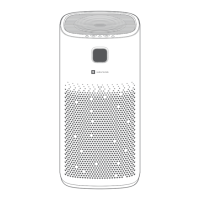

 To Next Page