RTL8773E Motherboard User Guide
19
·Copyright 2019 Realtek Semiconductor Corporation.
All Rights Reserved.
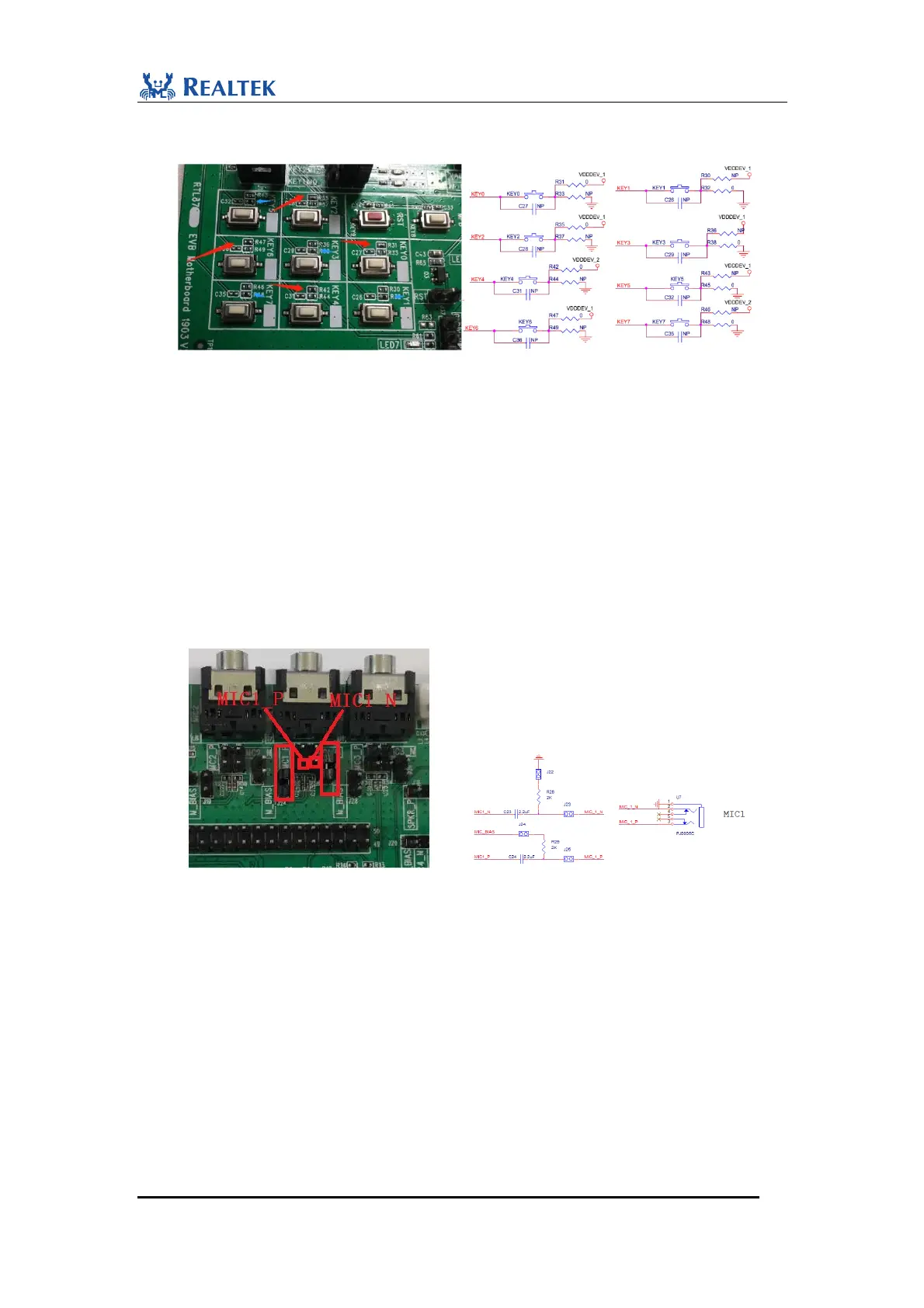
(KEY1, 3, 5, 7 marked by blue arrows) are all active-low. Users can choose either
of two types according to the specific development requirements.
Figure 2-7 Active-high KEYs & Active-low KEYs
2.2.5 Audio Interface
Aux line-in, dual microphones, and headphone out are supported on RTL8773E
Motherboard.
When MIC1 jack is used for electret condenser microphone input, follow the steps:
1) Short J22 and J24, as shown in red rectangle box.
2) Connect J25.1 with term 1(+) of microphone.
3) Connect J23.1 with term 2(-) of microphone.
Figure 2-8 MIC1 connections for condenser microphone
MIC2 jack is used for microphone input. When used as electret condenser microphone
input, follow the steps:
1) Short J15 and J19.
2) Connect J21.1 with term 1(+) of microphone.
3) Connect J16.1 with term 2(-) of microphone as shown below. MIC2 interface begins to
sample voice signal through external microphone.


 To Next Page
 Loading...