

EasyManua.ls Logo

RealTrace PetScan RT100 V8 - User Manual

RealTrace PetScan RT100 V8
21 pages
Print Icon
To Next Page IconTo Next Page
Loading...
26/02/2013
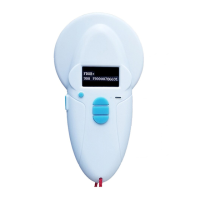
RT100 V8.
ISO FDXB tag
In/out button (1)
Mini USB
interface
LED blue Bluetooth activated
LED red charging battery
LED green battery charged
Display OLED
128×64 pixels
Scroll up button (2)
Mid button (4)
( Enter)
Scroll down button (3)
Battery charge level
Question and Answer IconNeed help?

Do you have a question about the RealTrace PetScan RT100 V8 and is the answer not in the manual?

Summary

Reader Characteristics

Bluetooth RT 100 V8 Reader

Data Transmission via Bluetooth or USB Cable

Explains data transfer methods using Bluetooth or USB cable.

WOOSIT System for Animal Tagging

Synoptic Menu SCAN

Synoptic Menu Language

Synoptic Menu Bluetooth 1

Synoptic Menu Bluetooth 2

Reader Memory Function

Storage of Read Tag Numbers

Explains how the reader stores tag numbers for PC transfer.

Deactivating the Memory

Details procedures for deactivating the reader's memory function.

Erasing the Memory

Details procedures for erasing stored tag numbers from the reader's memory.

Synoptic Menu Memory 1

Synoptic Menu Memory 2

Synoptic Menu Memory 3

Communication Between V8 Reader and PC

Serial Link: Windows Hyperterminal Usage

Guide to using Hyperterminal for PC communication via serial link.

Data Frame Description and CRC Calculation

Details transmitted data frames and the CRC calculation algorithm.
USB Port Identification on Windows XP

USB Port Identification on Windows 7

RealTrace PetScan RT100 V8 Specifications

General IconGeneral
BrandRealTrace
ModelPetScan RT100 V8
CategoryScanner
LanguageEnglish