EasyManua.ls Logo

ReAthlete Cyclo - User Manual

ReAthlete Cyclo
8 pages
Print Icon
To Next Page IconTo Next Page
Loading...
1
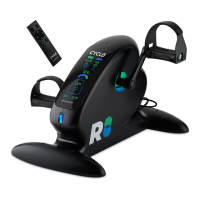
Compact Electric Pedal Exerciser
for Training and Rehabilitation
USER MANUAL
Contact us:
www.reathlete.com
support@reathlete.com
Question and Answer IconNeed help?

Do you have a question about the ReAthlete Cyclo and is the answer not in the manual?

Summary

Assembly Instructions

Step 1: Attach Stabilizers

Attach the stabilizers to the front and back end of the main frame using screws and washers.

Step 2: Attach Pedals and Straps

Thread the left pedal with left-hand threads clockwise and the right pedal with right-hand threads counterclockwise. Attach pedal straps.

Remote Control Functions

Manual Mode Operation

Use buttons to start, adjust resistance, pause, or reset settings for cardio and aerobic improvements.

Automatic Mode Operation

Use buttons to start, change pedal direction, adjust speed, pause, or reset for therapeutic rehabilitation.

LED Display Guide

Display Indicators

Explains indicators for manual/automatic mode, time, resistance levels, speed, cycle count, distance, and calories.

Usage Positions

Details on how to position the unit for lower body (seated/lying) and upper body (seated) use.

Important Safety Notice

Storage and Maintenance

Storage Guidelines

Store the device in a safe, dry, and cool place, avoiding wrapping the power cord around it.

Cleaning Instructions

Clean with a non-abrasive cleaner or mild detergent and a soft cloth, then wipe dry.

Usage Cautions

Consult a physician before use if experiencing pain, hypertension, or post-surgery.

Overview

The REATHLETE CYCLO is a compact electric pedal exerciser designed for both training and rehabilitation. It offers a versatile range of health and wellness benefits, suitable for various users and exercise needs.

Function Description:

The CYCLO operates in two primary modes: Manual and Automatic. In Manual Mode, users actively pedal the device to achieve cardio and aerobic improvements, targeting different muscle groups of the lower and upper body. This mode allows for personalized training with adjustable resistance levels. Users can start, pause, and reset their workouts, and adjust the intensity to suit their fitness goals. In Automatic Mode, the CYCLO's pedals move on their own, therapeutically encouraging leg or arm movements. This mode is particularly beneficial for rehabilitation purposes, providing gentle, controlled exercise. Users can adjust the speed of the automatic pedaling and switch between forward and reverse directions. Resistance adjustment is inactive in this mode.

The device can be used in multiple positions:

  • Seated (Lower Body): Placed on the floor in front of a chair, allowing users to pedal with their feet.
  • Lying (Lower Body): Positioned at a comfortable distance while lying down, with lower back support, for foot pedaling.
  • Seated (Upper Body): Placed on a table at chest height, enabling users to pedal with their hands.

Important Technical Specifications:

The CYCLO features an LED display that provides real-time workout data.

  • Mode Indicators: Lights up to show whether the device is in Manual or Automatic mode.
  • Time Display: Shows the duration of the exercise in minutes and seconds, with a stopwatch handle rotating to visually indicate time progression.
  • Resistance Levels: Ranges from 0 to 100, with power dots progressively lighting up from bottom to top to indicate the selected resistance level. (Note: Resistance is inactive in Automatic mode).
  • Speed Display: Shows the current speed in miles per hour (Mph). A speed accelerometer visually grows as the speed increases. (Note: Speed is adjustable in Automatic mode, with 12 different levels).
  • Cycle Counter: Counts every completed lap (0.05 mile), with dots moving around a running track to show progress towards the next lap.
  • Distance Display: Shows the total distance covered during the workout in miles.
  • Calories Burnt: Displays the number of calories expended during the workout.

The device is controlled via a remote control with dedicated buttons for various functions:

  • Change Mode: Switches between Manual and Automatic modes.
  • Forward/Reverse: Changes the pedal direction (active in Automatic mode).
  • Decrease/Increase Speed: Adjusts the speed with 12 intensity levels (active in Automatic mode).
  • Decrease/Increase Resistance: Adjusts the resistance levels (active in Manual mode).
  • Start Workout: Initiates the exercise.
  • Pause/Reset Workout: Pauses the workout or resets settings if pressed twice.

Usage Features:

  • Assembly: The device requires minimal assembly, involving attaching two stabilizers to the main frame with screws and washers, and then threading the left and right pedals to their respective cranks. Pedal straps are then snapped onto the pedals.
  • User Interface: The LED display provides clear and comprehensive feedback on workout metrics, allowing users to monitor their progress effectively.
  • Remote Control: The included remote control offers convenient access to all settings and modes, enhancing ease of use.
  • Safety Features: The device includes safety guidelines such as unplugging when not in use, avoiding contact with moving parts, not submerging in liquids, and not operating with damaged cords or plugs. It also advises against use by pregnant women and children under 12.

Maintenance Features:

  • Cleaning: The unit should be turned off and unplugged before cleaning. It should be cleaned with a non-abrasive cleaner or mild detergent and a soft cloth, then wiped dry.
  • Storage: Store the device in a safe, dry, and cool place. Avoid wrapping the power cord around the device to prevent breakage.
  • No User Serviceable Parts: Users are advised that there are no user-serviceable parts within the product.
  • Caution: Users with hypertension, those who have undergone recent surgery, or those with other health concerns should consult a physician before use. Immediate cessation of use is recommended if discomfort or abnormalities occur.

ReAthlete Cyclo Specifications

General IconGeneral
BrandReAthlete
ModelCyclo
CategoryFitness Equipment
LanguageEnglish