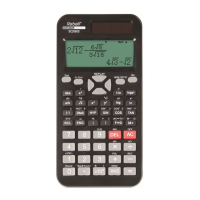
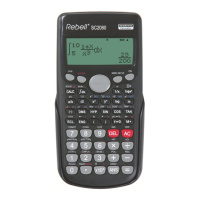
The Rebell SC2060 is a scientific calculator designed for a wide range of mathematical operations, from basic arithmetic to complex scientific and statistical calculations. It features a multi-line display, various input and output formats, and several memory functions to enhance usability and efficiency.
Function Description
The calculator offers several operational modes:
- COMP Mode: Suitable for fundamental calculations, including scientific operations.
- STAT Mode: Designed for performing regression and statistical calculations involving one or two variables.
- TABLE Mode: Displays defined functions in a tabular format.
Key functions include:
- Basic Arithmetic: Standard addition, subtraction, multiplication, and division. Operations are performed from left to right, following the standard order of operations (parentheses first).
- Scientific Calculations: Supports angle calculations (degrees, radians, gradians) with conversion capabilities. It also handles goniometric (sin, cos, tan, sin⁻¹, cos⁻¹, tan⁻¹) and hyperbolic (sinh, cosh, tanh, sinh⁻¹, cosh⁻¹, tanh⁻¹) functions, as well as logarithmic (log, ln, logax, 10ˣ, eˣ) and exponential functions.
- Fraction Calculations: Fractions can be entered and displayed in mixed or improper forms. The calculator automatically converts to decimal format if the total number of characters exceeds 10.
- Probability Functions: Includes calculations for permutations (nPr), combinations (nCr), factorials (x!), and random number generation (Ran# and RanInt).
- Other Functions: Calculates absolute values (Abs), rounds numbers (Round), and performs prime factorization (FACT).
- Coordinate Conversions: Enables conversions between rectangular and polar coordinates.
- Sexagesimal and Decimal System Conversions: Allows calculations and conversions between sexagesimal (degrees, minutes, seconds) and decimal systems.
Important Technical Specifications
- Display: Features a multi-line display with a dedicated input data line, a result line, and various indicators. The input data field can show up to 99 characters, shifting left if more than 15 characters are entered. The cursor changes from "I" to "■" to warn of approaching capacity limits after the 89th character.
- Result Display: Results are shown with up to 10 digits, including decimal numbers, a negative sign, and a two-digit positive or negative exponent for x10 notation.
- Calculation Accuracy:
- Output capacity: up to 10 digits.
- Internal calculation capacity: up to 15 digits.
- Generally, 10 digits or a 10-digit local base and an exponent of 10±99 are sufficient.
- Memory: Equipped with 9 independent memories (A, B, C, D, E, F, M, X, Y) for storing real numbers. A common memory is also available for adding results.
- Power Supply: Operates on one AAA alkaline battery.
Usage Features
- Switching On/Off: Press [ON] to turn on; press [2ND] and [OFF] to turn off.
- Automatic Shut-off: The calculator automatically turns off after approximately 10 minutes of inactivity to conserve battery life. Pressing [ON] resumes previous settings and memory content.
- Reset Function: In case of unexpected errors, press [2ND] and [9] to initiate a reset. Selecting [3] clears memory and restores factory settings. A manual restart can be performed by inserting a sharp-tipped object into a hole on the backside.
- Contrast Adjustment: Adjust display contrast by pressing [2ND][MODE/SET UP][▼], then [5], and using [◄][►]. Confirm with [AC].
- Input Modes: The calculator supports an input mode (vertical cursor "I") and an overwriting mode (horizontal cursor "_"). In linear format, switch between modes using [2ND][INS]. Only input mode is available in mathematical format.
- Error Correction: Errors can be corrected by navigating with [◄][►] to the error location or by pressing [AC] to cancel the entire calculation.
- Replay Function: Stores the last performed operations in COMP mode, allowing users to review and edit previous steps using [▼], [▲], [◄], and [►].
- "2ND" and "ALPHA" Functions: Access secondary functions (printed above keys) by pressing [2ND] followed by the desired key. Access alphabetical characters by pressing [ALPHA] followed by the desired key.
- Display Formats: Customize number display with a fixed number of decimals (0-9), scientific notation (0-9), or normal notation (Norm1/Norm2) to control exponential display. Technical exponential display (exponent multiple of 3) is also available via [ENG] or [2ND][←].
- Statistical Data Entry: In STAT mode, enable/disable the frequency table using [2ND][MODE/SET UP][▼][3] to input repetition counts for values. Data can be entered in 1-VAR or 2-VAR formats.
- Statistical Data Analysis: After data entry, access various statistical functions via [2ND][⌐STAT¬] to analyze sums, variables, regression coefficients, and minimum/maximum values.
Maintenance Features
- Care: Avoid bending or twisting the calculator, contact with water or other liquids, and strong impacts or vibrations. Clean with a soft, dry cloth.
- Battery Replacement: Replace the AAA alkaline battery when digits on the screen become dim. The battery compartment is located on the back, secured by a CLOSE/OPEN switch. Ensure correct polarity during replacement. After battery replacement, perform a specific key sequence: [ON][2ND][9] (CLR) [3] (ALL) [=] (YES) [AC].
- Disposal: The product should not be disposed of with household waste. It must be handed over to a designated collection point for the recycling of electrical and electronic components.
The Rebell SC2060 is manufactured by REBELL GmbH in Munich, Germany, and imported by MORAVIA Consulting, spol.s r.o., in Brno, Czech Republic. The manual is printed in China.

 Need help?
 General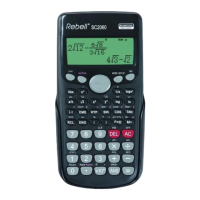

 To Next Page