38
12-MENU ENTRIES AND OPERATION
MAIN MENU
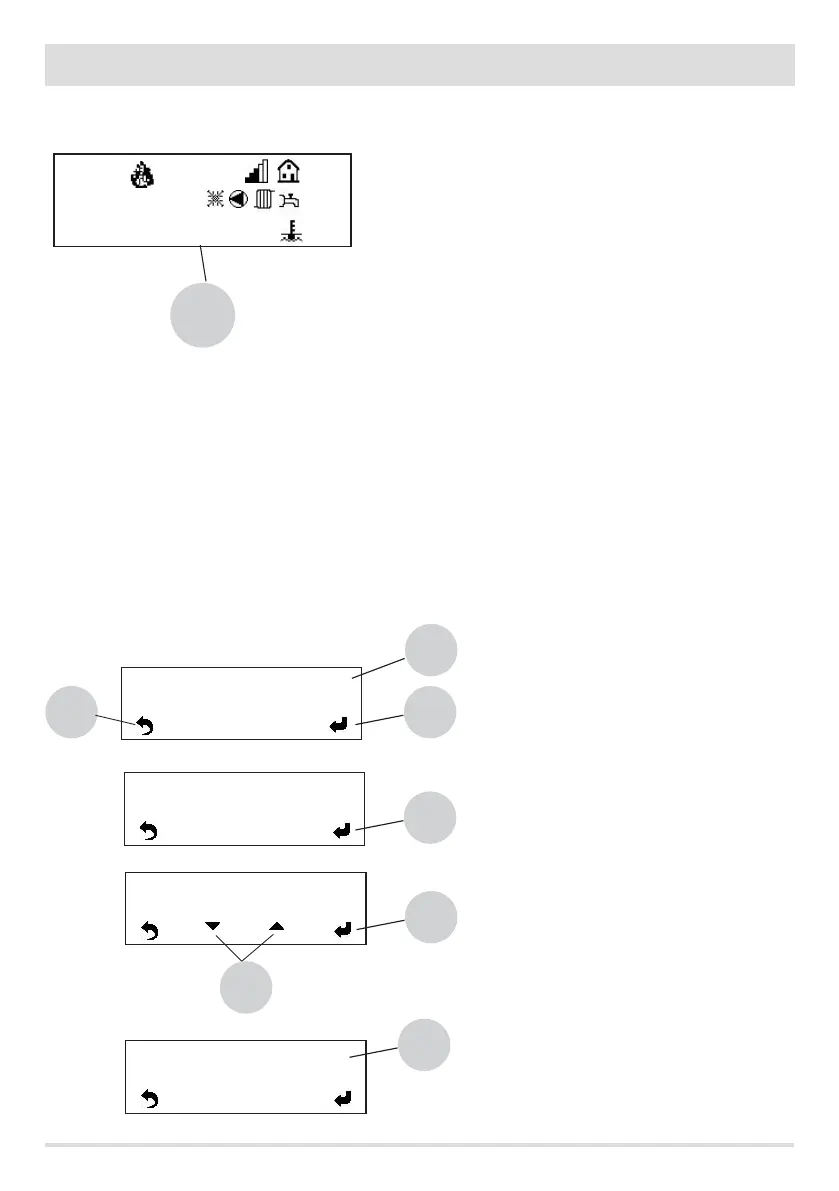
Press key 6/7 (MENU) to go to the available boiler parameters.
Here are the functions you can access under the MENU function:
• Date and Time
• Timer
• Sleep (only when boiler is on)
• Settings
• Info (Product Type - Parameter Type - Firmware Version - SW - Total Hours - No. of Start-ups - Extractor rpm - Smoke T - Exchanger
voltage - Feed screw load - Flame - Shut-down timer)
• Network (if you do not connect the optional accessory N024 multizone control expansion code 40A13021)
Date and time conguration
The “date and time” setting is used to adjust: day, hours, minutes, day number, month and year. If you press key 6/7 MENU (screen above)
the rst available entry is: Date and Time. Key 4 is used to select the entry you want to modify among the available ones (day, hours,
minutes, day number, month and year). The system used to adjust the settings is the same for all the entries, here below is an example
with the option DAY.
So then press:
• the MENU key (6/7) (main screen, see image above)
• key 4 select Day
• key 5 select the day (e.g.: We), two “b” arrows will appear
(i.e. keys 6/7), which are used to change the day
• key 5 to conrm
• key 4 to go to the next option (HOURS)
• key 8 to go back to the main screen
ON
MENU
10:29
Eco Mode on
20°
50°
70°
6/7
Time and Date >
58
4
Day >
5
We
Day >
5
We
Day >
4
We
b


 To Next Page