This document is an instruction manual for the "motion ROBOT" from RED5, suitable for ages 6 and up. It provides detailed information on the robot's controls, functions, programming capabilities, and gesture controls, along with important compliance and manufacturing details.
The robot is a sophisticated interactive toy designed to engage children through various modes of play, including movement, music, educational content, and programmable actions. It features a sleek, humanoid design with 18 LED eyes that likely enhance its expressive capabilities during interactions.
Function Description:
The motion ROBOT is an interactive toy that can perform a variety of actions and respond to user input. Its primary functions include:
- Movement: The robot can slide and walk forwards, backwards, left, and right. It offers multiple sliding speeds and both slow and fast walking speeds, controlled via a dedicated remote.
- Audio Features: The robot is equipped with a speaker that allows it to play music (8 songs), sing (5 songs), produce cool robot sounds, and speak. It also provides educational content through "Science facts" (4 facts) and "Life lessons" related to learning, politeness, hygiene, and safety.
- Interactive Modes:
- Demo Mode: Allows the robot to showcase its various capabilities automatically.
- Programming Mode: Users can program a sequence of movements (e.g., forwards, left, backwards, right) for the robot to perform, fostering an understanding of basic coding principles.
- Gesture Control: A unique feature that allows users to control the robot's movements (forwards, backwards, left, right) using hand gestures detected by a gesture sensor.
- Voice Alerts: The robot provides a low battery warning voice alert when its power is running low, ensuring users are aware of the need for recharging.
- Automatic Power Off: If there is no user action for a certain period, the robot will speak again and eventually power off to conserve battery life.
Important Technical Specifications:
While specific technical specifications like battery type (e.g., Li-ion, NiMH) or capacity (mAh) are not explicitly stated, the manual provides crucial operational details:
- Charging Time: 2 hours.
- Operating Time: 2 hours.
- Charging Indicator: An indicator light illuminates when the battery is fully charged.
- Age Recommendation: Suitable for ages 6+.
- Safety Compliance: The product bears the CE mark, indicating conformity with European health, safety, and environmental protection standards. It also includes a warning about small parts, making it unsuitable for children under 3 years due to choking hazard.
- WEEE Compliance: The product is marked with the WEEE symbol, indicating that it should be handled as waste electrical and electronic equipment for recycling or dismantling to minimize environmental impact.
- EU Declaration of Conformity: The product is declared to be in compliance with the essential requirements and other relevant provisions of Directive 2014/53/EU (Radio Equipment Directive).
Usage Features:
The robot is designed for intuitive and engaging use, offering several features that enhance the user experience:
- Remote Control: A dedicated remote control provides buttons for various functions, including:
- Mode switch (Demo, Programming)
- Movement controls (Slide forward/backward/left/right, Turn left/right, Walk forward/backward/left/right)
- Audio controls (Music, Robot voice, Sing, Volume +/-, Stop)
- Educational content access (Science facts, Life lessons)
- Reset key
- ON/OFF switch
- Volume Control: The robot offers 5 levels of volume adjustment (+ and -).
- Stop Function: A dedicated STOP button allows users to immediately halt any current function the robot is performing.
- Interactive Dialogue: Upon powering ON, the robot will speak, dance, and play music, immediately engaging the user. It also speaks again after a few seconds of inactivity, prompting further interaction.
- Gesture Control: This feature adds an interactive and modern dimension to controlling the robot, allowing for non-contact command execution.
Maintenance Features:
The manual provides essential information regarding the care and maintenance of the robot, primarily focused on battery management and general product handling:
- Charging Guidelines: Users are explicitly instructed not to use the robot whilst it is charging. This is a critical safety and battery longevity instruction.
- Battery Status Indicators: The presence of a charging indicator light and a low battery warning voice alert helps users manage the robot's power effectively, preventing unexpected shutdowns and ensuring timely recharging.
- Environmental Responsibility: The WEEE symbol and accompanying text emphasize the importance of proper disposal and recycling of the product at the end of its life, aligning with environmental protection guidelines.
- General Care: While not explicitly detailed, the nature of electronic toys suggests standard care practices like keeping it dry, avoiding extreme temperatures, and handling it gently to prevent damage. The warning about small parts also implies the need for careful handling, especially around younger children, even though the product is rated for ages 6+.
- Manufacturer Information: The inclusion of manufacturer details (Gift Universe Management Ltd, The Atrium, Curtis Road, Dorking, Surrey RH4 1XA) and the supplier item reference (822) along with the manufacturing date (07/18) and product number (71517) are important for warranty, support, and future reference. Users are advised to retain this information.

 Need help?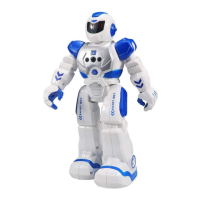

 To Next Page
 General