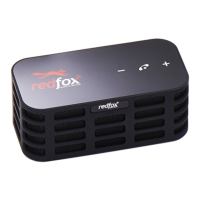
FOXBOX
owner’s manual
FOXBOX
owner’s manual
FAQs:
- I cannot hear anything on the speaker
•Insurethespeakerispairedwithyouraudiodevice
•Insuretheaudiodeviceisplaying
•Insurethevolumeisturneduponyouraudiodevice
•InsurevolumeisturnedupontheFOXBOX
- I cannot answer/end a call
•Somephonesdonotsupporthandsfreecalling.Consulttheuser’smanualforyour
phonetoinsureitsupportshandsfreecalling.
- Can FOXBOX connect to two Bluetooth devices at the same time?
•No,itcannot.
- I cannot connect to my phone via Bluetooth
•InsureyouhaveturnedyourphonesBluetoothon
•InsureyouhavepairedtheFOXBOXtoyourphone
- I hear crackling noises or clipping of my music
•Bluetoothisawirelessradiotechnologywhichmeansitcanbesensitivetoobjects
betweenyourphoneandtheFOXBOX.TheFOXBOXisdesignedtobeusedwithin32
feetofyourphonewithnomajorobstructionsbetweenthedevices(walls,cars,etc).
Ifyouexperienceclippingorcracklingnoisestryrepositioningyourphonesproximity
totheFOXBOX.
How to Care For Your FOXBOX Speaker:
• AlwaysstoreyourFOXBOXwiththepoweroffandawayfromdustyconditions.
• Avoidstoringatextremetemperaturesasthiswillshortenbatterylifeandaffectthe
speakerfunctions.
• Hightemperaturesmayalsodegradeperformance.
• YourFOXBOXisnotwaterproof;pleaseavoiddamporwetconditions.
TechnicalSpecications:
• Weight:240g
• Dimension:122mmx60mmx48mm
• Speaker:Omnidirectional
• ACPowerSupply:USB5v
• Power:3w*2
• SpeakerUnit:2x40mmNdFeBfullbandspeakers
• AudioJack:3.5mmaudioinputjack
• Battery:1800Amhrechargeablelithiumbattery
• OperatingRange:Upto10meters(32feet)
• BluetoothVersion:2.1
3


 To Next Page
 Loading...