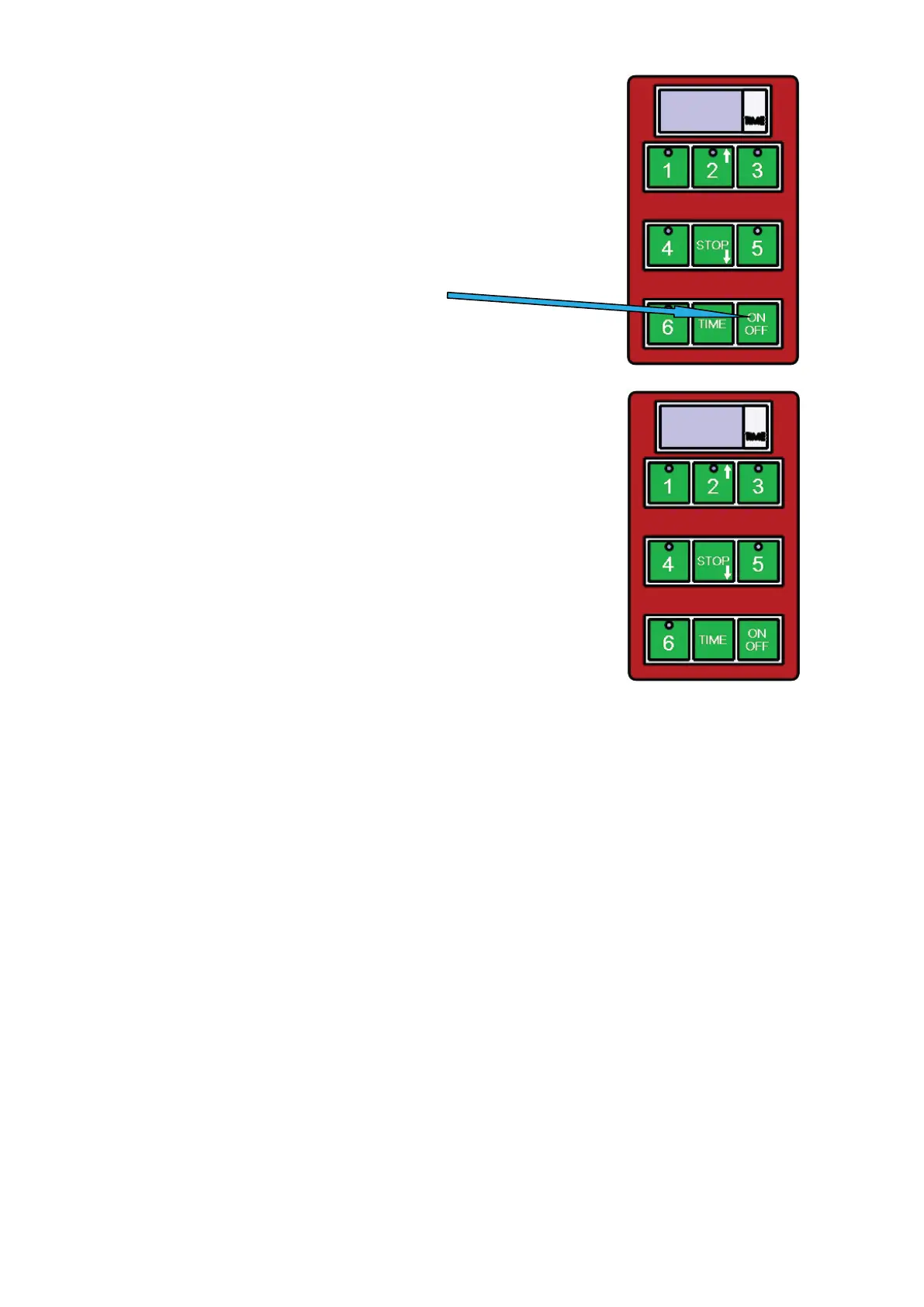
1) ALLUMÉ/ÉTEINT
UTILISEZ CETTE TOUCHE
2) POUR LANCER LE TEMPS PRÉRÉGLÉ
LE MINUTEUR DISPOSE DE 5 DURÉES PRÉRÉGLÉES.
VOUS POUVEZ LANCER CES DURÉES EN APPUYANT SUR
LES TOUCHES 1 À 5 OÙ LA TOUCHE :
RÉGLAGE D‘USINE
NUMÉRO DU PROGRAMME DURÉE
PROGRAMME 1 (TOUCHE 1) 1 MIN.
PROGRAMME 2 (TOUCHE 2) 1:30 MIN.
PROGRAMME 3 (TOUCHE 3) 2 MIN.
PROGRAMME 4 (TOUCHE 4) 2:30 MIN.
PROGRAMME 5 (TOUCHE 5) 3 MIN.
PROGRAMME 6 (TOUCHE 6) PROGRAMMATION PAR L‘UTILISATEUR
POUR PROGRAMMER UN CYCLE DANS LE CADRE DU PROGRAMME 6 (TOUCHE 6), IL
EST NÉCESSAIRE DE RESPECTER LES INSTRUCTIONS SUIVANTES
1. CONTRÔLEZ QUE L‘ÉCRAN DU PANNEAU DE COMMANDE AFFICHE 3 TIRETS „---“
2. APPUYEZ SUR LA TOUCHE DÉSIGNÉE „TIME“
3. UTILISEZ LA TOUCHE AVEC LA FLÈCHE VERS LE HAUT (TOUCHE 2) ET CELLE AVEC
LA FLÈCHE VERS LE BAS (TOUCHE STOP) POUR MODIFIER LE TEMPS INDIQUER SUR
L‘ÉCRAN (MODIFICATION PAR INTERVALLES DE 30 SEC.).
4. LE TEMPS SÉLECTIONNÉ SUR LA MINUTERIE VA CLIGNOTER.
5. APPUYEZ ET MAINTENEZ LA TOUCHE DÉSIGNÉE „TIME“ POUR ENREGISTRER LA
DURÉE CHOISIE.
6. APPUYEZ SUR LA TOUCHE „6“ POUR COMMENCER LE CYCLE DU GRILL.
SI VOUS UTILISEZ LA POSSIBILITÉ DE PROGRAMMATION DU PROGRAMME 6 POUR
RENOUVELER LE CYCLE DÉFINI PAR L‘UTILISATEUR, VOUS DEVEZ PROCÉDER SELON
LES ÉTAPES 5 ET 6
LA FIN DU TEMPS PRÉRÉGLÉ EST INDIQUÉE PAR UN SIGNAL SONORE. CE SIGNAL SE
COUPE AUTOMATIQUEMENT AU BOUT D‘UNE MINUTE OU BIEN IL PEUT ÊTRE ÉTEINT
PAR L‘UTILISATEUR À L‘AIDE DE LA TOUCHE STOP.
PENDANT QUE LA MINUTERIE INDIQUE QUE LE TEMPS S‘EST ÉCOULÉ, LA TOUCHE
ROUGE DU CLAVIER CLIGNOTE POUR INDIQUER L‘INTERRUPTION DU PROGRAMME
PRÉRÉGLÉ.
VOUS POUVEZ INTERROMPRE UN PROGRAMME EN COURS EN APPUYANT SUR LA
TOUCHE STOP.
7
Instruction for use for digital timer
The timer does not control the power, it is provides a visual countdown and alarm when a set
cooking time has elapsed.
1) Switching on/off
Use button ON/OFF
2) To start a pre-set time
The timer has 5 basic pre-set times.
These can be started by
pressing buttons 1-5, where:
1- For example time for hamburgers
2- For example time for fish
3- For example time for rare steak
4- For example time for medium rare steak
5- For example time for well done steak
At the end of the set time, the timer alerts with a loud tone.
This tone stops by timer itself after approximately 1 minute,
or it can be stopped by the operator by pressing the STOP button.
Whilst the timer is beeping a small red light flashes in the keyboard.
Interrupting the program
You can interrupt running pre-set program anytime you need by pressing the button STOP.
7
Instruction for use for digital timer
The timer does not control the power, it is provides a visual countdown and alarm when a set
cooking time has elapsed.
1) Switching on/off
Use button ON/OFF
2) To start a pre-set time
The timer has 5 basic pre-set times.
These can be started by
pressing buttons 1-5, where:
1- For example time for hamburgers
2- For example time for fish
3- For example time for rare steak
4- For example time for medium rare steak
5- For example time for well done steak
At the end of the set time, the timer alerts with a loud tone.
This tone stops by timer itself after approximately 1 minute,
or it can be stopped by the operator by pressing the STOP button.
Whilst the timer is beeping a small red light flashes in the keyboard.
Interrupting the program
You can interrupt running pre-set program anytime you need by pressing the button STOP.
25


 To Next Page
 Loading...