INSTRUKCJA OBSŁUGI
Programator nie służy do ustawiania temperatury, ale tylko do odliczania czasu i jako alarm, kiedy
proces podgrzewania zbliża się do końca.
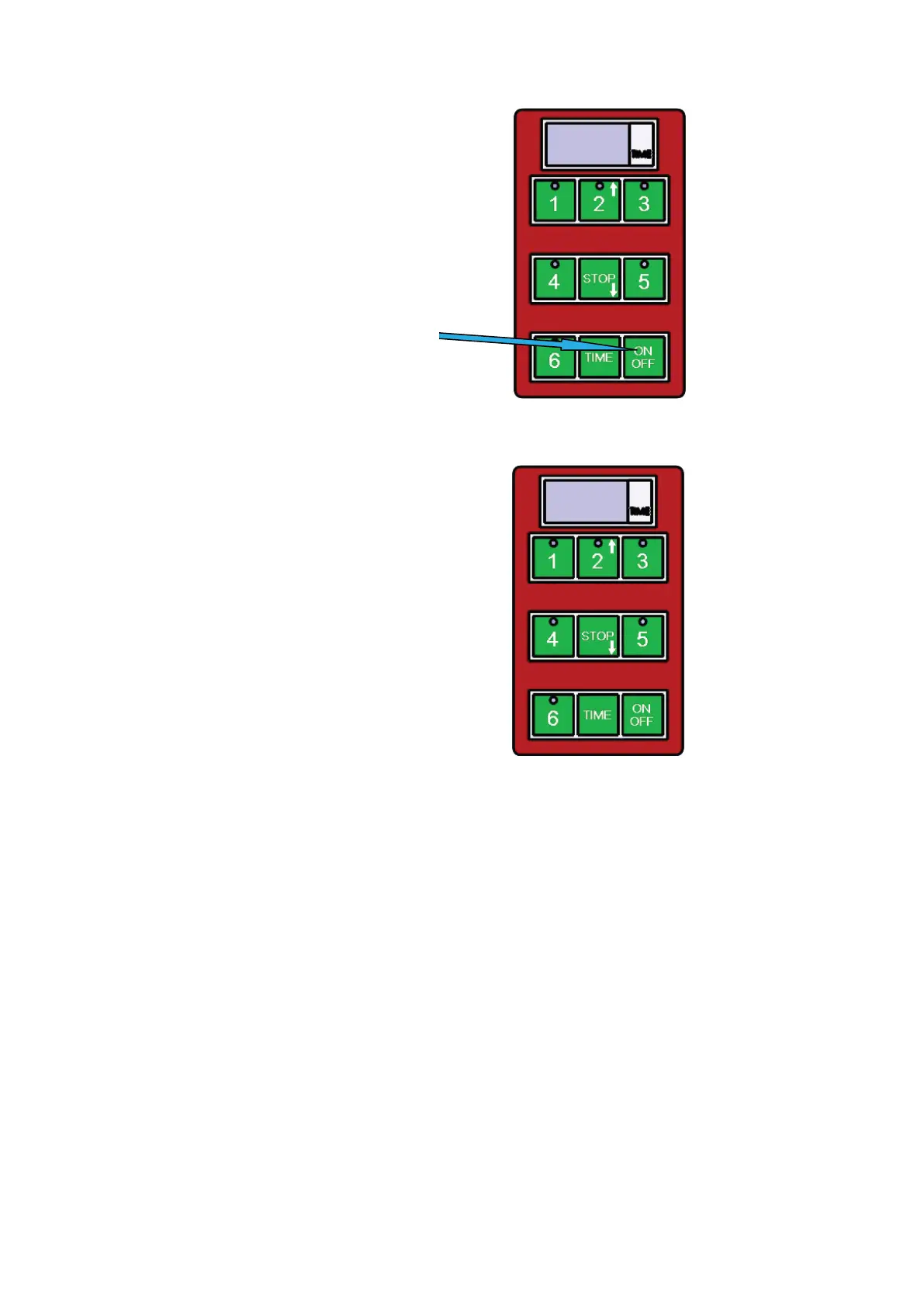
1) Włączenie/wyłączenie
Korzystamy z tego przycisku
2) Włączanie na zaprogramowany czas
Programator ma 5 zaprogramowanych odcinków czasu. Te czasy włączamy naciskając przyciski 1-5,
gdzie mamy:
Ustawienia fabryczne
NUMER PROGRAMU CZAS
Program 1 (Przycisk 1) 1 min.
Program 2 (Przycisk 2) 1:30 min.
Program 3 (Przycisk 3) 2 min.
Program 4 (Przycisk 4) 2:30 min.
Program 5 (Przycisk 5) 3 min.
Program 6 (Przycisk 6) Pogramowany przez użytkownika
Do programowania cyklu w opcji 6 (przycisk 6) trzeba przestrzegać następujących zasad
1. Sprawdzamy, czy wyświetlacz na panelu sterującym pokazuje 3 myślniki „---”
2. Naciskamy przycisk oznaczony „TIME”
3. Za pomocą przycisku ze strzałką do góry (przycisk 2) i przycisku ze strzałką w dół (przycisk
STOP) zmieniamy czas pokazywany na wyświetlaczu (co 30 sekund).
4. Czas ustawiony w programatorze będzie migać.
5. Naciskamy i przytrzymujemy przycisk oznaczony „TIME”, aby wybrany czas został zapisany.
6. Naciskamy przycisk „6”, co rozpoczyna cykl grillowania.
Pod koniec zaprogramowanego czasu, programator ostrzeże nas sygnałem dźwiękowym.
Ten sygnał wyłączy się sam po jednej minucie albo może być wyłączony przez obsługę naciśnięciem
przycisku STOP.
Kiedy programator ostrzega nas o zbliżającym się końcu procesu, na klawiaturze miga czerwony przy-
cisk służący do przerwania aktualnego programu.
Aktualny program można przerwać naciśnięciem przycisku STOP.
7
Instruction for use for digital timer
The timer does not control the power, it is provides a visual countdown and alarm when a set
cooking time has elapsed.
1) Switching on/off
Use button ON/OFF
2) To start a pre-set time
The timer has 5 basic pre-set times.
These can be started by
pressing buttons 1-5, where:
1- For example time for hamburgers
2- For example time for fish
3- For example time for rare steak
4- For example time for medium rare steak
5- For example time for well done steak
At the end of the set time, the timer alerts with a loud tone.
This tone stops by timer itself after approximately 1 minute,
or it can be stopped by the operator by pressing the STOP button.
Whilst the timer is beeping a small red light flashes in the keyboard.
Interrupting the program
You can interrupt running pre-set program anytime you need by pressing the button STOP.
7
Instruction for use for digital timer
The timer does not control the power, it is provides a visual countdown and alarm when a set
cooking time has elapsed.
1) Switching on/off
Use button ON/OFF
2) To start a pre-set time
The timer has 5 basic pre-set times.
These can be started by
pressing buttons 1-5, where:
1- For example time for hamburgers
2- For example time for fish
3- For example time for rare steak
4- For example time for medium rare steak
5- For example time for well done steak
At the end of the set time, the timer alerts with a loud tone.
This tone stops by timer itself after approximately 1 minute,
or it can be stopped by the operator by pressing the STOP button.
Whilst the timer is beeping a small red light flashes in the keyboard.
Interrupting the program
You can interrupt running pre-set program anytime you need by pressing the button STOP.
54


 To Next Page
 Loading...