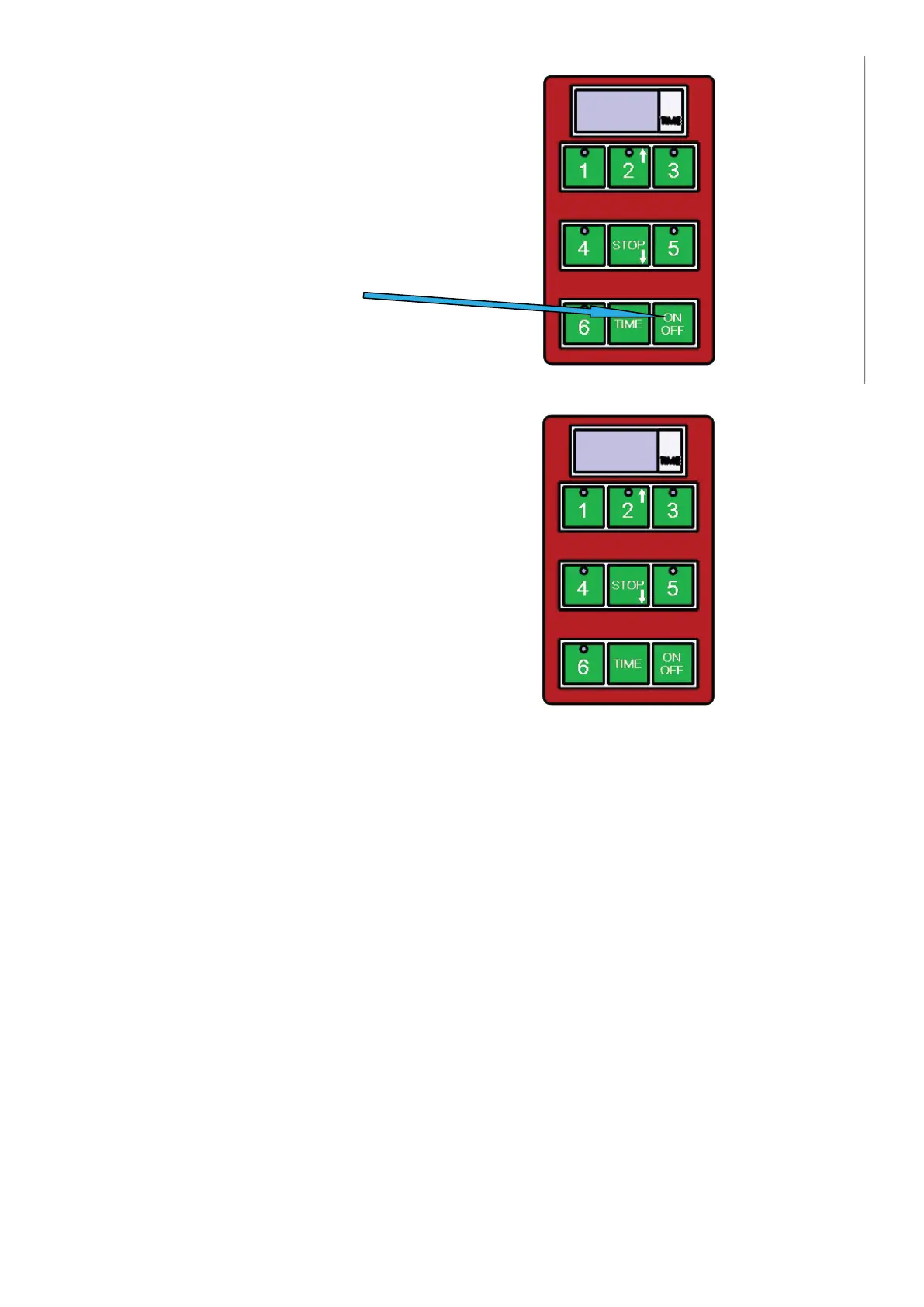
1) In-/uitschakeling
Gebruik deze knop
2) Voor het starten van de vooringestelde tijd
De timer heeft 5 vooringestelde tijdsintervallen.
Deze intervallen kunnen gestart worden door op
de 1-5 knoppen te drukken, waar de knop:
Manufacturer’s settings
PROGRAM NUMBER TIME
Programma 1 (knop 1) 1 min.
Programma 2 (knop 2) 1:30 min.
Programma 3 (knop 3) 2 min.
Programma 4 (knop 4) 2:30 min.
Programma 5 (knop 5) 3 min.
Programma 6 (knop 6) Door gebruiker te programmeren
Voor het programmeren van de cyclus in optie 6 (knop 6) moeten volgende instructies
gevolgd worden:
1. Controleer of het display van het bedieningspaneel 3 streepjes “---” weergeeft.
2. Druk op de knop aangeduid als “TIME”.
3. Gebruik de omhoog pijlknop (knop 2) en de omlaag pijlknop (STOP-knop) om de
tijd die op het display weergegeven wordt te wijzigen (na 30 seconden).
4. De geselecteerde tijd op de timer knippert.
5. Druk op de “TIME”-knop en houd deze ingedrukt om de geselecteerde tijd op te
slaan.
6. Druk op de toets “6” om de grillcyclus te starten.
De programmeerbare knop werkt cyclisch - d.w.z. dat als u de gewenste tijd heeft
ingesteld en u het programma 6 start, is het voor opnieuw starten van dit programma
voldoende als u de clam sluit en de tijd zal automatisch starten.
Aan het einde van de voorgeprogrammeerde tijd geeft de timer een geluidssignaal af.
Deze toon wordt na één minuut automatisch uitgeschakeld of kan door de operator
uitgeschakeld wordt door op de STOP-knop te drukken. Terwijl de timer het einde van
het proces aangeeft, knippert de rode knop op het toetsenbord die de onderbreking
van het voorgeprogrammeerde programma aangeeft. Het lopende programma kunt u
onderbreken door op de STOP-knop te drukken.
7
Instruction for use for digital timer
The timer does not control the power, it is provides a visual countdown and alarm when a set
cooking time has elapsed.
1) Switching on/off
Use button ON/OFF
2) To start a pre-set time
The timer has 5 basic pre-set times.
These can be started by
pressing buttons 1-5, where:
1- For example time for hamburgers
2- For example time for fish
3- For example time for rare steak
4- For example time for medium rare steak
5- For example time for well done steak
At the end of the set time, the timer alerts with a loud tone.
This tone stops by timer itself after approximately 1 minute,
or it can be stopped by the operator by pressing the STOP button.
Whilst the timer is beeping a small red light flashes in the keyboard.
Interrupting the program
You can interrupt running pre-set program anytime you need by pressing the button STOP.
7
Instruction for use for digital timer
The timer does not control the power, it is provides a visual countdown and alarm when a set
cooking time has elapsed.
1) Switching on/off
Use button ON/OFF
2) To start a pre-set time
The timer has 5 basic pre-set times.
These can be started by
pressing buttons 1-5, where:
1- For example time for hamburgers
2- For example time for fish
3- For example time for rare steak
4- For example time for medium rare steak
5- For example time for well done steak
At the end of the set time, the timer alerts with a loud tone.
This tone stops by timer itself after approximately 1 minute,
or it can be stopped by the operator by pressing the STOP button.
Whilst the timer is beeping a small red light flashes in the keyboard.
Interrupting the program
You can interrupt running pre-set program anytime you need by pressing the button STOP.
34


 To Next Page
 Loading...