3. Pairing/Connection
When you need to use handsfree operations, you
should establish a connection between the unit and
your mobile phone.Turn on Bluetooth function of
your mobile phone, and turn on the Bluetooth device
searching. When pairing, the mobile phone will
display the Bluetooth device name , you should enter
[0000] as the password. After pairing successfully,
the unit will enter Bluetooth mode automatically,
and mobile phone Bluetooth name will appear on the
screen.
4. Direct Number Call
You can press numeric keys of mobile phone or the
touch keys to select dial numbers.
The selected numbers will be displayed on the
screen. If there is a wrong number, please touch
to delete one by one.
when numbers ready, touch to dial.
5. Answeriang a Call
When there is an incoming call, the unit will switch
to Bluetooth mode automatically, as below.
Touch on the screen or press the key on the front
panel or on the remote control, to terminate a call.
Voice recognition: During talking, touch key
to transfer audio from the unit to your mobile phone,
and press the key again to transfer audio from your
mobile phone to the unit.
Microphone mute: During talking, touch key
to mute the volume of microphone, and the other
side communicator can not hear your voice. Touch
the key again to cancel.
6. Direct Number Call
In the Bluetooth menu, touch icon to enter
phone book menu.
Touch the logo on control bar you can enter to other
interface.
On the phonebook state, you can choose the
telephone number by sliding on left or search by
letter on right.
7. Pairing History
In the Bluetooth menu, touch to enter pairing
history list.
8. Bluetooth Stereo
In the Bluetooth menu, touch to enter music
playing back.
After pairing successfully, in the mode of Bluetooth
main menu, open the audio player of your mobile
phone and set the transmit mode to Bluetooth.
Note:
The mobile phones should support this function
which can transmit stereo Audio.
The playing back mode should select Bluetooth
playing back mode.
8
Bluetooth Operations
The Bluetooth allows you to utilize your car built-in
audio system for wireless mobile phone or music hands
free communication. Some Bluetooth mobile phones
have the audio features. The car stereo with Bluetooth
installed will be able to retrieve phonebook contacts,
received call, dialed call, missed call, incoming calls,
outgoing call and listen to music.
Note:
This system will not operate or may operate improperly
with some Bluetooth audio players and cannot
guarantee the compatibility of all mobile phones.
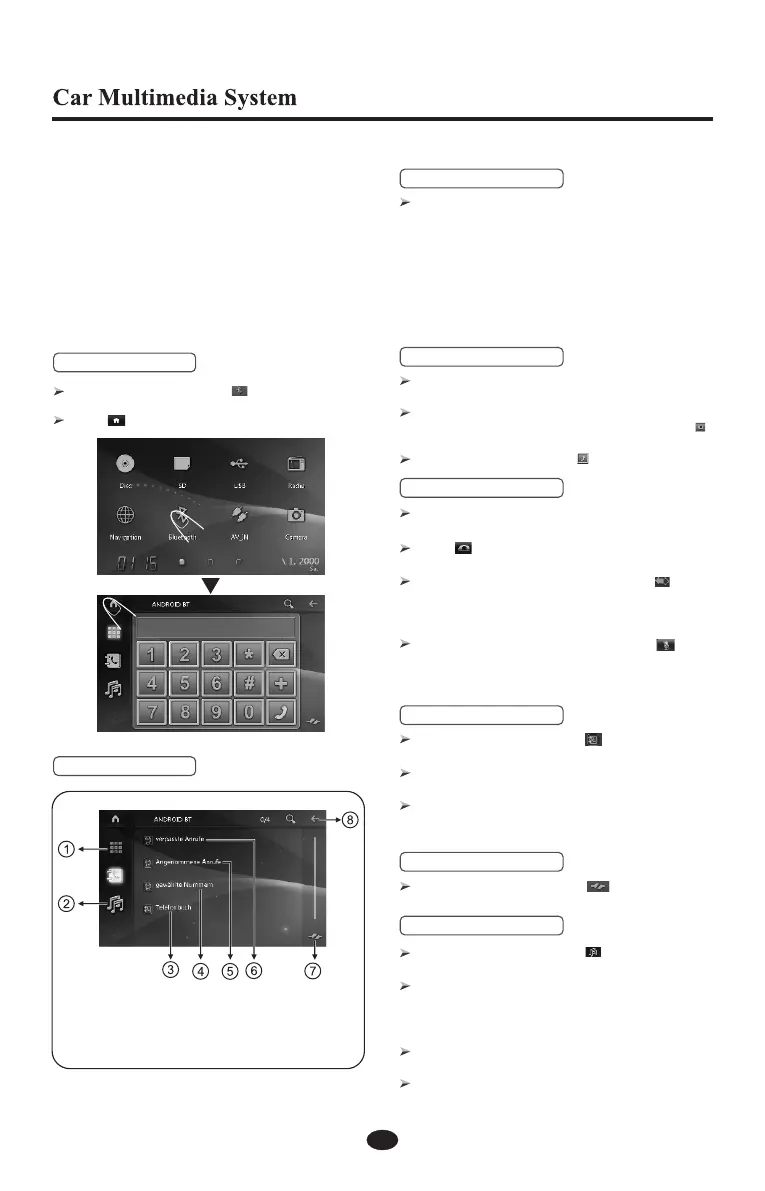
1. Bluetooth Mode
Enter the main menu, touch key to enter
Bluetooth mode.
Touch to exit the Bluetooth mode.
2. Bluetooth Menu
1. Dialing number menu
2. Switch to music
3. Phone book
4. Dialed call list
5. Received call list
6. Missed call list
7. Pairing and connection
8. Back


 To Next Page
 Loading...