If your watch is water-resistant, meter marking or ( ) is indicated.
Water-Resistance Depth p.s.i.a.* Water Pressure Below Surface
30m/98ft 60
50m/164ft 86
100m/328ft 160
*pounds per square inch absolute
WATER & SHOCK RESISTANCE
BATTERY
Reebok strongly recommends that a retailer or jeweler replace battery. If applicable, push
reset button when replacing battery. Battery type is indicated on caseback. Battery life estimates are
based on certain assumptions regarding usage; battery life may vary depending on actual usage.
DO NOT DISPOSE OF BATTERY IN FIRE. DO NOT RECHARGE. KEEP LOOSE BATTERIES
AWAY FROM CHILDREN.
WARNING: TO MAINTAIN WATER-RESISTANCE, DO NOT PRESS ANY BUTTONS UNDER WATER.
1. Watch is water-resistant only as long as lens, push buttons and case remain intact.
2. Watch is not a diver watch and should not be used for diving.
3. Rinse watch with fresh water after exposure to salt water.
4. Shock-resistance will be indicated on watch face or caseback. Watches are designed to pass ISO test
for shock-resistance. However, care should be taken to avoid damaging crystal/lens.
ALARM
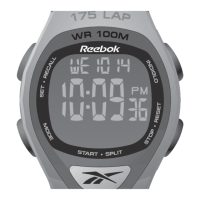
1. Press MODE until ALM 1 appears.
2. Press SET/RECALL to set alarm.
3. Hour digits flash. Press + / – to change hour.
4. Press NEXT and + / – to set minutes, AM or PM (if primary time display is in 12-hour format), DAILY,
WKDAYS, WKENDS, or day of the week (weekly alarm).
5. Press DONE to confirm and exit.
6. Press START/SPLIT or STOP/RESET to turn Alarm ON or OFF.
7. To set remaining alarms, press MODE for ALM 2 or ALM 3 and set as above.
TIPS: • When Alarm is on, appears in Time display.
• When Alarm goes off, INDIGLO® night-light and alarm icon flash and alert sounds. Press any
button to silence.
• If no button is pushed, alert will cease after 20 seconds and Backup Alarm will activate after 5
minutes.
INDIGLO® NIGHT-LIGHT/NIGHT-MODE® FEATURE
1. Press INDIGLO to activate night-light. Electroluminescent technology (U.S. pat. 4,527,096 and
4,775,964) illuminates entire watch face at night and in low light conditions.
2. Continue to press up to 3 seconds to maintain illumination.
3. Press and hold INDIGLO for 4 seconds to activate NIGHT-MODE® feature (U.S. pat. 4,912,688),
will appear.
4. In NIGHT-MODE® feature, push any button to illuminate watch face for 3 seconds.
5. To deactivate NIGHT-MODE® feature, press INDIGLO for 4 seconds. Feature will automatically
deactivate after 8 hours.
© 2003 Reebok International Ltd. All rights reserved.
REEBOK and the Vector Logo are registered trademarks of Reebok International.
Manufactured and distributed by Timex Corporation under license from Reebok International.
NIGHT-MODE is a registered trademark of Timex Corporation in the U.S and other countries.
INDIGLO is a registered trademark of Indiglo Corporation in the U.S. and other countries.


 To Next Page
 Loading...