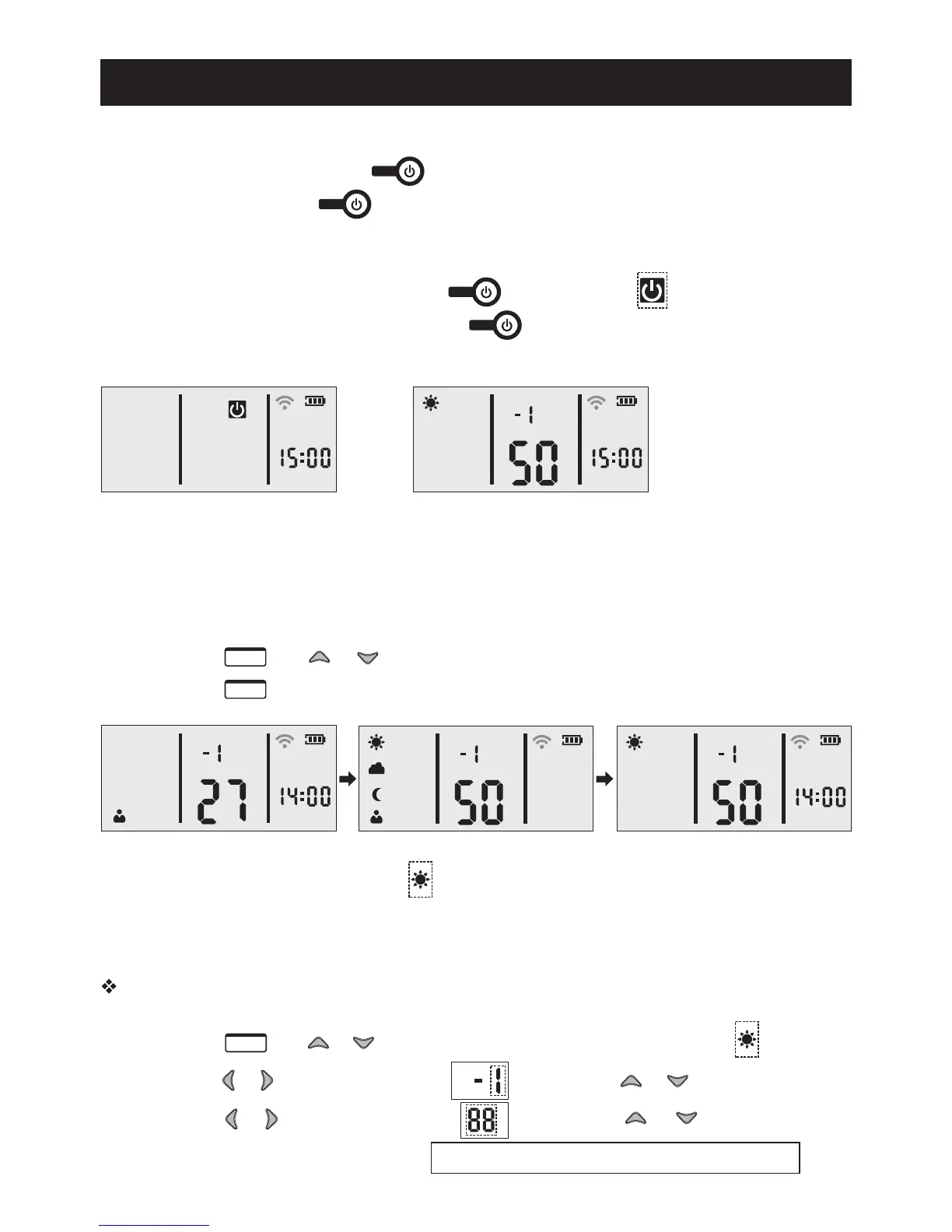
1. Remote Controller ON/OFF
(1) Turns on: One touch of the ."P
(2) Turns off: Touch the and hold for about 3 seconds."Po
2. Light ON/OFF
(1) Light OFF: If light is on → Touch the → Light OFF→appears on the screen."Po w
(2) Light ON: If light is off → Touch the → Light ON→Controller restores "Po w
to the previous saved settin g .
Functions Instructions
POWER
POWER
POWER
POWER
0
0
/
CH
Light ONLight OFF
3. SUNNY, CLOUDY, MOON and CUSTOM Mode
(1) Mode Selection
Step1: Touch and or to switch between 4 modes
Step2: Touch to enter a selected mode
0
0
/
CH
0
0
/
CH
0
0
/
CH
ME NU
OK
Select SUNNY mode, display
shows flashing.
(2) SUNNY, CLOUDY, MOON Mode Settings
Take SUNNY mode for an example. Setting CLOUDY, MOON mode in the same way.
Step1: Touch andorto select SUNNY mode. Display shows flashing
Step2: Touch or to select Channel, flash. Press or to select CH-1
Step3: Touch or to select intensity, flash. Press or to increase/
reduce the intensityof CH-1 Intensity value changes from 0 to 100.
ME NU
0
0
/
CH
1
Functions Instructions
Time
Intensity Variation
9:00
0%
9:06
10%
9:12
20%
9:18
30%
9:24
40%
9:30
50%
9:36
60%
9:42
70%
9:48
80%
9:54
90%
10:00
100%
2
Repeat step2 and step3 to set up your own intensity for CH-2 /-3 /-4 /-5 /-6
0
0
/
CH
Step1
Step2
Step3
(3) CUSTOM Mode Setting
Time is set from 0:00 to 23:00 per hour only.
Before setting the CUSTOM mode, we suggest you make a graph of the values.
Step1: Touch and or to select CUSTOM mode. Display shows flashing
Step2: Touch or to selectthe time, flash. Press or to set hour
Step3: Touch or to select channel, flash. Press or to selectCH-1
Step4: Touch or to select intensity, flash. Press or to increase/reduce
the intensity of CH-1.
Repeat step 2 through 4 to set up your own intensity for for all 24 hours.
ME NU
Note: While you set the steps in one hour increments, the controller will actually
divide each hour up into 10 smaller steps between each hour.This is illustrated in the
table below.
CH
0
0
/
0
0
/
CH
Step1
Step2
Step3
Step4


 To Next Page