Need help?
Do you have a question about the Refco DIGIMON-SE and is the answer not in the manual?
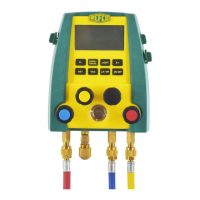
The REFCO DIGIMON-SE and DIGIMON4 are advanced digital manifolds designed for measuring and adjusting pressure and temperature in both mobile and stationary refrigeration equipment. These devices are intended for use by trained refrigeration and air-conditioning service engineers.
The primary function of the DIGIMON-SE and DIGIMON4 is to provide accurate digital readings of pressure and temperature within refrigeration systems. They support a wide range of refrigerants, including R11, R113, R114, R12, R123, R124, R13, R134a, R13B1, R22, R227, R23, R290, R32, R401A (Liq/Vap), R401B (Liq/Vap), R402A (Liq/Vap), R402B (Liq/Vap), R403B (Liq/Vap), R404A, R406A (Liq/Vap), R407A (Liq/Vap), R407C (Liq/Vap), R407F (Liq/Vap), R408A (Liq/Vap), R409A (Liq/Vap), R410A, R413A (Liq/Vap), R414B (Liq/Vap), R416A, R417A (Liq/Vap), R420A, R422A (Liq/Vap), R422B (Liq/Vap), R422C (Liq/Vap), R422D (Liq/Vap), R427A (Liq/Vap), R437A, R438A (Liq/Vap), R500, R502, R503, R507, R508A, R508B, R600A, R744, R1234yf, and R1234ze.
The manifolds feature both digital and analogue displays, offering flexibility in how readings are presented. They can measure both positive and negative pressures, and include a vacuum display function. An optional external vacuum sensor (DIGIMON-VAC) can be connected for more precise vacuum measurements. The devices also support external K-type thermocouples and clamp thermocouples for temperature measurement, enabling the calculation of Superheat and Subcool values, which are crucial for system diagnostics.
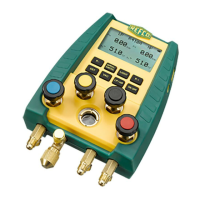
The DIGIMON-SE and DIGIMON4 are designed for ease of use with a clear button layout.
For the DIGIMON-SE, the blue hose connects to the suction pressure side, the red hose to the high pressure side, and the yellow hose to the vacuum pump. Both valves (low and high pressure) should be closed initially. For the DIGIMON4, the blue hose connects to the suction pressure side, the red hose to the high pressure side, and the yellow hoses (3/8" and 1/4") connect to the vacuum pump and refrigerant cylinder, respectively. Both valves should be closed.
To evacuate a system, the manifold must be switched on, and the VAC button pressed to enter vacuum mode. Hoses are connected, the vacuum pump is switched on, and all manifold valves are opened. The vacuum display is monitored, and once the ultimate vacuum is achieved, all valves are closed. The LP/HP button is used to exit vacuum mode. It's important to note that evacuation time varies based on system size, with small to medium systems requiring at least 20 minutes. The manifold must remain on during the entire evacuation process.
For DIGIMON-SE, the yellow hose is disconnected from the vacuum pump and screwed onto the refrigerant bottle/cylinder. The valve on the refrigerant bottle is opened, then the blue valve (low pressure side) on the manifold is opened to allow refrigerant flow. If flow is insufficient, the compressor may need to be switched on. After filling, the refrigerant bottle valve and blue manifold valve are closed. System pressure and temperature are checked, and then both manifold valves are opened before removing hoses. For DIGIMON4, the yellow 3/8" hose is disconnected from the vacuum pump, and caps are screwed onto the 3/8" SAE thread. The black valve is opened, followed by the refrigerant bottle valve. The blue valve (low pressure side) is then opened to allow refrigerant flow. If needed, the compressor is switched on. After filling, the black valve and refrigerant bottle valve are closed. The red valve (high pressure side) is opened to check system pressure and temperature. If readings are satisfactory, all valves are closed, and hoses are removed. Finally, all valves are opened.
This mode requires plugging K-type external or clamp thermocouples into the DIGIMON's sockets (t1 and t2). The thermocouples are then attached to the desired measuring points on the high or suction pressure side of the system using adhesive tape. The appropriate refrigerant is selected, and the SUPERH/SUBCOOL button is pressed to display the temperature difference.
The device allows for calibration of pressure sensors and K-type temperature sensors. Pressure sensor calibration requires a certified monitor and involves a specific sequence of button presses to enter calibration mode, select the low pressure side, apply a known pressure (e.g., 400psi), and confirm the reading. The process is then repeated for the high pressure side. Temperature sensor calibration can be performed using room temperature or an ice water bath (0°C/32°F). Both methods involve specific button sequences to enter calibration mode and ensure stable temperature readings for accurate adjustment. During temperature calibration, it's crucial that thermocouples are properly connected and that ambient or ice bath temperatures remain stable.
Regular maintenance is essential for the longevity and accuracy of the DIGIMON manifolds.
The DIGIMON-SE and DIGIMON4 are robust instruments designed for professional use, emphasizing safety, accuracy, and ease of maintenance within the demanding field of refrigeration and air-conditioning service.
 General
| Accuracy (Pressure) | ±0.5% FS |
|---|---|
| Display | LCD |
| Pressure Units | bar, psi, kPa |
| Temperature Units | °C, °F |
| Accuracy (Temperature) | ±0.5°C |
| Operating Temperature | -10 to 50°C (14 to 122°F) |
| Storage Temperature | -20°C to 60°C |
| Refrigerants | R22, R404A, R407C, R410A, R507, R744 |
| Pressure Range | -1 to 60 bar |
| Temperature Range | -40 to 150 °C |
| Weight | 1.1 kg |

 To Next Page