EasyManua.ls Logo

Reflex Lexicon - Page 16

Default Icon
49 pages
Print Icon
To Next Page IconTo Next Page
To Previous Page IconTo Previous Page
Loading...
Reflex
Service Manual
Performance Verification
Display
1 .
Power
cycle
Reflex
and
verify
that
all display
segments except the
decimal
point,
and
all LEDs
except for
the headroom
LED, light
for approximately
2
seconds.
This
is
followed
bythe display
of
L for
approximately 7 seconds,
after which
the display will
indicate
the current
position of the
REGISTER/
PRESET
knob.
In
this
case, +13 should
be displayed.
2. Power off
Reflex.
Connections
1.
Using the 15 foot
1/4"
phone plug
cable supplied with the
footswitch,
connect one end
to
the
footswitch
and the other end
to the
Reflex
rear
panel FOOTSWITCH
(Bypass/Step)
jack.
2. Connect the
MIDI
cable between
the Reflex rear
panel
MIDI IN
and
MIDI
OUT/THRU
jacks.
Encoders
1.
Power
on
Reflex
while
pressing and holding
STORE/CLEAR and
PA-
RAMETER/LEARN.
2. After
3
or
4 seconds, verify
that the letter
d appears on
the display, then
release the
buttons.
3. Press
and
hold
the
REGISTER/PRESET
button
until
the display
goes
blank. The
display should
read:
12.
4.
Press STORE/CLEAR
to
enter
the
test.
Verify
that
the
display
becomes
dim
and
that the display
reads:
-
C.
5. Turn
the REGISTER/PRESET
knob
to
its
6:00
position and
verify
that the
display reads
+
0.
6.
Turn
the REGISTER/PRESET
knob
clockwise
one position, and turn
VALUE
clockwise
one
position. The
display
should read:
+1
.
7.
Reset each knob
to
the
remai ning 1
4
positions and
verify
that the
+
symbol
is
displayedwhen
both knobs
are
in
the same
position.
The
display
should
also indicate the
current
encoder
positions
in
hexadecimal.
NOTE:
When
the knobs are
in different
positions,
the
-
symbol
will
be
displayed along with
the current
position
of the REGISTER/PRESET
knob
(0-
15).
When
the knobs are
in
matching positions,
the
-
symbol
will
change to
the
+
symbol. To check
the
current
position of VALUE,
press
STORE/CLEAR
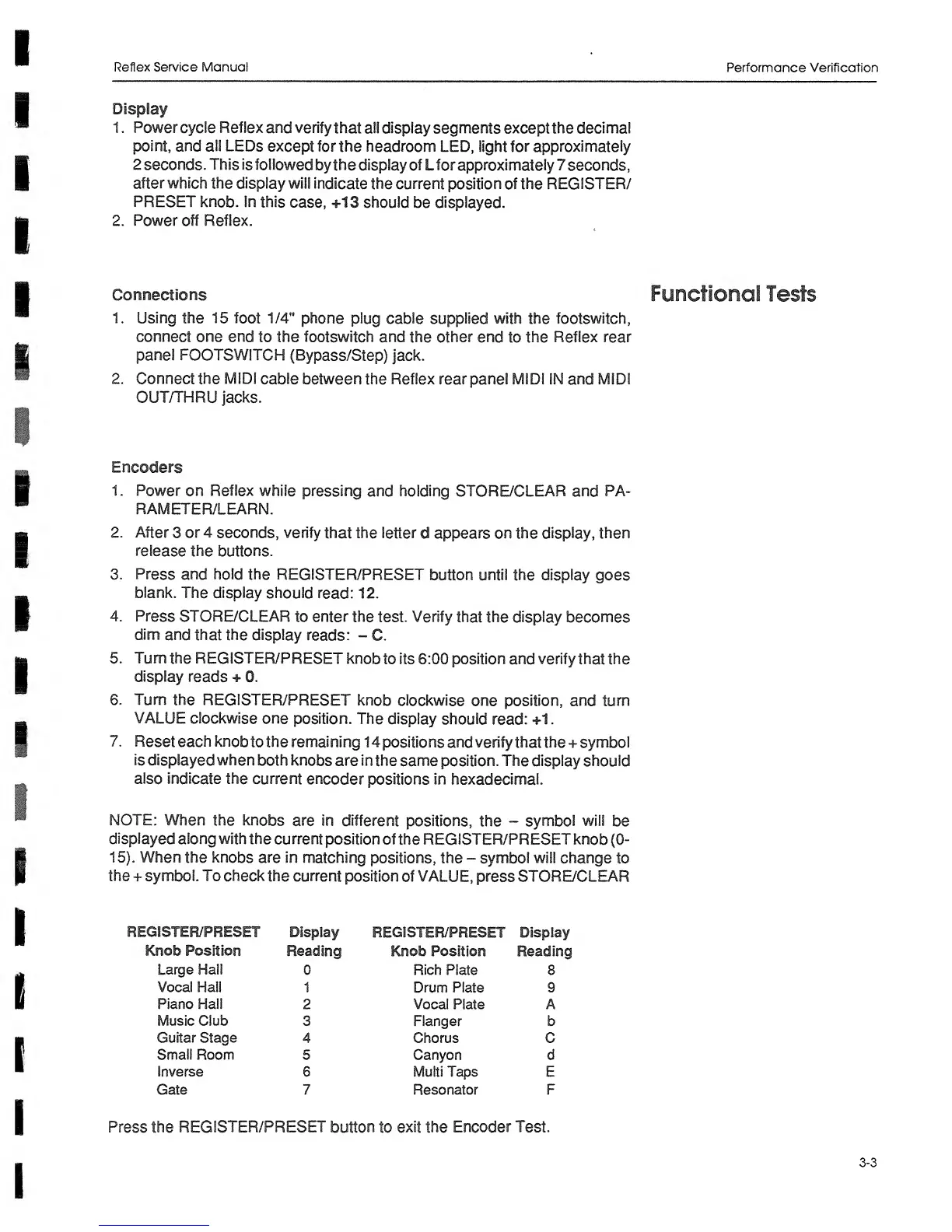
•GISTER/PRESET
Display
REGISTER/PRESET
Display
Knob Position
Reading
Knob Position Reading
Large Hall 0
Rich Plate 8
Vocal Hall
1
Drum
Plate
9
Piano Hall
2
Vocal
Plate A
Music Club
3 Ranger b
Guitar Stage
4 Chorus C
Small
Room 5 Canyon d
Inverse
6
Multi
Taps
E
Gate 7
Resonator
F
Press the
REGISTER/PRESET
button
to
exit the
Encoder
Test.
Functional
Tests
3-3