UK
15
Note:
- To completely disconnect the device when not in use for an extended period of time,
unplug the power cord from the device.
Headphone warnings:
Set the volume of the device to minimum before using headphones. A volume that is set too high can
lead to hearing impairment / damage over a long period of time. Therefore, to protect your hearing,
use a comfortable room volume.
Note:
- The speaker is automatically disabled when headphones are connected.
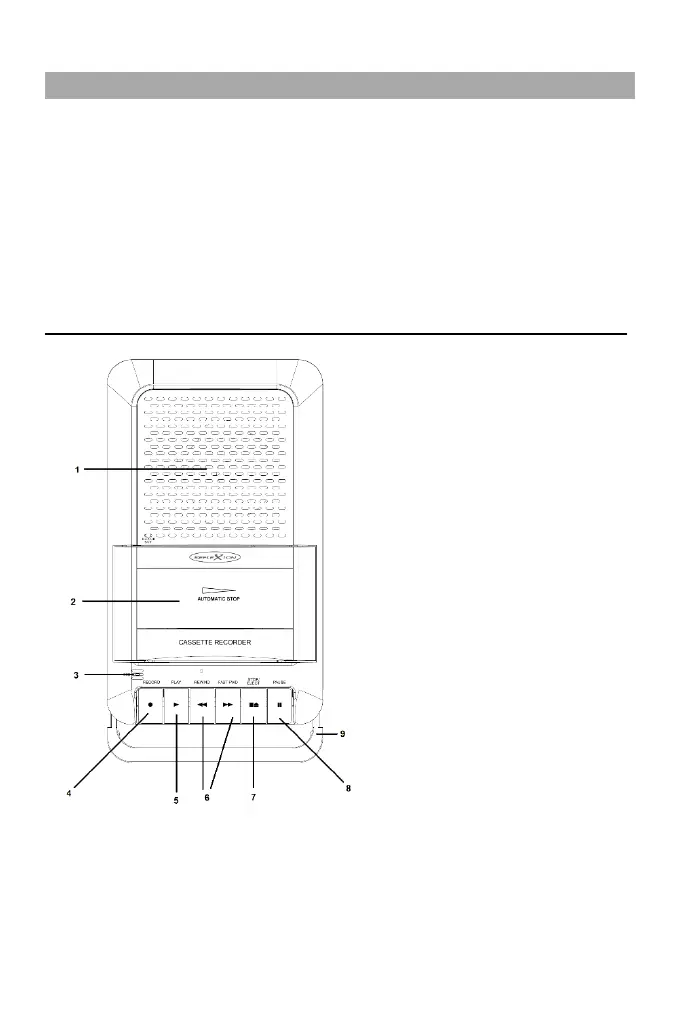
CONNECTIONS AND CONTROLS
1. SPEAKER: For audio output.
2. CASSETTE DOOR / CASSETE TRAY: Insert
the cassettes into this tray.
3. RECORD BATT: Indicator LED for
recording and battery operation.
Position of the integrated microphone.
4. RECORD: Press the button to start tape
recording.
5. PLAY: Press the button to start cassette
playback.
6. REWIND/FAST FWD: Press the button to
start fast forward or rewind.
7. STOP/EJECT: Press the button to stop
playback and again to open the cassette
compartment.
8. PAUSE: Press the button to pause
playback and again to resume playback.
9. HANDLE: Carrying handle to pull out.



 To Next Page