Setting SETUP menu
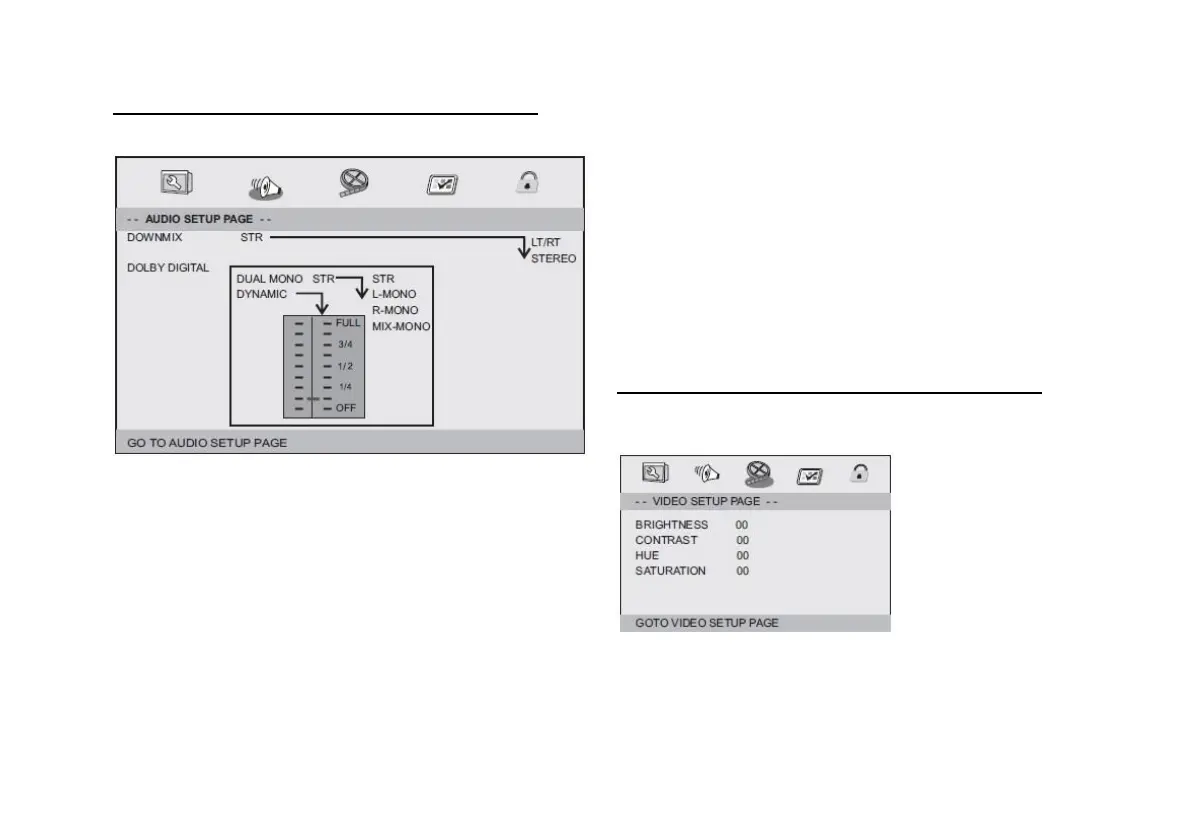
AUDIO SETUP PAGE
Audio settings page
DOWNMIX
Sets the analog stereo output of your DVD player.
L/R: Select this option if the DVD player is connected to a
Dolby Pro-Logic decoder.
Stereo: Select this option when playing through two front
speakers.
DOLBY DIGITAL
The DOLBY DIGITAL setting options are DUAL, MONO, and
DYNAMIC.
DUAL MONO
STEREO: The left mono sound is played on the left and the
right mono sound is played on the right speaker or output.
MONO L:
The left mono sound is played back on the left and right
speakers or output.
MONO R:
The right mono sound is played back on the left and right
speakers or output.
MIX MONO:
The mixed left and right mono sound is played back on both
speakers and outputs.
Dynamik:
Sets the dynamic compression from full (FULL) to off (OFF).
VIDEO SETUP PAGE
VIDEO SETUP PAGE
VIDEO SETUP
You can change the video settings:
BRIGHTNESS, CONTRAST, COLOR, COLOR INTENSITY.


 To Next Page