17
OPERATING KEYS AND CONNECTIONS
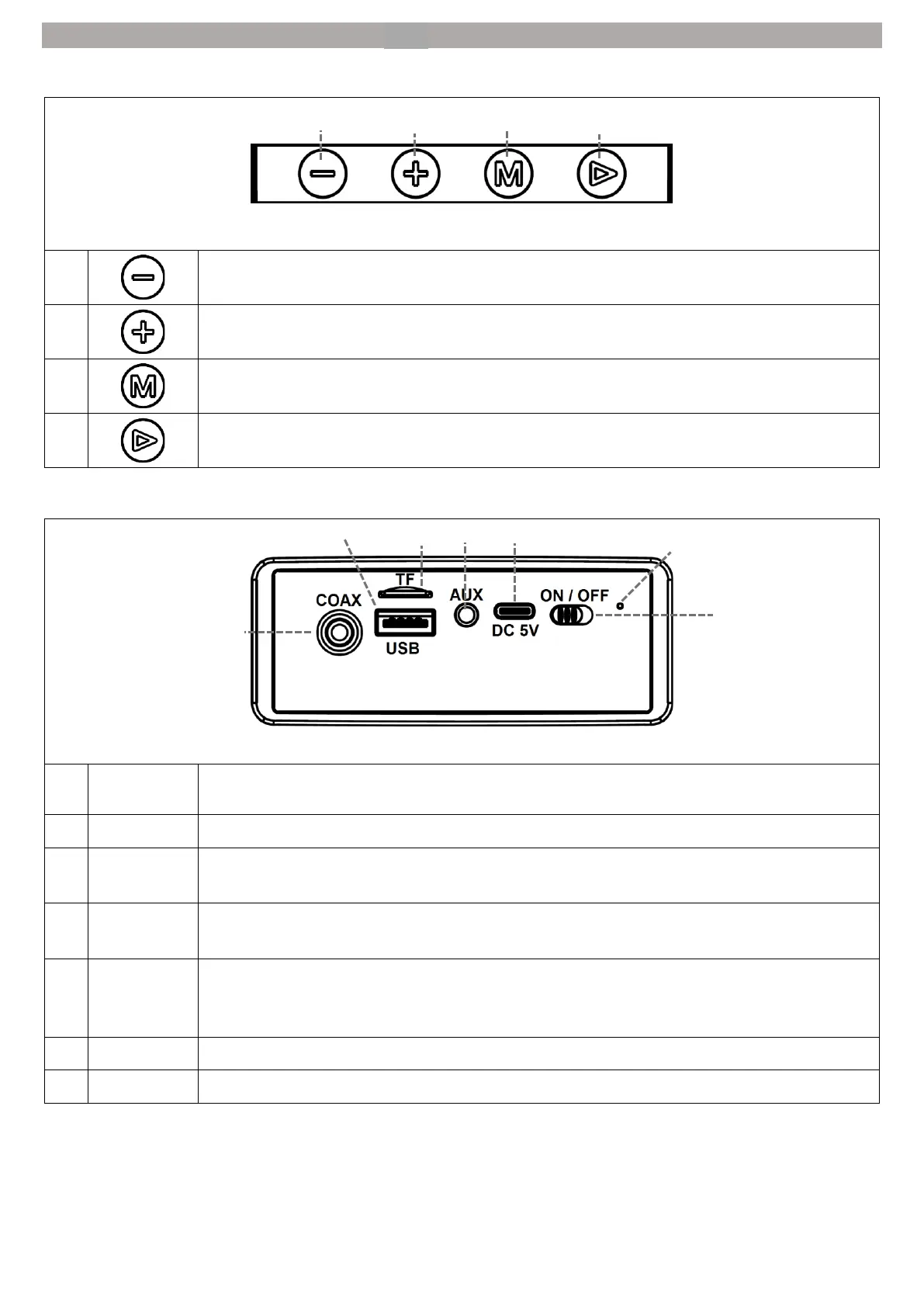
Control panel on the front
Volume(-) button: Quieter
Volume (+) button: Louder
Play / pause button: Pause or resume playback.
COAX input: Digital audio input for TV sets, AV receivers and other devices with a
coaxial digital audio output.
USB connection: USB connection (max. 32GB / FAT32) for music playback (MP3, WAV).
Micro SD card slot: Micro SD card slot (max. 32GB / FAT32) for music playback (MP3,
WAV).
AUX-IN socket: AUX-IN socket for connecting TV sets, AV receivers and other devices
with an AUX output.
USB Type-C socket: USB Type-C socket for using the device and charging the integrated
battery. Connect the device with a USB cable to a DC 5V power source such as a PC
socket or a mobile phone charging adapter.
Status LED: Indicates power, battery and Bluetooth status.
Power slider: Switch the unit on or off.


 To Next Page