
 Need help?
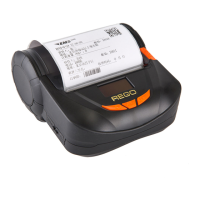
Do you have a question about the Rego RG-MLP80B and is the answer not in the manual?
Introduction to the manuals for RG-MLP80B, covering usage and development.
Steps to install the battery into the printer housing.
Procedure for charging the printer's battery using a USB cable.
Instructions for opening the paper case and loading paper.
How to turn on the printer by pressing the power button.
How to turn off the printer by pressing the power button.
Process for feeding paper, including normal and special paper types.
Guide to setting display language and printing language.
Details on printing method, paper type, resolution, and speed.
Information on power adapter and battery specifications.
Supported interfaces: RS-232, USB, Bluetooth, and Wi-Fi.
Dimensions and weight of the printer.
Operating and storage temperature and humidity ranges.
Details on paper loading, detection, commands, power, and battery life.
Description of the web interface and default network settings.
Steps to connect to and log in to the printer's web interface.
How to search for and connect to wireless access points.
Configuration of wireless and network parameters for AP mode.
Serial port and network parameter settings for Wi-Fi module.
Page for setting the web server user name and password.
Instructions for updating the Wi-Fi module firmware.
Information on restarting the device and applying configurations.
How to reset the printer to its factory default settings.
General instructions for using the Wi-Fi interface.
Procedures for testing Wi-Fi connection using STA interface.
Guide on using TCPUDPDbg for printer testing.
Regulations for pre-printed black marks for proper detection.
Specifications for label paper to ensure proper detection.
Reference to the REGO Thermal Printer Technical Manual for developers.
How to use RG-SetTools to configure printer parameters.
 General
| Brand | Rego |
|---|---|
| Model | RG-MLP80B |
| Category | Label Maker |
| Language | English |

 To Next Page