
 Need help?
Do you have a question about the Reichert 7 and is the answer not in the manual?
This section outlines critical warnings regarding safe operation, electrical hazards, and proper usage of the instrument.
This section details cautions to prevent product damage from static discharge, improper cleaning, and external influences.
Explains the meaning of various symbols displayed on the Reichert 7 instrument for user understanding.
Introduces the Reichert 7 Auto Tonometer, its function, and target users, including contact information.
Specifies the medical conditions for which the tonometer is indicated, primarily glaucoma screening.
Lists conditions where the use of the Reichert 7 Tonometer is contraindicated, such as corneal issues.
Detailed steps for safely unpacking the Reichert 7, identifying accessories, and removing protective packaging.
Instructions on handling the essential shipping protector to prevent instrument damage during transit.
Guidance on correctly applying input voltage and safely disconnecting power from the Reichert 7 instrument.
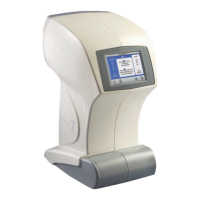
Identifies and describes the main components of the Reichert 7 Auto Tonometer, including display, ports, and objective.
Lists essential accessories provided with the Reichert 7, such as printer paper, dust cover, and cables.
Provides definitions and explanations for icons used in the Reichert 7's icon/menu-based operating system.
Step-by-step guide on how to customize the default operational and system settings on the Reichert 7.
Presents a summary of default settings for Tonometer, Printout, Communication, and General setup options.
Configures pressure units (kPa/mmHg) and the averaging method for measurement results (e.g., Avg[3], Avg[4]).
Customizes date format, time format, printer status (On/Off), and practice name for printouts.
Configures serial communication parameters (Baud, Parity, Data Bits, Stop Bits) and printer status for data export.
Sets instrument language, audible tone, sleep mode duration, and display contrast for user preference.
Covers the initial system check upon powering on and the first step of patient alignment using the forehead rest.
Details the automated alignment system and instructs the patient on positioning for accurate measurement.
Illustrates correct and incorrect patient alignment and provides notes for achieving optimal positioning.
Explains how to initiate measurements (single, triple, quadruple puff) and what occurs during the positioning process.
Details options available after measuring the first eye, including clearing data, printing, or moving to the next eye.
Describes the function of the DEMO icon to provide a sample air puff for patient demonstration and reassurance.
Explains readings identified with an asterisk, often due to blinking or eyelashes, and how to resolve them.
Discusses fluctuations in IOP readings due to cardiac pulse or other factors, and 'flier' readings indicated by brackets.
Addresses the 'Too Far Away' message, instructing the user to reposition the patient for accurate measurement.
Details how to print measurement data and how to clear data from the instrument after use.
Instructions for safely replacing fuses in the power input module, with essential safety warnings.
Provides methods for cleaning external surfaces, the forehead rest, and the display using mild solutions.
Instructions on how to replace the thermal printer paper roll in the Reichert 7 tonometer.
Detailed cleaning procedures for positioning windows, applanation windows, and the air tube to ensure signal integrity.
Step-by-step instructions with figures on how to grip, remove, and install the forehead rest pad.
Guide on navigating the instrument's menu to access helpful information and operational tips.
A chart detailing common instrument errors, their probable causes, and recommended solutions for quick resolution.
Describes the 'PRINTER IS OUT OF PAPER' message and the procedure to resolve it during a print cycle.
Lists physical dimensions, electrical requirements (voltage, power, fuses), and weight of the Reichert 7.
Defines the measurement range for IOP and the standards for measurement accuracy (ISO 8612).
Details the recommended environmental conditions for operating, transporting, and storing the Reichert 7.
Classifies the instrument according to electrical safety (Class I, Type B) and ingress protection (IPX0).
Provides manufacturer's declaration on electromagnetic emissions and guidance for their control.
Details the manufacturer's declaration on electromagnetic immunity and guidance for ensuring proper environment.
Outlines RF immunity test levels and recommended separation distances for portable RF communication equipment.
Provides calculations and tables for recommended separation distances between RF equipment and the tonometer.
Details the one-year limited warranty, exclusions, and conditions for repair or replacement of the instrument.
Outlines patent warranty obligations and Reichert's right to make design changes to products.
Provides procedures for filing claims related to shipping shortages and damages incurred during transit.
 General
| Brand | Reichert |
|---|---|
| Model | 7 |
| Category | Health Care Products |
| Language | English |

 To Next Page